

/image%2F1896381%2F20151209%2Fob_cb2b49_obd365-com.png)
Dr.GINI B021 Coding Software and Function Explanation
We have discussed Dr.GINI B020 version software in detail in previous post. Here you can download newer B021 version for free.
Note: B021 is not the latest version, latest B022 is not for free. Latest BMW ICOM HDD also comes with free Dr.GINI engineering software.
Introduction:
The friend who made this is called Dr.GINI.
The advantage of this program is that can be used on both E-series and F-series.
The friend who made this is called Dr.GINI.
The advantage of this program is that can be used on both E-series and F-series.
The friend is great,but sometimes this tool is likely to be paid.
Free download Dr.GINI-B021 coding software
https://mega.nz/#!Hp1mAaZS!EtNhwaSwVtpYHoSAVjNakuYjqPFU-zPrrzrDv_9DrmY
https://mega.nz/#!Hp1mAaZS!EtNhwaSwVtpYHoSAVjNakuYjqPFU-zPrrzrDv_9DrmY
File Including:
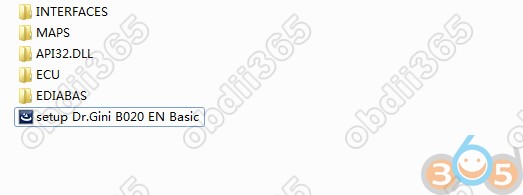
–AP132.DLL: Use if error occurs during installation
–ECU: Use in Expert menu
–EDIABAS: EDIABAS installation file
–INTERFACES: EDIABAS.INI file for each interface
–MAPS: Latest lookup.xml file for map updates
–setup Dr.GINI EN Basic.exe: B021 installation file based on B020
–ECU: Use in Expert menu
–EDIABAS: EDIABAS installation file
–INTERFACES: EDIABAS.INI file for each interface
–MAPS: Latest lookup.xml file for map updates
–setup Dr.GINI EN Basic.exe: B021 installation file based on B020
The difference between B020 and B021 is…
-Convenient to use ICOM in Interface
-Convenient to use ICOM in Interface

-Units menu to complement and add FSC, instrument panel, FRM functions
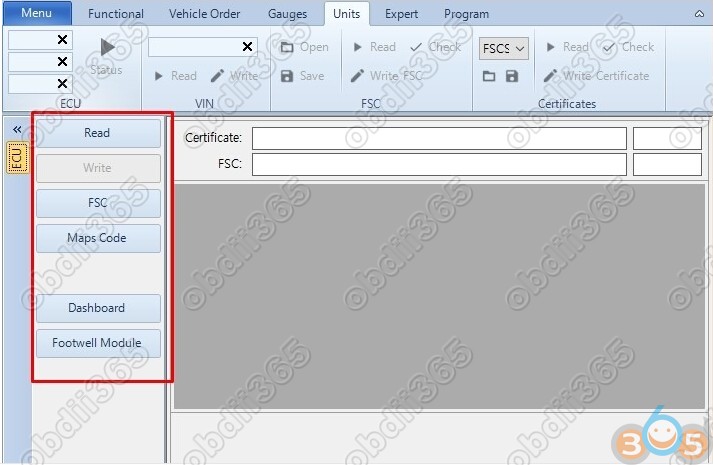
-Map update FSC code extraction

-Instrument cluster

Now let’s look at the Dr.Gini main features (use older version as example):
Delete Fault Code
Deleting fault code of module is very fast and quick
In the functional window, click 1.Identification 2.Read Errors at the bottom
Delete Fault Code
Deleting fault code of module is very fast and quick
In the functional window, click 1.Identification 2.Read Errors at the bottom
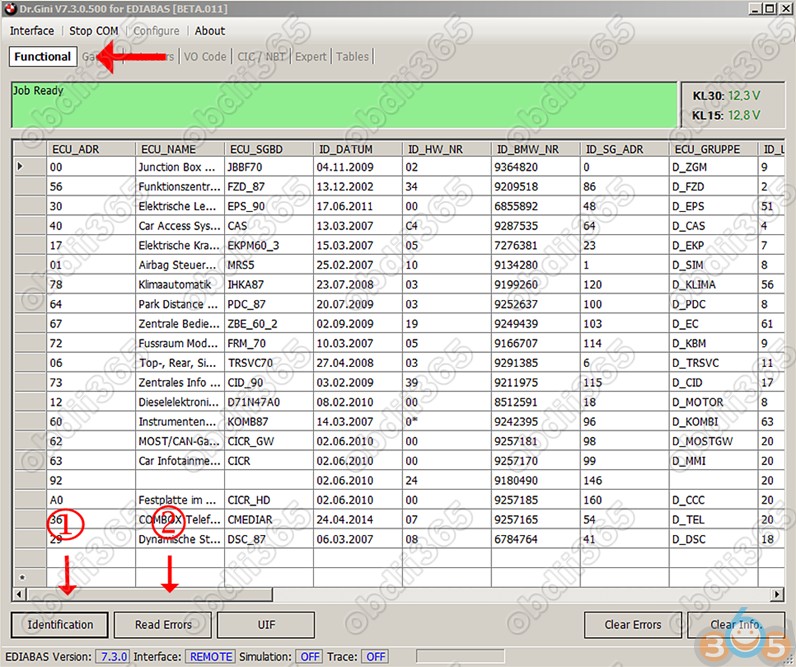
Module in error is shown in red, click “Clear Errors” in the bottom right corner.
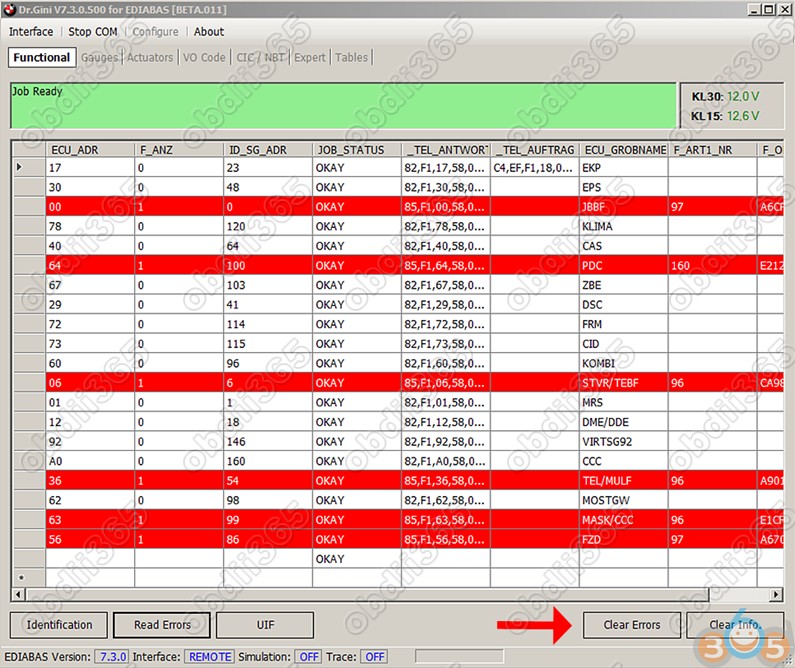
A list of error deleted. The time required is within a few seconds…
You don’t have to turn Rheignold to try to delete the fault code.
You don’t have to turn Rheignold to try to delete the fault code.
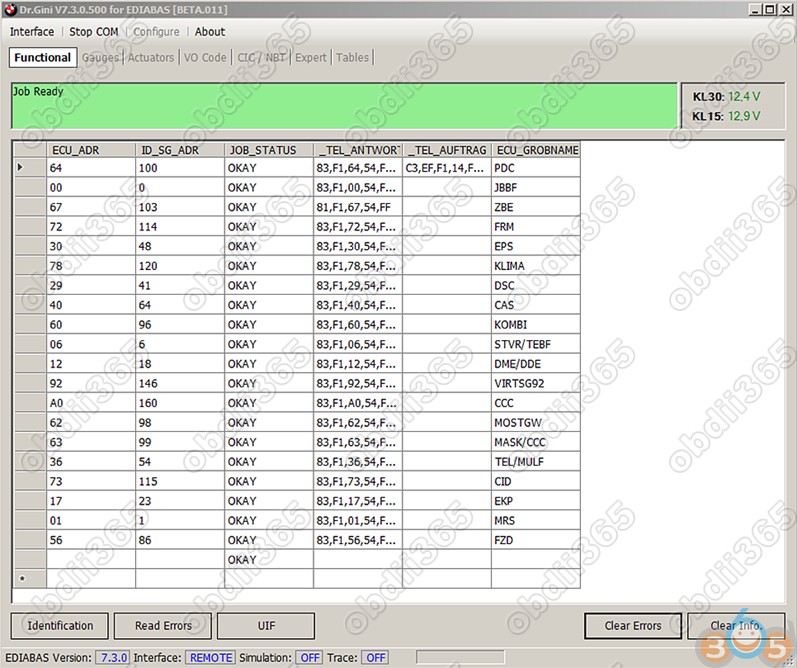
Gauge and actuators


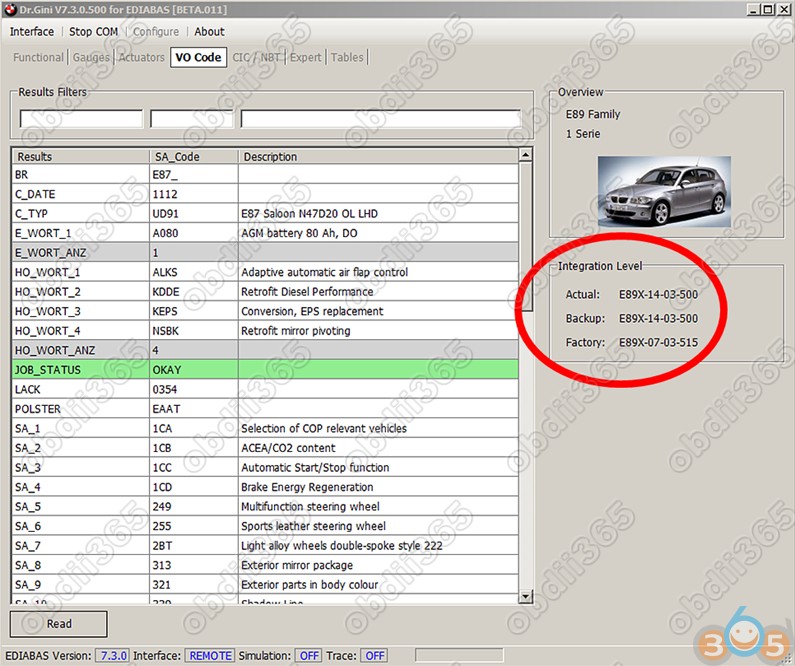
VO: Shows the vehicle order of the vehicle. It also shows the i-level of the vehicle
on the right side.
on the right side.
Map update FSC code generation.
Generate fsc code to update CIC/NBT Map.

In Expert Mode, also VIN change, module reset
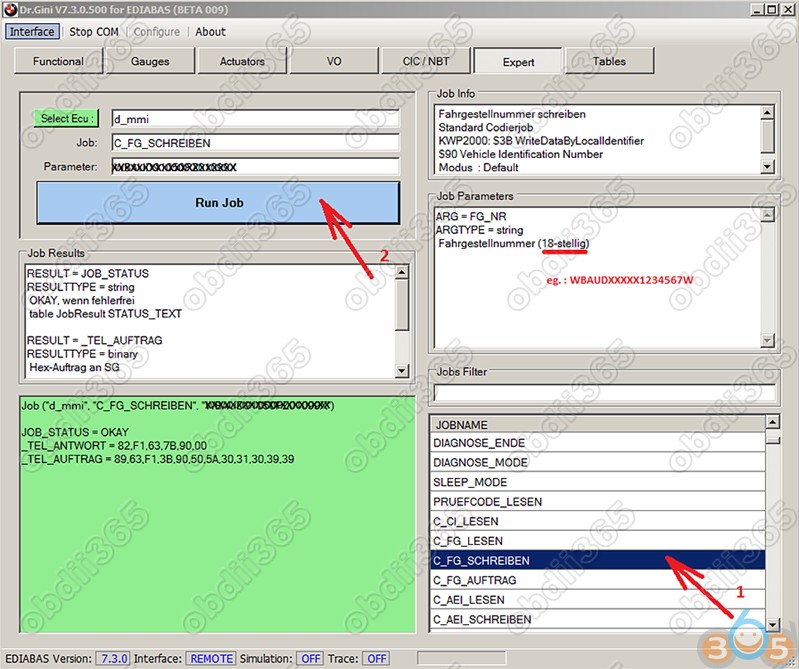
It seems that a small program is integrated with a clear function.
See also:
Dr.gini B020 BMW Manual: Download, Install, How to use
http://blog.obdii365.com/2018/03/30/free-download-bmw-dr-gini-b021-coding-software/
Publicité
Partager cet article


Pour être informé des derniers articles, inscrivez vous :
/https%3A%2F%2Fblogger.googleusercontent.com%2Fimg%2Fb%2FR29vZ2xl%2FAVvXsEj3QtrsQWphCHNvnjnRUwceOWzHGv056whwA4_O2L5KwOZsEmP4dP-lH18EnGpwdvUmGrfXAnwyEJUYzbDgPVBr1sdcA3h9_6BEj6HplD0fBL1D33McD4gF7qnJ6D1scbd9OmFo3LF_D6D8JSWn4yPoQ_LN-3pB1i-NplxAAxRbHhmcYQLtlZ96KRhYeQXk%2Fw640-h418%2F2m2-tank-2-pro-vs-Shadow-Warrior.jpg)
/https%3A%2F%2Fblogger.googleusercontent.com%2Fimg%2Fb%2FR29vZ2xl%2FAVvXsEgevucGAOFWmDU-MVRQ-ACa5lggHORD51r3UYGioqQCk43lV_3AltKb-USh3ZxJ7O4snWLgjLrjI0zPT8rQnpvjSdqrNmJctIzP7cM_V4s54vvEJJjjhAWlaIny0DCRdWzkEkzcnZg7dNDACXJskRC_vFydV1GoxjQEzs3T2no2GqEi7we4mfxt-XQ-QtWy%2Fw640-h360%2FAutel-IM508-Failed-to-Program-2025-Ram-Promaster-All-Keys-Lost.jpg)
/https%3A%2F%2Fblogger.googleusercontent.com%2Fimg%2Fb%2FR29vZ2xl%2FAVvXsEg1MqZqmW1OJxMCQfN3p1E7bNQwXKtviij3xU3IJxJmnxEee8fLj6WSG2YR__Ws16ksYdVSWkpJhQz8JNue3fRGNWxbBq5GRPmq9kJjUF-UNioYU7FtGz7oW-7TqJT4THFedTY67XV6SRudnNhnwnqk8f-hqBDLPdRMJcPB8PwGoRhbOWfhCf0iehyphenhyphen4_ARZ%2Fw408-h640%2FCG70%20repair%20toyota%20airbag%201.jpg)
/https%3A%2F%2Fblogger.googleusercontent.com%2Fimg%2Fb%2FR29vZ2xl%2FAVvXsEiTMfcVL5uK265Kwcht0IKVP6PdFX9-DDv_1mkkxnP0lMWnzKIvB3m6uMnCR8bSCvolJhVkj_vD_1MKg8_JMYKgG7SMg-YwypchVWqGyNP1VJHQJfjmJprkex28CFlw3XccxLUDTerbpErZz2uxDtnZxSGRzoAtR0JH3ZFx04_jEGXHxlXbX5GwWEad1L2q%2Fw522-h640%2Fformulaflash-md1-mg1-ecu-unlock-1.jpg)
