

/image%2F1896381%2F20151209%2Fob_cb2b49_obd365-com.png)
Launch X431 Pros Mini Software and Function Not Working Solution
Problem:
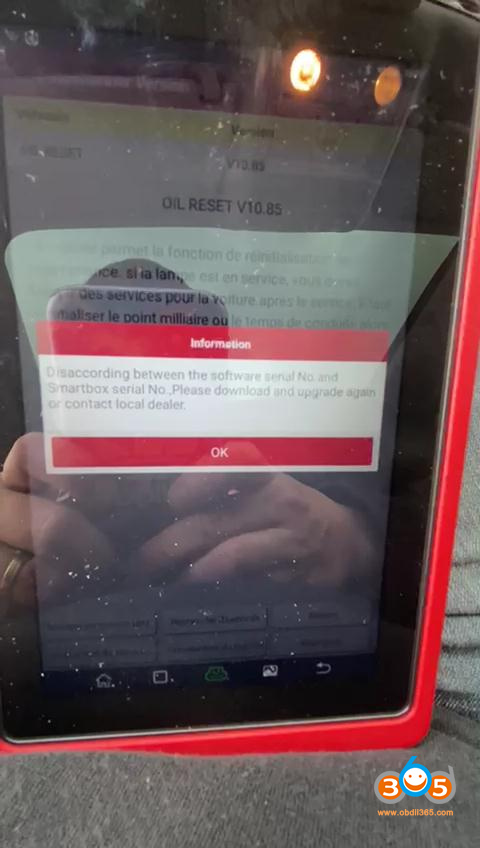
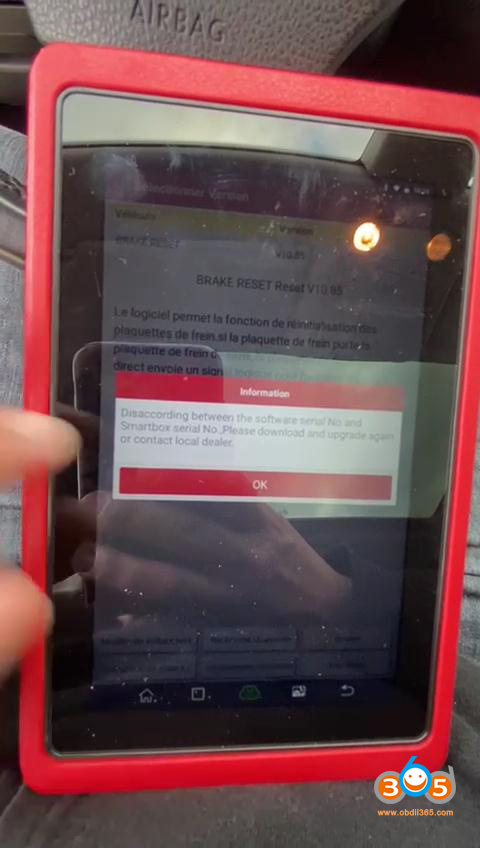
Launch X431 ProS Mini is connected to Bluetooth and tested the diagnostic functions and all advanced functions of the Xsara Picasso car, such as resetting the oil or other special functions, and received the same error message: “Disaccording between the software Serial No. and Smartbox Serial No. Please download and upgrade again or contact local dealer”. “disaccording” here should be “mismatch” i thought.
I also tested these cars before:
Volkswagen Passat cc 2009: failed
Volkswagen Passat B6 2007: : failed
Peugeot 308 2011: : failed
Xsara Picasso 2003: : failed
Mitsubishi Outlander 3 2017: : failed
Launch Engineer replied:
Solution 1:
Please find out and delete “cnlaunch” file in file management.
The error prompt has gone away, problem was solved!
If solution 1 failed, try 100% working solution 2.
Solution 2:
First step is a factory reset. Then go to the official website to download the APK for Launch X431 ProS Mini.
Do the following to reset X-431 PRO MINI to factory settings:
Tap “Settings” –> “Back & Reset”;
Tap “Factory data reset”;
Tap “Reset tablet”;
Tap “Clear all data” to start resetting until the tool automatically reboots.
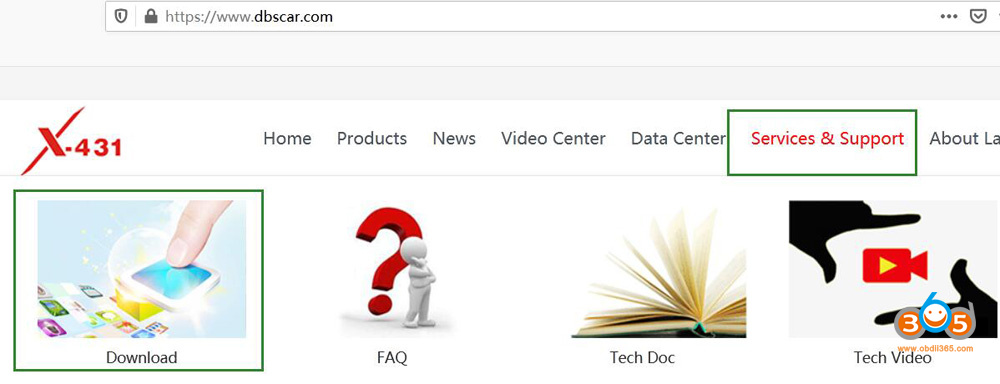
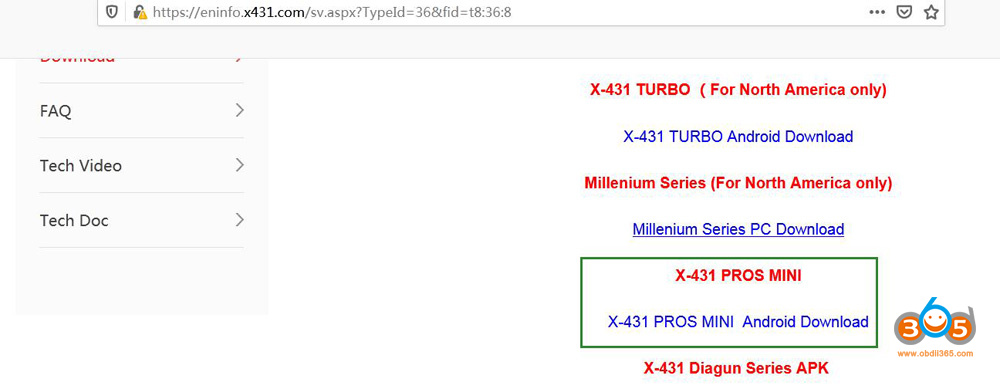
Browse https://www.dbscar.com/ or http://cnlaunch.com and then go to “Services & Support” to click on “Download”, scroll down and click on ” X-431 PROS MINI Android Download” to download application APK
Any problem, contact at www.obdii365.com


/http%3A%2F%2Fblogger.googleusercontent.com%2Fimg%2Fb%2FR29vZ2xl%2FAVvXsEjUo2tHwR6fJH5f34CwQHC6ukcxBZOsHL-J7Wpgl0i7My-TKOj9FXEkUUw5hDgRajoOArbE1CUEzrxpLZHhtq64DEMP5LhWFn5EX91aYm-fRoaEDjpb6RIKoH9fGKbJXjHmVNVpAmkV_a77vcEN9BYCVeYMOWVpq08H_mr-b9edRcLuzeqQA08yOQ8O%2Fw496-h640%2Flaunch-x431-pro3s-vs-x431-pro-2.jpg)
/http%3A%2F%2Fblogger.googleusercontent.com%2Fimg%2Fb%2FR29vZ2xl%2FAVvXsEgfQqJuJ94ivMMnXjexhRxqcuczFdPxSrbSaW-qQMCSZx9aWFk3OrNO8DWRebslrqzoxBxh7kCbFxDBzSpmCv9xgcEhODYMvjhw8ZfLNDU4TzGPnc2C3WKcPySO_PI0OhguXef8bclzcW31bl8NeHeQ9p1bazuGfAOEQ1O6NVcGtTCGCIePegd4DqC8%2Fw640-h402%2Flaunch-x431-pro5-configure-online-programming-1.png)
/http%3A%2F%2Fblogger.googleusercontent.com%2Fimg%2Fb%2FR29vZ2xl%2FAVvXsEhz4S3eUXr8rrMaXWWrTgNmWnWgoA3jMuqMJ2t-GvjLK_G7Dh5lQKvTtJiXrbMR-F4eJopSeofYJbyqpbLC6VPTe3PrKPfowwViuc7VAB3FCLBa2JtjoIVww692I-g9rkd6xiKvsTOdtgLYt1vLNz9smf0y_q6VlxB1BzQcv-GRAU79JqETDgF7WMV0%2Fw360-h640%2Flaunch-mcu3-adapter-6.jpg)
/http%3A%2F%2Fblogger.googleusercontent.com%2Fimg%2Fb%2FR29vZ2xl%2FAVvXsEhVedBxwmhv27RyI7GOvLearqqffHnv7V2ZwwhZbIGO9aNLUljWNla7zEd4IJV7fey_dqGkjWJLs4iAsjcuxBT23-00rX--j9fkItixeDjTi39Amqc0LecONPjUb1uEAbzOxHo3-AEvZN0rNbMnWtas2JO0jZEiwSgIoIgvZ-xTczACdoUA22vpmKSq%2Fw640-h360%2Flaunch-x431-enabled-porsche-911-emergency-brake-flashing-1.jpg)
