

/image%2F1896381%2F20151209%2Fob_cb2b49_obd365-com.png)
kt200
KT200 Software Update with Patch
Here is the official guide to update KT200/KTM200/ECUTuner ecu programmer software.
KT200 will prompt new version available when there is a new version. Press OK and follow steps below to run an upgrade.

Download the latest patch and dfb2xx.ll here
https://mega.nz/file/Mbs3XBwY#Ia3erk1QfYFLk5P8fO9JlU3rHBK5fE2Smo2oXGuG0Zo
Unexact zip file
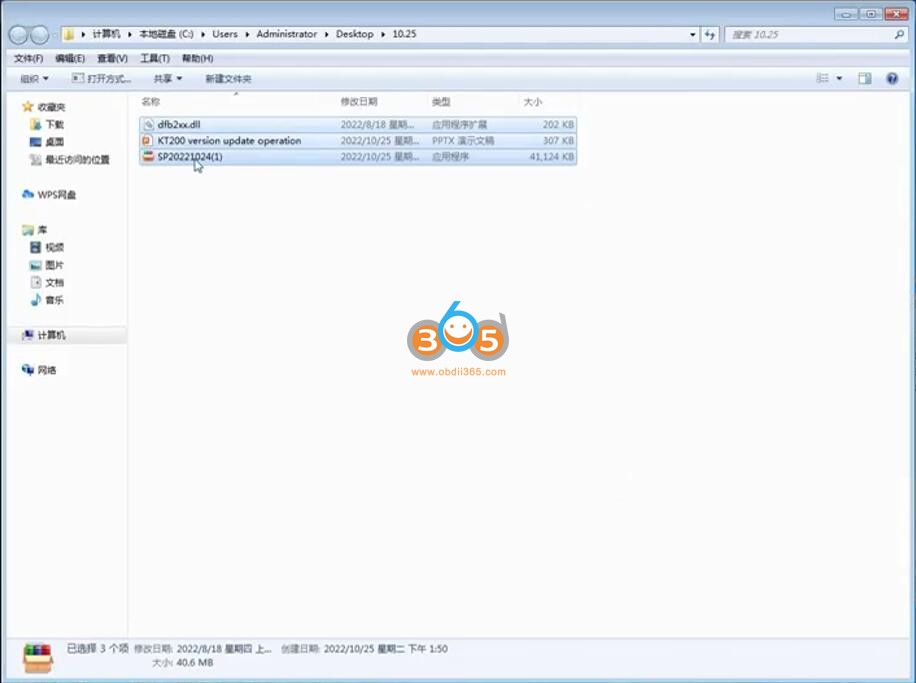
Load and install the Patch


Copy dfb2xx.dll to replace the specified folder file

Copy and paste dfb2xx.dll to C:/KT200-master/DFBTech_Driver/i386 folder

If your system is 32bit, copy and paste dfb2xx.dll to C:/Windows/System32 folder

If your system is 64bit, copy the dfb2xx.dll file to C:/Windows/SysWOW64 folder

Then run KT200 software again.

Update KT200 software finished. New version software is ready to use.

https://www.obdii365.com/service/install-kt200-ecu-programmer-software.html


KT200 Pinout to Bosch EDC17CV41
Here is the guide to read BOSCH EDC17 CV41 [ 1797 ] - [Diesel] Challenger, Claas, Isuzu, Iveco, JCB, Man, Massey Fergusson, New Holland, Valtra ECU with KT200.

CV41 has 2 possible S1 S2 pinouts for GPT. Connect the multi-function cable as follows. For this ECU there are 2 different types of hardware versions, try the following 2 combinations in series. The ECU will not suffer any damage during connection tests.
No. 1

No.2
Some ECUs enter bench mode with the pinout below

To read and write use the following driver:
→ BENCH MODE
→ [brand]
→ TC1797
– [brand]
→ EDC17 CV41
How to Solve KT200 Cannot find DFB2XX.dll Problem?
Problem:
I had a problem installing KT200 2022.10.01 software, error cannot find DFB2XX.dll. Reinstall software still no luck, any solution?

Solution:
Download dfb2xx.rar file and unzip
For 64bit system, paste DFB2XX.dll to C:\Windows\SysWOW64 folder
For 32bit system, paste DFB2XX.dll to C:\Windows\System32 folder
How to Solve KT200 Software 2022.10.01 Not Working?
Problem:
I am installing KT200 software version 2022.10.01 from the manufacturer's website but the program does not work.
When I install the older version from August, downloaded from the seller's website, the program starts
What's the problem and how can I update to the new version ???


Solution:
http://blog.obdii365.com/2022/09/30/free-download-kt200-2022-10-01-software/
Read and Write Volvo Euro 6 TRW EMS2.3 with KT200
KT200 full version ecu programmer reading and writing an Euro 6 Volvo ACM with JTAG... 100%
I don´t have here the writing picture, but trust me.. it works!!!!
This truck has an ECU TRW EMS2.3, read/write without problems, however, checksum can not be done. Use WinOls to do it.
EMS 2.3 R/W without problems... 100% working, only the checksum can not be performed, use winols to do it.


How to Tell Different Quality KT200 Boards?
There are 2 different quality KT200/KTM200 ecu programmer boards. And they are slightly different. One has a crossover board stuck to the back of the board and the other one does not. Looks like there have been revisions between them. The newest one was better quality soldering but looks like 2 chips have been hand soldered on and jumpers set differently.
One with cross overboard in the back is of very poor quality. One without cross-over board is a revision and is of better quality.
Good quality one
without crossover on back. Better soldering also.


Low quality with crossover

The poor quality kt200 won’t even i.d certain modules. Sometimes the toolboot option is useless as it won’t work at all.
Where do you recommend to buy a well made kt200?
Always buy from an authorized dealer. Don’t look cheap.
Obdii365.com have KT200 full and basic version with high-quality boards.
It can do a full backup of edc15 (flash+eeprom) by pinout. No need to open and boot mode which is a rare feature. It has some functions that even my genuine kess3 and Autotuner doesnt.

KT200 Software Update to 22.08.20
KTM200/ECUTuner/KT200 ECU programmer and chip tuning kit software update to V22.8.20 in Auguest 2022.
.jpg)
the newest V22.8.20 KT200 software fixes some function problems & bugs as follows.
1. Solved the problem that the mobile network cannot connect to the server.
2. Added the boot screen to solve the long-term unresponsiveness of the click software.
In the old version, the software bootup may take too long or the click software does not respond. We fixed this problem in the new version.
3. The virtual data read and write functions are fully optimized.
The new version of KT200 optimizes the virtual data read and write function. The models that support VR reading and writing can be viewed in the ECU List. We will keep updating the ECU support list to meet more of your need!
Obdii365.com shares KT200 22.8.20 08/2022 software download:
https://mega.nz/file/m6wUhByI#Nn-_1GUBrgIKqpm9WfuwN3nRZ7aKWZvFhoSv4qpAzYI
Disable anti-virus program before installing software.
Incl.
KT200 software
KT200 driver
KT200 user manual
KT200 frequently asked questions
Update Log
Compatible operating systems:
Windows 7
Windows 8/8.1
Windows 10
Windows 11 !
Minimum recommended requirements:
CPU > 2.5 GHz (Intel i5, i7)
RAM > 4GB
How to Install KT200 software?
https://www.obdii365.com/service/install-kt200-ecu-programmer-software.html
