

/image%2F1896381%2F20151209%2Fob_cb2b49_obd365-com.png)
How to Update Autel MX808 DS808 IM508 MS906 VCI Firmware?
Here we will explain the VCI firmware update on the Autel MaxiCheck MX808 and any of the Autel scan tools with wire cable.
This would include the DS808, IM508, MS906 non-bluetooth models.
What it means is there is a vci firmware board mounted inside the tablet and not externally from the tablet like the Bluetooth units and these do need updating separately from time to time.
In order to do the VCI update on the mx808, we need to go Settings.
Go under Settings, and go into Firmware Update.
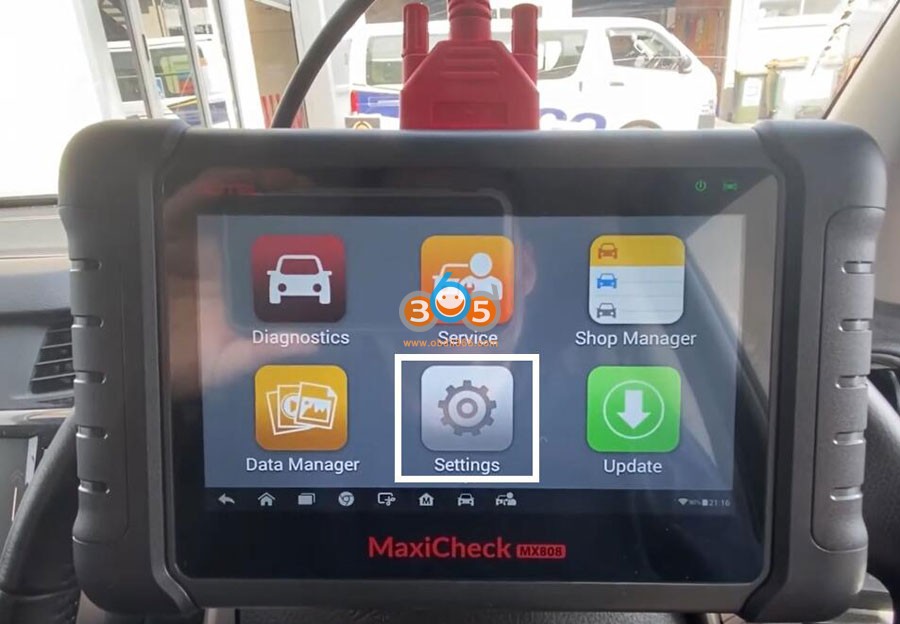
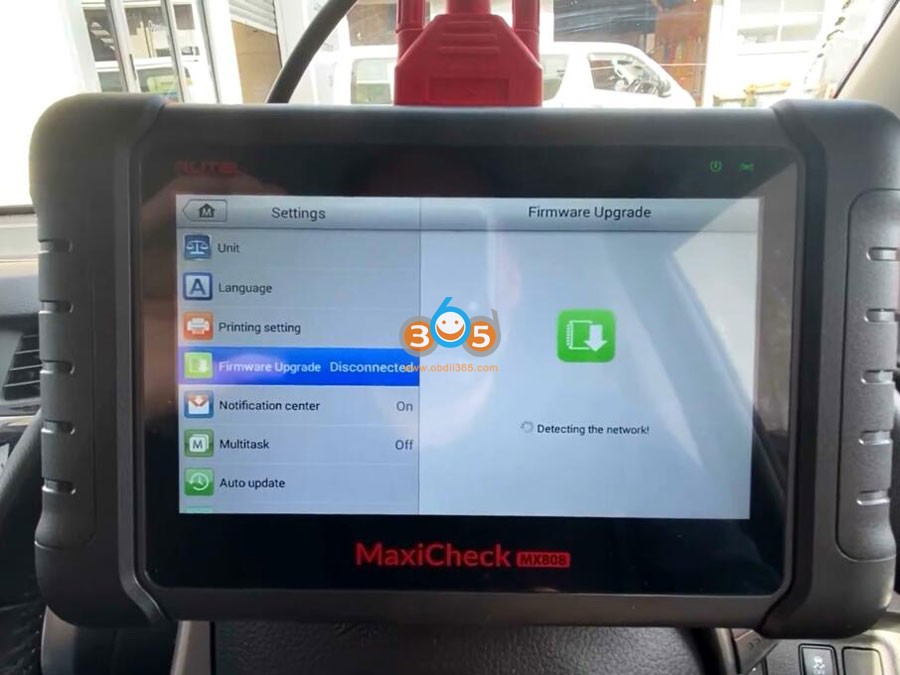
The data cable actually need to be plugged into a power supply or vehicle.
It’s plugged into the obd2 port and we can tell it’s functioning because we’ve got the little car green light up the top.
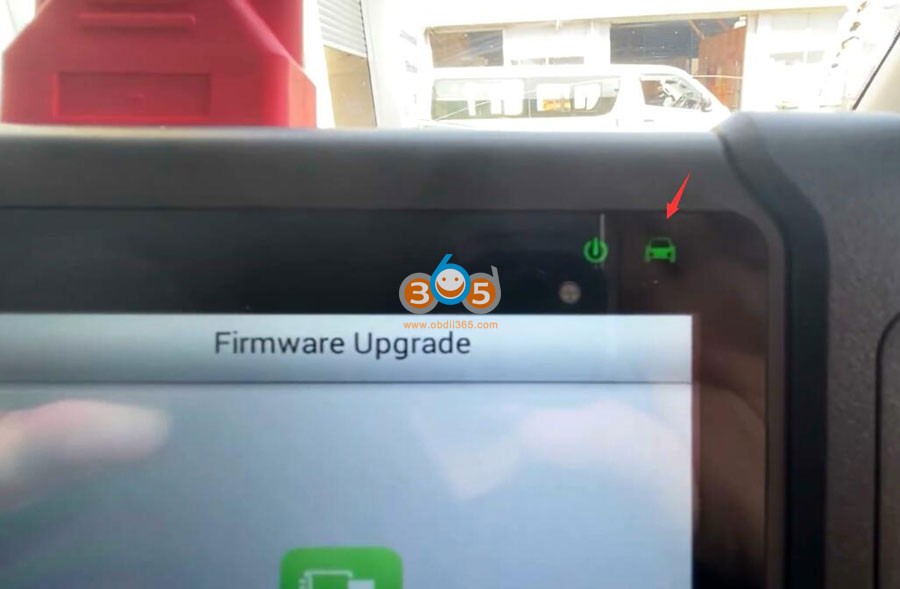
Without it being connected to something it won’t do the firmware update.
Current firmware version is 1.08, the new version is 2.0.
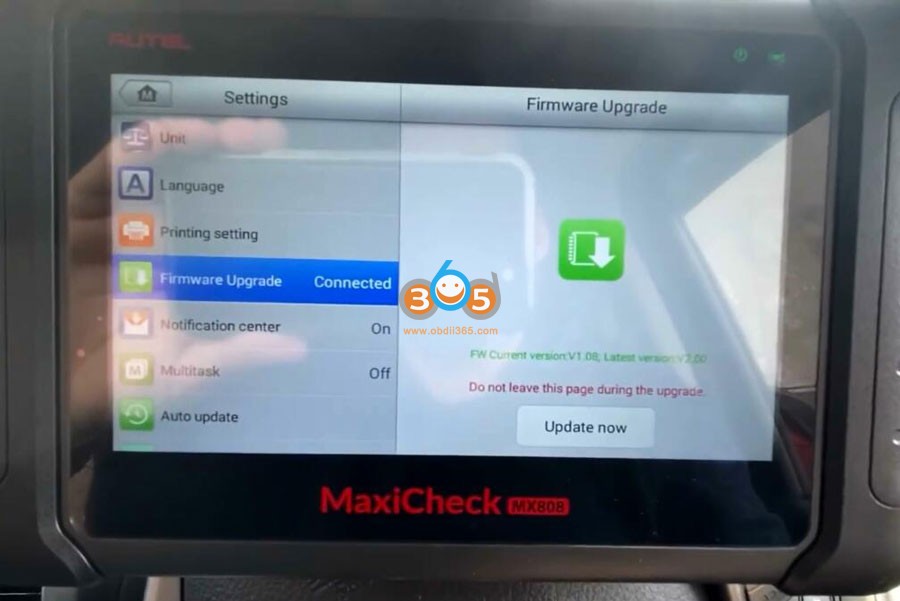
It’s telling me to update. Press Update Now.
Firmware is uploading please do not leave this page as a message that comes up quickly, and it reflashes the vci firmware board mounted inside the scan tools tablet to the latest version.
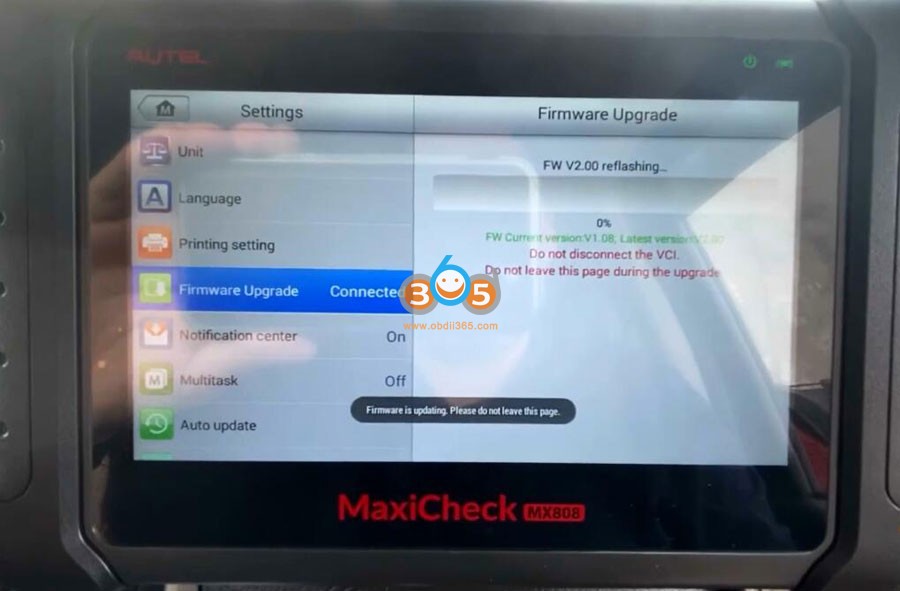
so the current version is now 2.0.
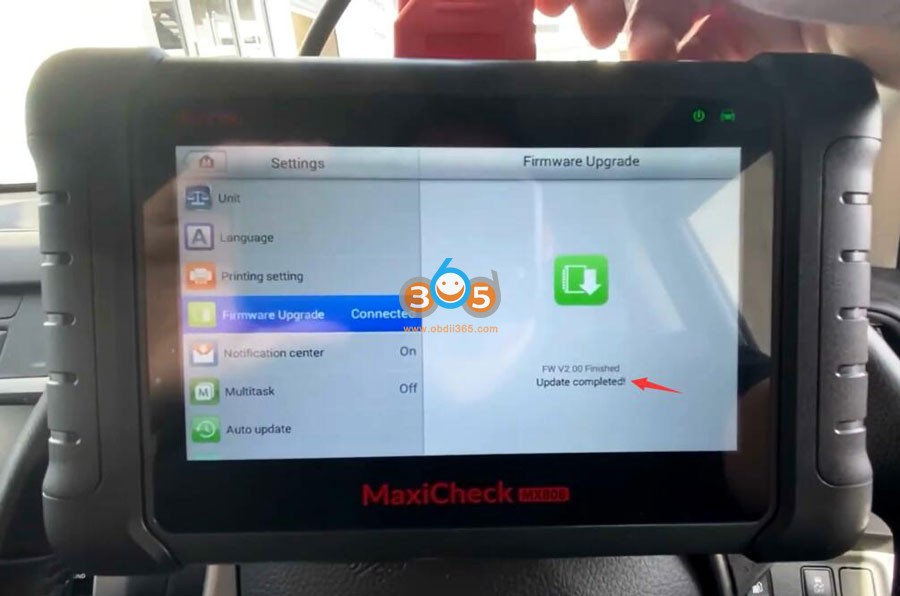
Reboot your vci to complete.
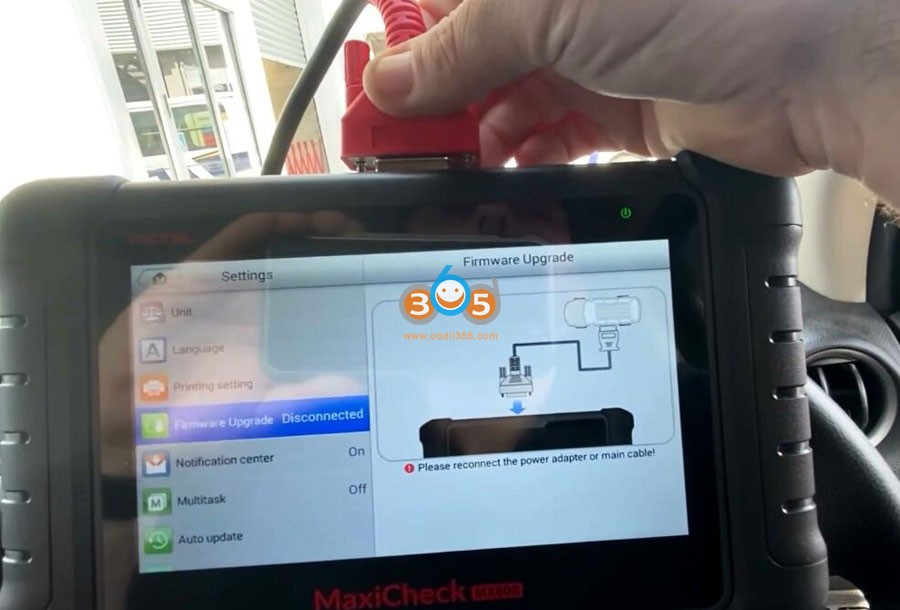
Reboot the vci. It’s purely as simple as removing it from the vehicle or removing it from its power source.
Disconnect main cable from MX808 main unit and reconnect it back in again.
Then now you can see it’s detecting the network again.
VCI firmware update is completed.
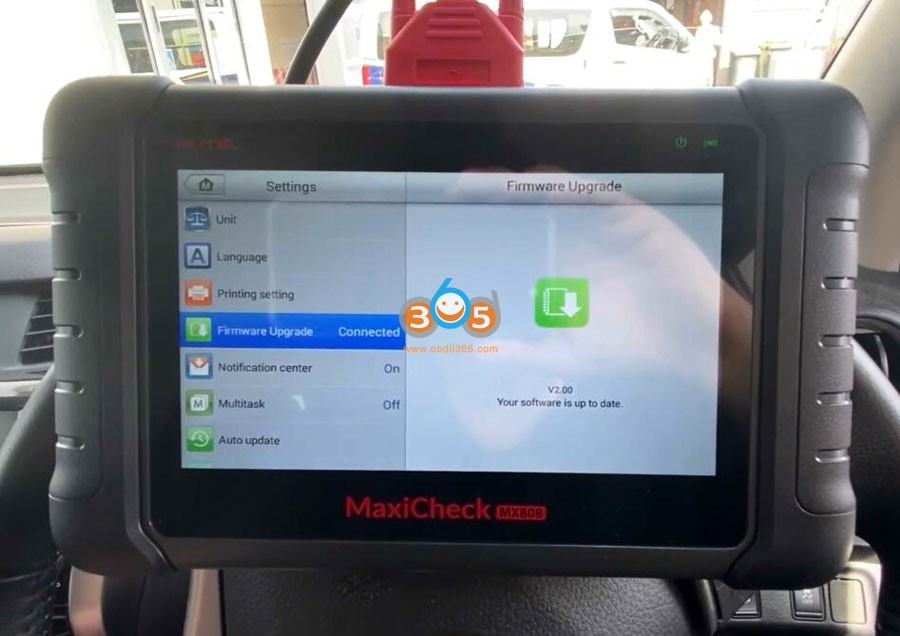
You should carry out your vci firmware updates from time to time.
Our recommendation is to check at least once a month and this applies to all Autel scanners not just the cable ones.
https://www.obdii365.com/service/autel-mx808-firmware-update-guide.html


Autel KM100 Incorrect Key Use Toyota Universal Key Solution
Problem:
I tried to generate the universal key for Lexus by using bundle universal key however Autel km100 device shows should use toyota universal key.
Is there different types of universal key?

Solution:
It’s new, not out yet. They had to make a different key as most Toyota Prox keys are dual frequency – standard ikey doesn’t support dual frequency.
Use Xhorse or keydiy Toyota keys, work great.
Program Toyota Camry 2020 All Keys Lost with Autel KM100
Autel KM100 program Toyota Camry 2020 all smart keys lost successfully.
The customer brought a used key.
Back up immo data, generate analog key and add smart key.
Autel bypass entry code if you do an immobilizer data backup.
KM100 has built-in emulator. You don’t need APB112 when generating the emulator key.
Images attached:


Program Nissan Sentra 2022 Proximity by Autel KM100
Autel KM100 new user feedback:
Key Programming for Nissan Sentra 2022.
Need 28 digits pin code (KM100 doesn't release the pin code).
Once you have the PINCODE (got the pin from a Master), you can program proximity with KM 100.
Nissan cable (16+32 gateway adapter) needed And if you already have the code you can program it with km100 without any problem.
Special cable is needed is cable 16 + 32 and connects up in the direction of the accelerator pedal when you send the pin programs with km100 of the model 2022.


Tips to Program 2021 Kia Forte All Smart Keys Lost
Here comes the problem:
Working on a 2021 Kia Forte LXS with bladed ignition. All keys lost. Customer gained entry somehow before I arrived and alarm was active (sounding.)
The Hyde manual states no transponder on this model. No security symbol. There’s a security light when the car senses a transponder key. If there’s no transponder key there’s no light. It’s opposite from every other manufacturer out there.
It might have a transponder being a 21 but basically the new update to the BCM that they came out with makes it where you can’t start the vehicle if the alarm’s going off and you can’t deactivate the alarm without the remote.
Customer had key code so I cut a test key blade and it turn the ignition but would not start the vehicle.
How to turn the alarm off with a non-transponder key? Some of the older ones would turn off by cycling the key 6 times with foot on brake. Or does some of the Kias have transponders?

Problem solved:
Turn ignition on and leave for 30 seconds. Alarm will sound for the 30 seconds then beep twice. Used the Kia online owners manual.
Launch CRP919E BT Scanner 2022 Toyota Highlander Review
I have a 2022 Highlander that I hated with a passion the seat belt siren. This let me shut it off for only my drivers seat while leaving the others working.
So I bought the Launch CRP919E BT bi-directional scanner.
I can do full system health scans.
I can reprogram Key fob controls.
I can reprogram what happens when I unlock the doors with touch sensors.
I can reprogram window switch functions.
I can test relays.
I can test evap surge solenoids.
I can control fuel pumps.
I can activate fans.
I can activate horns.
I can run engine power cycles.
I can run engine running live tests.
I can control windows.
I can control and test every option a vehicle is equipped with key words there is EQUIPPED WITH.
If the vehicle does not have that feature no you can not do anything with it. Yes the scanner will tell you if you have that feature on the vehicle.


Autel KM100 Program Renault KOLEOS 2018 All Keys Lost by OBD
Renault Koleos 2018 all key lost programmed by Autel KM100, still mark as fail the last process if the key is programmed.
Using the original key.
Everything was via OBDII. You extract a file, you save it and the KM100 does everything.
Same happened to me in a logan 2016 error appeared but yes program!!!!


How to Add 2023 Renault Kangoo 4A Key by Autel KM100
Autel MaxiIM KM100 user new feedback:
Add a new spare key to 2023 Renault Kangoo successfully. It is 4A key. It’s because it’s continental.
Enter by Logan 2019 and from there he takes you alone.
Follow the Guided function, it reads pin and adds key.
You read it and save it.
Back up information as you keep continuously.
Done sandero and kwid 4A and no issue just good battery or stabilizer.
You can also do everything with xtool, it comes out straight 5 minutes for obd.


VW Golf 2013 All Keys Lost with Autel KM100
VW GOLF 2013 all keys lost successfully programmed by Autel MaxiIM KM100 programmer via OBD.
You don’t need a code when you read the immo data and it precharges the key.
All done via OBD.
if it is board MM+95320 if possible key if all keys lost.
If it’s the continental board you can’t program AKL with KM100.


Read BMW Siemens Bosch ECU ISN by Free Software
Free software to read/calculate BMW Siemens/Bosch ECU ISN code via eeprom/flash data.
Support following ECUs:
Siemens MS42/43/45.0/45.1/MSV70/ME9/ME9.2
Siemens MSV80/MSV80.1/MSD80/MSD80.2/MSD81.2/MSD85.1
Bosch EDC17/MEVD17xx/MVD17xx/MV1722/MED17xx
Bosch MEVD172/MEVD172Y/MEVD1725/B38 and B48/X63TU
Bosch ME17N45/MED172/MEV17N46

Contact www.obdii365.com if need software link.
How to use Remote Desktop on Autel KM100?
Problem:
Anyone else having issues with remote desktop not working on Autel km100 now? I believe it has an older unsupported version of remote desktop but can’t figure out a way to force that APK to update with no native access to play store. All system update are on newest possible.
Needs manual QS APK update:
1.) Download from verified source: https://www.teamviewer.com/cs/download/android/
2.) Transfer via USB from the PC to the KM100.
3.) Go to Settings -> System Settings -> More -> Storage -> Files
4.) Browse for the APK file, tap on it, allow all the miscalaneous warnings, confirm You want to update the built-in app a here we go again!
NOTE: Do not use the USB-C on both ends. Use the cable with USB-C on one end to connect to the KM-100 and with USB-A on the other end to connect to the computer.

Nissan Sentra 2018 Key Works But Has Key Error?
Problem:
Nissan Sentra 2018 Key Works but it says key error see owners manual on the dashboard.


Possible reason and solution:
Wrong button configuration is what throw the I key light.
The car you are working on probably has remote start and your keys aren’t.
Never use shit keys from Amazon.
Always get original keys do that on Sentras.
How to Get Audi A3 2006 7th Byte if Lost All Keys?
Audi a3 2006 how to get the 7th bytes in all key lost?
You have 2 options
1 – perform all keys lost and xhorse change by itself the 7th byte
But you change original data.
A vvdi key tool plus does not need the 7 byte but when you do all the keys lost you will no longer be able to make dealer key anymore in that car because the 7 byte invented the tool read immo and from there create a key of dealer of which already brings the car much easier and faster

2- go to key learning inmo status
Check item dealer key you put the 7 from hex 00 to FF
( 256 possibilities take one hour )
When you see yes dealer you got it and var get original data
That if only have xhorse device.
Another way is to use autel with apb112 to sniff the 7 in one minute.
I use Autel IM508/IM608 and apb112 for this car. Read 7th byte from ignition switch.
Read ecu get 6th byte cs and sniff switch with apb112 and you get 7th byte.
Check instruction
http://blog.obdii365.com/2022/06/16/audi-a3-2204-2013-all-keys-lost-with-autel-im608-apb112/
Launch CRP919E BT BMW FRM Module Coding Guide
Tutorial: BMW 3 series BMW FRM Footwell Module coding using Launch CRP919E BT/CRP919X BT diagnostic scanner.
Go to BMW->Coding Program->3 series-> 3’_ E90 E91 E92 E93->Coding/Program


Read Vehicle Order

Select Coding System List

Select FRM (Footwell Module)

Turn off ignition
Wait 15s
Turn on ignition
Code control unit
Coding in progress

FRM Coding completed.


How to Program Porsche BCM 2M25J Key with Xtool KC501?
How-to: read Porsche Continental BCM which was installed in all cars from 2011 to 2018 using Xtool tablet (X100 PAD3, X100 MAX, H6, H6 Pro, and many more) and KC501 programmer.

In order to prepare dealer key and learn key, we need to read Dflash data from the BCM.
Connect xtool table with KC501 and vehicle
Select Special function->Key Programmer->Porsche->Panamera->Immobilizer->2011-2017-> Read Dflash


Choose processor, here choose BCM 2M35J->DFlash

Check operation instruction

BCM 2M25J (Metal Crystal Oscillator)

We will see wiring diagram to BCM
Xtool wirings require to remove components.


Follow wiring diagram to connect BCM with Xtool KC501

Read Dflash and save


Generate dealer key
Upload Dflash saved and select an unused key position to generate dealer key.


After generating dealer key you can learn key with the xtool kc501.

http://blog.obdii365.com/2024/03/13/read-porsche-bcm-2m25j-with-xtool-kc501/
