

/image%2F1896381%2F20151209%2Fob_cb2b49_obd365-com.png)
Autel IM508 Toyota Smart ECU Software Not Supported Solution
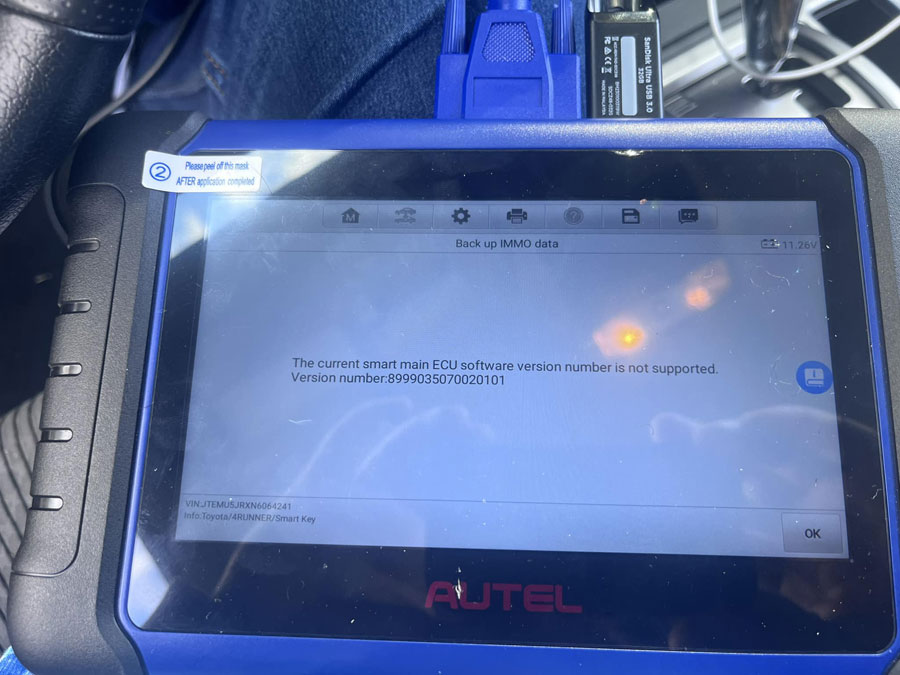
One of the obdii365.com customers reported that he failed to program a 2022 Toyota 4Runner US proximity and ran into this problem on the Autel IM508.
Error: The current smart main ECU software version number is Not Supported?
Solution:
Confirmed by Autel engineer. Autel won’t backup immo data for this software version as it said the ECU software number is not supported.
Get code send to a vendor or nastaf for outcode. Reset box, add key. Will need to send off code again for the outcode. Program key.
Same as SmartPro, it will also ask to input the data through NASTF.
Here is an online resource where you can get Toyota incode and outcode.


Xhorse 8A AKL Adapter Toyota Lexus BA IMMO Car List
Xhorse released new KD8ABAGL Toyota BA All Keys Lost Adapter for 2022- Toyota/Lexus IMMO key programming via OBD.

IMMO type: 8A BA
Function: Add key and all keys lost bypass pin code
Compatible device: VVDI Key Tool Max Pro, FT Mini OBD Tool and Key tool Plus
Compatible keys: Xhorse Toyota XM38 smart remote
Xhorse BA AKL Cable Vehicle List
| Brand | Year | Board Number | P4 | Note |
| Harrier | 2022- | 3041 | BA | / |
| Venza | 2021- | 3041 | BA | / |
| Sienna | 2021- | 3041 | BA | / |
| Tundra | 2022 | 3041 | BA | / |
| Levin | 2023- | / | BA | / |
| Sequoia | 2023- | 3041 | BA | / |
| Guangqi Venza | 2022- | 3041 | BA | / |
| RAV4 Dual Engine E+ | 2021- | 3041 | BA | With A/C button |
| GRANVIA | 2022- | 3041 | BA | / |
| BZ4X | 2021- | 3041 | BA | / |
| Land cruiser | 2022- | 2050 | BA | / |
| Prius | 2023- | 3041 | BA | / |
| Lexus NX | 2022- | 6100 | / | RF432 |
| Lexus NX | 2023 | 6100 | / | 312-314 |
| Lexus LX | 2022- | 0010 | / | RF432, new PCBA |
Connection wiring diagram

Autel KM100 Ford Remote “Frequency is Not Supported”?
Problem:
Trying to program an Autel ikey universal key to a 2018 ford edge with Autel KM100, anyone see this message before?
Error “The Universal Key Frequency is Not Supported”

Solution:
There are high frequency and low frequency keys when trying to generate Ford’s.
Need the 900mhz high frequency Ford style universal ikeys. You’ve got the low frequency one in there; replace with a high frequency one (with H or A as the 6th digit).
Only IKEYFD005AH and IKEYFD004AH ikey remotes can be used to generate 868Mhz-915Mhz remote.


How to Restore FEM if Yanhua ACDP2 BMW FEM Died?
Problem:
I got this yesterday with Yanhua mini acdp 2, and fem died.
I’ve tried to reprogram fem, no luck. Internet connection was okay also. Any solution?

Solution:
ACDP2 gives you option to restore eeprom and coding data.
Menu path: BMW->FEM/BDC-> Mode 1: Add key- >FEM/BDC initial programming process- Method 2-> Recover EEPROM/Coding data


Perform Step 6: Recover EEPROM Data and Step 7: Recover Coding data.
Free Download VNCI MDI2 Firmware Update Tool
How to update the firmware of VNCI MDI2 new GM Opel GDS2 Tech2win diagnostic scanner?

1.Download VNCI Device Manager tool

2. Install VNCI Manager


3. Run VNCI Manager
Connect VNCI MDI 2 interface with laptop
Check device information and update log
Press ‘Update’ to update firmware


CG FC200 OK and Not OK ECU List
CG FC200 is not a very expensive tool for a newbie and small workshop. It is easy to use, cable quality is awesome, read and write fast, it will do checksum calculation, VIN change, read PIN, CS, Mac and more.

Here we post successful and failed jobs with the FC200.
Success:
Edc16c2 reading and writing ok (with mpc adapter)
Delco e83 opel read and write ok
Edc16c34 reading and writing ok (with mpc adapter)
Pcr 2.1 read/write normally, Need to correct the checksum manually
Immo off edc17c10 ok
Dodge charger 2020 ZF 8hp TCM. Read and write OK
Md1Cs004 h30 read / write Leon 2021
Edc17C64 golf 7 reading and writing ok.
Audi Q7 edc17cp54 passes very well
md1cs003 Berlingo 2021 read and write ok
Edc17cp14 R/w checksum
Edc16c35 BMW e90 320d,manual Cheksum, this ecu does not appear available but I read and write after edc16cp35
Mercedes classe A 2012 calculator Delphi CRD3.6 read and write ok
Edc17cp14 hyundai reading immo off tprot off writing ok.
EDC17CP44 AUDI Read/write/chk ok
Fc200 read and write ok EDC17C64
Reading MD1CS003 nickel with cf 200
Edc17cp14. Nice and easy, butter smooth.
Bmw edc17cp02 reading and writing ok and with ISN change.
Range rover edc17cp11 read ok
Reading delphi crd 3.58 very fast
Edc 17cp14 passes without a problem
EDC17C46 VW read write ok
Edc17cp14 audi a4 v6 tdi
Reading med17.4.2 Peugeot 508 in boot mode.
Opel crossland 2018 EDC17C60 TC1793 addblue dpf egr off
2017 Ford Focus 2.0L ECM Clone VIN change with FC-200
FC200 by EDC 17C55 ECM read & write & vin number change
Peugeot 308 EDC17C60 Full Backup & Password Reading on Bench
FC200 read isn all keys lost 2016 BMW 328I F30 N26.
MEVD17.2.5 DME N13 Engine Cloning OK
CG FC200 BMW EDC17CP02 FULL BACKUP BENCH
Delphi CRD3.6 Read and write with FC200
Cloning Second Generation DQ200 TCM
FC200 read BMW MSV80 DME ISN and VIN on bench
Hyundai I10/I20 Automatic M7.9.8 read and write
SIM271 KE2.0 Cloning By FC200 Programmer
FC200 Cloning Med17.5.20 Ecu
BMW F Series 6HP EGS Clone on bench
Fiat Doblo EDC17C49 Full backup Bench and Password Reading
Mercedes benz ecm delphi crd2.16 read write with fc200 | Clone with boot mode
Renault ME17.9.20 TC1782 Fully Backup Bench
Meg17.9.12 Hyundai I10 grand TCM read write with fc200
Hyundai VERNA 840 ECM READ BY FC200
SIM271DE2.0 Read write by FC200
FC-200 GM E38 read and write.
Read BMW MG1CS003 SPC5777 ISN EEPROM FLASH
MEVD17.2.5 DME N13 Engine Clone by CG FC-200
Clone MEVD17.2.5 DME N13 Engine
Clone Audi Gearbox DL382 ON BENCH
CITROEN C3 CROSS BOSCH MD1CS003 Fully Backup
Mercedes benz ecm delphi CRD3.10 OM651 Clone by fc200
Fiat ECU EDC17C69-3.K2 TC1793 Bench for Backup
BMW EDC17CP02 FULL BACKUP BENCH
Read and Write VW GOLF7 GTD 2.0L 184CH EDC17C64 with FC200
BMW Bosch ME17.8.8 TC1728 read and write
ECU MED17.5.21 Cloning By FC200 Programmer For Seat Leon (5F) mk3 1.2 TSI
reading BMW MSV80 ISN .
Mahindra Tuv 300 EDC 17c63 Ecu Read & Write by FC200
BMW MSD87.2 DME clone with FC200
GPEGD2.20.4 Venue ECM read and Write by FC200
did bmw g12 MD1CP002 with no problem on bench
Read BMW MG1CS003 SPC5777 ISN EEPROM FLASH
Did 17c50 and checsum did online…need wait foe a 10seconds
did md1cs006 eeprom and flash
bench read vag edc17c14 for testing ok.
Tested ok Vw crafter dc17c54, Vag edc17c14, Bmw edc17, Ford edc17
R/W Edc17c06 Cheksum ok
Read and Write Crd3.20 Sprinter, Read/Write, checksum ok
Audi a6 competition Edc17CP44 R/W ok, checksum ok
BMW zf 8hp R/W ok
Vw EDC17C74 R/W checksum
Audi a4 EDC17cp14 R/W ok, checksum ok
Audi A7 2011 EGR OFF STAGE1 Engine v6 TDI ECU :EDC17CP44 TDI
VW Golf GTD 2015 read and write DPF EGR off EDC17C64
Mercedes CLA W176 2012 Delphi CRD3.6 read and write ok
Edc16c35-> this ecu model appears in the list as unsupported.use the protocol for edc16cp35 and it will work., R/w ok, checksum manually
clones MQB DQ250 TCM for Skoda Kodiaq 2020 ok
read Chevrolet Equinox ACDelco E38 on bench
bmw 6hp egs is only backup and isn reset
Audi_A6_Avant_3.0_TDI_Allrad_2013 4G0907311E EDC17CP44 Read Bench: ok
Failure:
gm 6t70 tcm clone not ok
Delphi Crd2.35 checksum error, fixed by kess v3
Failed to read ACDelco E92 (not supported)
No Lucky on GPEC2
failed to connect land rover zf 8hp tcu
Program Land Cruiser GXR 2021 All Keys Lost by Lonsdor K518ISE
User feedback:
Land cruiser GXR 2021 all keys lost. Autel IM508 failed to backup immo data via OBD. Lonsdor K518 did the job perfectly.
lonsdor k518ise backup Immo Data via obd using ADP25 adapter with LKE emulator.
Back up immo data, generate emulator key and add smart key.


CG FC200 Adds SDI9, SDI3, SDI4, Simox8.2x in Boot
CG FC200 ecu programmer released new software update on October 16th, 2023. Adding GPEC3 GPEC2 GPEC2A GPEC4 E98 and more other ECUs.
V1.1.6.0 NEW
(2023.10.16)
1.Added CONTINENTAL TC17 type engine computers (BOOT mode): SID310, SID807EVO, EMS3110;
2.Added CONTINENTAL SPC5xx type engine computers (BOOT mode): GPEC3, GPEC2A, GPEC4, GPEC4LM, GPEC2;
3.Added CONTINENTAL TC17 type engine computer (BOOT mode): SIMOS8.2x, EMS2511, EMS24xx, EMS2205, SDI9, SDI3, SDI4, SDI10.x, SDI21.x;
4. Added new GM type engine computer: GM AcDelco E98;
5. Added the Flash verification function of the gearbox computer: DQ380, 8HP, 7DCT300, 9GT-VGS-NAG3;
6. Added PFlash verification function for CONTINENTAL TC17 engine computer;
7. Added the function of independently reading and writing DFlash/PFlash/ExtEEPROM/ExtFlash: MSD80/MSD81/MSD85/MSD87/MSV90/SIM271KE;
8. Fix some BUGs and optimize software performance.
Free download CG FC200 new software

PCMTuner Read Ford SID211 TC1791 in BSL Mode
User feedback: Sid211 TC1791 Ford Transit 2018 Adblue Off, a lot of work, but it worked the first time.
PCMTuner will read it via OBD if ecu is unlocked, or module 53 BSL to read/write or unlock.
This Ecu is Unlock. To read and Write tc1791 boot mode. once unlocked you can now write via obd with the reading obtained by bench.
Bench Boot Read & Unlock + Obd Write using pcmtuner.
Perfect.
.jpg)
Flex and kt200, kess3, Bitbox, foxflash can read/write this ECU by OBD.
What was most difficult is opening. a lot of glue. Once opened it was easy. If you don’t have those tools you can do it in boot mode and everything turned out well.
Wiring diagram:
This ecu for bsl need boot pins on both sides of ecu pcb.


Tool to Program 2023 Subaru Forester All Keys Lost
As titled, which tool to program 2022/2023 models like forester and outback G & H type keys when all keys lost?
Here is the clue.
didn't work as it was unable to read eeprom data
tried obdstar x300 which didn't even have the correct car on there.
with ssm4 it requires server authentication and when i use a bypass patch to activate ssm4 that process doesn't work.
Subaru SSM4 with subscription:
Yes, Need a legit SSM4 and current authentication key. (The authentication key that changes every 6 months)
OTOFIX D1 Series Product Comparison
Here comes the OTOFIX D1 series universal diagnostic scanners comparison.
OTOFIX D1 Lite vs D1 vs D1 Pro vs D1 Plus vs D1 Max vs EvoScan Ultra


Click on images to enlarge or download PDF here.
OBDSTAR Ducati 2009 Hypermotard S Service Reset Success
Just purchased an OBDstar iScan Ducati scan tool off obdii365. My intent was to use it to clear the service code on a 2009 Hypermotard S. But I can't get it to work properly. I know there are dozens of pages on the OBDStar scanner tool, and yes, I've looked through them. All I get is the "Communications Error" page. It clear it's not handshaking with the ECU because I always have to enter the VIN manually. Yes, I set up the online account. Yes, I did the updates, Yes, I downloaded (or "upgraded" as they called it) the software. I just double-checked and the device says there are no other updates. Yes the ignition key is on. I'm using the cables supplied with the device. The bike has the Ducati "Race" or performance ECU installed.


Solution:
The device must be connected to the internet. You must register by OBDStar.
Feedback:
Updated. I made a mistake.
I was trying to use the 4 pin connector under the seat, when I should have been using the “old style” 3 pin connector (and battery power) under the right panel next to the ECU. Once I did that, cleared the service indicator in about 5 min.
Lonsdor K518 Adds Fiat Cars in October 2023
Lonsdor K518ISE and K518S series Update Fiat IMMO Models on October 9th, 2023
MIDDLE EAST
Albea (2002-2013) Bipper (2007-2017) Boxer (2006-2011)
CHINA
Palio Weekend (2002-2019) Grande Punto (1999-2006)
ASIA
Avventura (2014-2018) Daily (2006-2011)
NORTH AMERICA
500C (2011-2021) 500L (2012-2021)
SOUTH AMERICA
500C (2011-2021) 500L (2012-2017) Boxer (2011-2017) Daily (2009-2016)
AUSTRALIA
500 (2008-2021) 500X (2014-2021) Daily (2006-2011)
AFRICA
500 (2008-2017) Boxer (2011-2017) Ducato (2006-2010)

How to Solve Autel MaxiSys Jeep Renegade 2020 Unlock Failed?
Here comes a similar problem:
One of our customers failed to reset oil on a Jeep Renegade 2020 with Autel MaxiCOM MK908 II diagnostic scanner.
Error message “Unlock failed. The tool did not allow.”


Solution:
For 2018+ FCA Chrysler Jeep Dodge you need to unlock or bypass gateway to access functions.
2 Ways:
1. use Chrysler 12+8 gateway adapter, Start Connector to unlock gateway
Chrysler 12+8 Bypass Cable, Star Connector?
2. purchase AutoAuth license
How to Purchase, Activate and Use FCA AutoAuth for Autel Scanners?
This can be applied to all Autel MaxiSys and MaxiCOM scanners.
Will Xtool A30M OBD2 Scanner Program Keys?
Xtool A30M is definitely a great option for a bi-directional scanner without the need for subscription fees especially if you’re on a budget.
Can it program keys?
For example, under the 2017 Honda Accord, under the immobilizer ECU the option for key programming was available, made multiple attempts to program keys to this
car but it just kept on filling, also hooked up the a30m to a Toyota, there wasn’t any support for key programming.
key programming isn’t listed under special functions for the a30m. For the price of the A30M it’s sure it’s not available.


You don’t need to invest in the a30m if your sole purpose is to use it for programming car keys.
But a30m definitely remains a solid device and offers a lot of value without the need for a subscription license.
The A30M is the lite version of D7. The D7 has around 36 special functions now, while the A30M has 21. Another difference is that the D7 gets more updates and understandably so, since there’s an annual update cost after subscription expires.
