

/image%2F1896381%2F20151209%2Fob_cb2b49_obd365-com.png)
Lonsdor K518 Adds Nissan Pathfinder 2022 Smart Key Programming
Lonsdor K518 Pro and K518ISE series update Nissan and Chevrolet immo key programming models on Dec. 18th, 2023.
SUPPORT MODELS
NISSAN
Rogue\2021-\Smart key
Almera\2022-
Pathfinder\2022\Smart key
New X-Trail\2014-
Patrol\2018\Smart key
4-digit PIN code\Without slot-button type 3
CHEVROLET
Aveo\2017-2020\Smart key
Aveo\2017-2020\lmmobilizer
Blazer\2020-2022\Mechanical key
Cavalier\2019-2022\lmmobilizer
Lova RV\2016-2018\Smart key
Lova RV\2016-2018\Remote
Lova RV\2016-2018\lmmobilizer
Malibu Classic\2001-2005\Remote
Menlo\2020\Smart key
Monza\2022-2024\Mechanical key
Seeker\2022-2023\Smart key
Seeker\2022-2023\Mechanical key
Trailblazer\2020-2021\lmmobilizer
CHEVROLET
Only K518PRO supports CANFD protocol vehicles
Tracker\2020-2022\Smart key
Tracker\2020-2022\Mechanical key


Foxflash VAG MED17.5.2 ECU Cloning in Boot Mode
New user feedback about foxflash clone function.
ECU MED17.5.2 Tc1767 (Vw passat)
Tricore boot ‘Read Password,
Tricore boot ‘Read Micro&Eeprom,
Tricore boot ‘Write Clone File’ to new use ECU.
All processes went smoothly and successfully.
Just use the foxflash come with clone function deal the files.


BOSCH MED17.5.2 [ TC1767 INT.F.] – VW, Audi, Seat, Skoda boot pinout to foxflash
Step 1: Read and Write ECU
Connect with the multifunction cable the following pinout and the boot shown below.
Use the driver:
→ TOOLS BOOT MODE
→ INFINEON TRICORE Boot
→ SAK TC1767

Step 2: Password Search
Disable the boot mode by unsoldering there resistances.
Connect the pinout below.
Use the driver:
→ TOOLS BOOT MODE
→ INFINEON TRICORE Tool Password
→ OBD PASSWORD TPROT V08 VAG
→ Click on “Find Password” and follow the software messages.

If the password was found with this system, go directly to the boot step to read and write the control unit. Otherwise, see next step ..
Step 3: Password Search
Connect the pinout below.
Use the driver:
→ TOOLS BOOT MODE
→ INFINEON TRICORE Tool Password
→ PASSWORD BFT
→ Click on “Find Password” and follow the software messages.

Now that the password has been found it’s possible to read and write the control unit as described inSTEP 1.
Kess V3 Module List and ECU List
Here comes the original Alientech Kess V3 protocol license price list and vehicle coverage.

- Protocol Activation Price List
2. Kess3 Master vs Slave Version
As a Master user, you can read the files in clear. This allows you to operate independently in order to remap and reprogram the ECU with modified files. As a slave user, only your master will be able to decrypt your files. (Recommended choice for taking the first steps in chiptuning, supported by your Master)
3. Kess V3 ECU & TCU List
What types of vehicles are supported?
Alientech supports hundreds of thousands of vehicles. Not only engine control units, but also transmission control units equipped on cars, motorcycles, tractors, trucks and boats. To know all the vehicles that Alientech supports, you can easily consult our vehicle list.
How to Obtain Yanhua Digimaster 3 IP Automatically?
If you fail to update Yanhua Digimaster 3 mileage programmer, it does not cummunicate with LAN. Here is the solution.
Set IP automatically and try again.
Menu path:
Management-> Remote Assistance->Set IP->Obtian IP automatically


Tips to Clone BMW EDC16CP35 ECU by OBDSTAR DC706
Problem:
I try to connect BMW EDC16cp35 ECU with OBDSTAR DC706 with P003 adapter but is impossible.
Check wiring diagram many times
On diagram I have this – Kline on 4 pin. In description pin 8. I try both. no work.
DC706 doesn’t read/write the internal flash. Failed to clone ecu.
Any solution?


Solution:
On the DC706 it says to use both MP001 and P003 adapters.
The function is only supported by P003 adapter and MP001 programmer.

This is the MP001 programmer (coming soon).

Function of the MP001 programmer
Standalone:
Read/Write/Clone EEPROM, MCU, ECU for cars, motorcycles and marines.
Works with P002 adapter:
Toyota/Ford All keys lost
Honda/Yamaha/Suzuki All keys lost
Works with P003 adapter:
Switch Kline and CAN BUS between part of engine ECUs, gearbox TCUs
Boot mode read and write for part of ECUs
MP001 and P003 adapter wiring diagram


How to Use CG100X D1 to Change MQB Mileage?
CGDI released a new D1 adapter for CG100X Programmer. The D1 adapter is used to repair/change VAG MQB D70F34XX and D70F35XX processor mileage without soldering.
Function requires CG100X software version 1.3.5.1 and update.
1.Added D1 adapter (coming soon), support VW D70F34/35xx remove capacitor way mileage repair.

D1 adapter feature
No soldering
No lift pin
Can be reused.
CG100X and D1 Adapter Pinouts to VAG MQB Cluster


CG100X Adds VW D70F34 35xx Remove Capacitor to Repair Mileage
CGDI CG100X smart programmer software update to V1.3.5.1.
(2023.12.01)
1.Added D1 adapter, support VW D70F34/35xx remove capacitor way mileage repair.
2.Added 786 chips to Programer.
3.Added 31 models to dashboard.
4.Added 2 models to airbag.
5.Added 2 models to read-write.
The following chips are added for Programer.
PIC16F917
PIC16F690
PIC24FJ64GA006
PIC24FJ96GA006
PIC24FJ128GA006
PIC24FJ64GA008
PIC24FJ96GA008
PIC24FJ128GA008
PIC24FJ64GA010
PIC24FJ96GA010
PIC24FJ128GA010
PIC16F87
PIC12F675
PIC16F886
PIC16F887
PIC12F510
PIC16F506
PIC10F200
PIC10F204
PIC10F202
PIC10F206
PIC10F220
PIC10F222
PIC12F508
PIC12F509
PIC16F54
PIC16F57
PIC16F59
PIC16F505
PIC18F1320
PIC12F629
PIC12F635
PIC12F683
PIC16F616
PIC16HV616
PIC16F627A
PIC16F628A
PIC16F648A
PIC16F630
PIC16F676
PIC16F631
PIC16F636 (639)
PIC16F684
PIC16F685
PIC16F687
PIC16F688
PIC16F689
PIC16F677
PIC16F72
PIC16F73
PIC16F74
PIC16F76
PIC16F77
PIC16F737
PIC16F747
PIC16F767
PIC16F777
PIC16F785
PIC16HV785
PIC16F88
PIC16F818
PIC16F819
PIC16F873A
PIC16F874A
PIC16F876A
PIC16F877A
PIC16F883
PIC16F884
PIC16F913
PIC16F914
PIC16F916
PIC16F946
PIC18F242
PIC18F252
PIC18F442
PIC18F452
PIC18F458
PIC18F1220
PIC18F4220
PIC18F2320
PIC18F4320
PIC18F2220
PIC18F2331
PIC18F2431
PIC18F4331
PIC18F4431
PIC18F2450
PIC18F4450
PIC18F6722
PIC18F2410
PIC18F2420
PIC18F2455
PIC18F2480
PIC18F2510
PIC18F2520
PIC18F2550
PIC18F2580
PIC18F4410
PIC18F4420
PIC18F4455
PIC18F4480
PIC18F4510
PIC18F4520
PIC18F4550
PIC18F4580
PIC18F2515
PIC18F2525
PIC18F2585
PIC18F2610
PIC18F2620
PIC18F2680
PIC18F4515
PIC18F4525
PIC18F4585
PIC18F4610
PIC18F4620
PIC18F4680
PIC18F6527
PIC18F6622
PIC18F6627
PIC18F8527
PIC18F8622
PIC18F8627
PIC18F8722
PIC18F65J10
PIC18F65J15
PIC18F66J10
PIC18F66J15
PIC18F67J10
PIC18F85J10
PIC18F85J15
PIC18F86J10
PIC18F86J15
PIC18F87J10
PIC16F870
PIC16F871
PIC16F872
PIC16F873
PIC16F874
PIC16F876
PIC16F877
PIC16F84A
PIC18F6520
PIC18F8520
PIC12F615
PIC12HV615
PIC12F609
PIC12HV609
PIC16F610
PIC16HV610
PIC16F716
PIC18F6620
PIC18F8620
PIC18F6720
PIC18F8720
PIC18F67J60
PIC18F87J60
PIC18F97J60
PIC18F66J60
PIC18F66J65
PIC18F86J60
PIC18F86J65
PIC18F96J60
PIC18F96J65
dsPIC33FJ128GP706
PIC16F627
PIC16F628
dsPIC33FJ64GP206
dsPIC33FJ64GP306
dsPIC33FJ64GP706
dsPIC33FJ64GP710
dsPIC33FJ64GP310
dsPIC33FJ128GP206
dsPIC33FJ128GP306
dsPIC33FJ128GP310
dsPIC33FJ128GP710
dsPIC33FJ256GP710
PIC24HJ64GP206
PIC24HJ64GP506
PIC24HJ64GP210
PIC24HJ128GP306
PIC24HJ128GP506
PIC24HJ128GP310
PIC24HJ128GP210
PIC24HJ256GP210
PIC24HJ256GP206
PIC24HJ256GP610
PIC18F2685
PIC18F4682
dsPIC33FJ256GP506
PIC18F4321
PIC18F4221
PIC18F8585
PIC18F6585
PIC18F6310
PIC18F8310
PIC18F6410
PIC18F8410
PIC18F6390
PIC18F8390
PIC18F6490
PIC18F8490
PIC18F6680
PIC18F8680
PIC18F2221
PIC24HJ64GP510
PIC18F4685
PIC18F6621
PIC18F8621
PIC18F6525
PIC18F8525
dsPIC33FJ128GP708
dsPIC33FJ64MC506
dsPIC33FJ64MC510
dsPIC33FJ64MC706
dsPIC33FJ64MC710
dsPIC33FJ128MC506
dsPIC33FJ128MC710
dsPIC33FJ256MC510
PIC18F258
PIC18F448
PIC18F248
dsPIC33FJ128MC510
PIC18F45K20
PIC18F2321
PIC18F2682
dsPIC33FJ64MC508
dsPIC33FJ64GP708
PIC24HJ128GP510
PIC24HJ128GP206
dsPIC33FJ256GP510
dsPIC33FJ128MC706
dsPIC33FJ128MC708
dsPIC33FJ256MC710
PIC18F2523
PIC18F2423
PIC18F4423
PIC18F4523
PIC18F1230
PIC18F1330
dsPIC30F6014A
dsPIC30F4012
dsPIC30F4011
dsPIC30F2010
dsPIC30F2012
dsPIC30F3010
dsPIC30F3013
dsPIC30F2011
dsPIC30F3012
dsPIC30F3011
dsPIC30F3014
dsPIC30F4013
dsPIC30F5011
dsPIC30F5013
dsPIC30F5015
dsPIC30F5016
dsPIC30F6011A
dsPIC30F6013A
dsPIC30F6010A
dsPIC30F6012A
dsPIC30F6015
dsPIC30F1010
dsPIC30F2020
dsPIC30F2023
PIC16F882
PIC18LF25J10
PIC18LF24J10
PIC18LF44J10
PIC18LF45J10
PIC12F519
PIC24FJ64GA004
PIC24FJ48GA004
PIC24FJ32GA004
PIC24FJ16GA004
PIC24FJ16GA002
PIC24FJ32GA002
PIC24FJ48GA002
PIC24FJ64GA002
PIC18F83J90
PIC18F84J90
PIC18F83J11
PIC18F84J11
PIC18F85J11
PIC18F86J11
PIC18F86J16
PIC18F87J11
PIC18F66J11
PIC18F66J16
PIC18F67J11
PIC18F25K20
PIC18F65J11
PIC18F85J90
PIC18F65J90
PIC18F6628
PIC18F6723
PIC18F8628
PIC18F8723
PIC18F65J50
PIC18F66J50
PIC18F66J55
PIC18F67J50
PIC18F87J50
PIC18F86J55
PIC18F85J50
PIC18F86J50
PIC24HJ12GP202
dsPIC33FJ12GP202
dsPIC33FJ12MC202
dsPIC33FJ12GP201
dsPIC33FJ12MC201
PIC24HJ12GP201
PIC18F2458
PIC18F2553
PIC18F4458
PIC18F4553
PIC18F63J11
PIC18F64J11
PIC18F63J90
PIC18F64J90
PIC16F526
PIC18F44K20
PIC18F24K20
PIC16F722
PIC16F723
PIC16F724
PIC16F726
PIC16F727
PIC16LF722
PIC16LF723
PIC16LF724
PIC16LF726
PIC16LF727
PIC18F46K20
PIC18F26K20
PIC18F14K50
PIC18LF14K50
PIC18F14K50-ICD
PIC18F6393
PIC18F6493
PIC18F8393
PIC18F8493
PIC32MX360F512L
PIC24HJ16GP304
dsPIC33FJ16GP304
dsPIC33FJ16MC304
PIC24HJ32GP202
PIC24HJ32GP204
dsPIC33FJ32MC202
dsPIC33FJ32MC204
dsPIC33FJ32GP202
dsPIC33FJ32GP204
PIC32MX360F256L
PIC32MX320F128L
PIC32MX340F256H
PIC32MX320F128H
PIC32MX320F064H
PIC32MX320F032H
PIC32MX460F512L
PIC32MX460F256L
PIC32MX440F128L
PIC32MX440F256H
PIC24FJ64GB110
PIC24FJ64GB108
PIC24FJ64GB106
PIC24FJ128GB110
PIC24FJ128GB108
PIC24FJ128GB106
PIC24FJ192GB106
PIC24FJ192GB108
PIC24FJ192GB110
PIC24FJ256GB110
PIC24FJ256GB108
PIC24FJ256GB106
PIC24FJ128GA110
PIC24FJ128GA108
PIC24FJ128GA106
PIC24FJ192GA110
PIC24FJ192GA108
PIC24FJ192GA106
PIC24FJ256GA110
PIC24FJ256GA108
PIC24FJ256GA106
PIC18F1330-ICD
PIC18LF13K50
PIC18F13K50
dsPIC33FJ32MC302
dsPIC33FJ32GP304
dsPIC33FJ64GP202
dsPIC33FJ64GP204
dsPIC33FJ64GP802
dsPIC33FJ64GP804
dsPIC33FJ128GP202
dsPIC33FJ128GP204
dsPIC33FJ128GP802
dsPIC33FJ128GP804
dsPIC33FJ128MC804
dsPIC33FJ128MC802
dsPIC33FJ128MC202
dsPIC33FJ128MC204
dsPIC33FJ64MC802
dsPIC33FJ64MC804
dsPIC33FJ64MC202
dsPIC33FJ64MC204
dsPIC33FJ32MC304
dsPIC33FJ32GP302
PIC18LF6520
PIC18LF8520
PIC24HJ32GP302
PIC24HJ32GP304
PIC24HJ64GP202
PIC24HJ64GP204
PIC24HJ64GP502
PIC24HJ64GP504
PIC24HJ128GP202
PIC24HJ128GP204
PIC24HJ128GP502
PIC24HJ128GP504
PIC32MX340F128L
PIC32MX340F128H
dsPIC33FJ16GS504
dsPIC33FJ16GS502
dsPIC33FJ16GS404
dsPIC33FJ16GS402
dsPIC33FJ06GS202
dsPIC33FJ06GS102
dsPIC33FJ06GS101
PIC18LF45J11
PIC18LF25J11
PIC18LF46J11
PIC18LF26J11
PIC18LF44J11
PIC18LF24J11
PIC18LF46J50
PIC18LF26J50
PIC18LF45J50
PIC18LF25J50
PIC18LF24J50
PIC18LF44J50
PIC18F14K22
PIC18LF14K22
PIC18F13K22
PIC18LF13K22
PIC16F1939
PIC16F1938
PIC16F1937
PIC16F1936
PIC16F1934
PIC16LF723A
PIC16LF1829
PIC16LF1934
PIC16LF1936
PIC16LF1937
PIC16LF1938
PIC16LF1939
PIC18LF14K50-ICD
PIC18F23K20
PIC18F43K20
PIC32MX420F032H
PIC32MX440F128H
PIC32MX440F512H
PIC18F87J90
PIC18F67J90
PIC18F66J90
PIC18F86J90
PIC24F04KA201
PIC24F04KA200
PIC24F16KA102
PIC24F16KA101
PIC24F08KA101
PIC24F08KA102
PIC24FJ64GA104
PIC24FJ64GA102
PIC24FJ64GB002
PIC24FJ64GB004
PIC24FJ32GA102
PIC24FJ32GA104
PIC24FJ32GB002
PIC24FJ32GB004
PIC32MX340F512H
PIC16F1826
PIC16F1827
PIC16LF1827
PIC16LF1933
PIC16F1933
PIC12F617
PIC16F707
PIC16LF707
PIC16LF1826
PIC18F45K22
PIC18LF45K22
PIC12F1822
PIC16F1823
PIC12LF1822
PIC16LF1823
PIC16F1947
PIC16LF1947
PIC16F1946
PIC16LF1946
PIC18LF25K22
PIC18F25K22
PIC18F46K22
PIC18LF46K22
PIC18F26K22
PIC18LF26K22
PIC18F44K22
PIC18LF44K22
PIC18F24K22
PIC18LF24K22
PIC18F43K22
PIC18LF43K22
PIC18F23K22
PIC18LF23K22
dsPIC33FJ256GP710A
dsPIC33FJ256GP510A
dsPIC33FJ256GP506A
PIC16F1824
PIC16F1828
PIC16LF1824
PIC16LF1828
PIC16F723A
PIC16F722A
PIC16LF722A
PIC16F721
PIC16F720
PIC16LF721
PIC16LF720
PIC16F1829
PIC16F1825
PIC16LF1825
PIC12F1840
PIC12LF1840
PIC16F1527
PIC16F1526
PIC16LF1526
PIC16LF1527
PIC16F1519
PIC16LF1519
PIC16LF1903
PIC16LF1902
PIC16LF1904
PIC16LF1906
PIC16LF1907
PIC16F1518
PIC16F1517
PIC16F1516
PIC16LF1518
PIC16LF1517
PIC16LF1516
PIC16LF1847
PIC16F1847
PIC16F1783
PIC16LF1783
PIC12F752
PIC12HV752
PIC16F1782
PIC16LF1782
PIC18F26K80
PIC16F1507
PIC16LF1507
PIC10F322
PIC10LF322
PIC10F320
PIC10LF320
PIC16F1503
PIC16LF1503
PIC16F1509
PIC16LF1509
PIC16F1508
PIC16LF1508
PIC12F529
PIC12F1501
PIC12LF1501
PIC12F1571
PIC12LF1571
PIC12F1572
PIC12LF1572
PIC12F1612
PIC12LF1612
PIC16F1613
PIC16LF1613
PIC16F1614
PIC16LF1614
PIC16F1615
PIC16LF1615
PIC16F1618
PIC16LF1618
PIC16F1619
PIC16LF1619
PIC12LF1552
PIC16F1454
PIC16LF1454
PIC16F1455
PIC16LF1455
PIC16F1459
PIC16LF1459
PIC16F1512
PIC16LF1512
PIC16F1513
PIC16LF1513
PIC16F1574
PIC16LF1574
PIC16F1575
PIC16LF1575
PIC16F1578
PIC16LF1578
PIC16F1579
PIC16LF1579
PIC16F1703
PIC16LF1703
PIC16F1704
PIC16LF1704
PIC16F1705
PIC16LF1705
PIC16F1707
PIC16LF1707
PIC16F1708
PIC16LF1708
PIC16F1709
PIC16LF1709
PIC16F1713
PIC16LF1713
PIC16F1716
PIC16LF1716
PIC16F1717
PIC16LF1717
PIC16F1718
PIC16LF1718
PIC16F1719
PIC16LF1719
PIC16F1764
PIC16LF1764
PIC16F1765
PIC16LF1765
PIC16F1768
PIC16LF1768
PIC16F1769
PIC16LF1769
PIC16F1773
PIC16LF1773
PIC16F1776
PIC16LF1776
PIC16F1777
PIC16LF1777
PIC16F1778
PIC16LF1778
PIC16F1779
PIC16LF1779
PIC16F1784
PIC16LF1784
PIC16F1786
PIC16LF1786
PIC16F1787
PIC16LF1787
PIC16F1788
PIC16LF1788
PIC16F1789
PIC16LF1789
PIC16F527
PIC16LF1554
PIC16LF1559
PIC16LF1566
PIC16LF1567
PIC18F26J53
PIC18F27J53
PIC18F46J53
PIC18LF26J13
PIC18LF26J53
PIC18LF27J13
PIC18LF27J53
PIC18LF46J13
PIC18LF46J53
PIC18LF47J13
PIC18LF47J53
PIC18F66J93
PIC18F67J93
PIC18F86J72
PIC18F86J93
PIC18F87J72
PIC18F87J93
PIC18F24K50
PIC18LF24K50
PIC18F25K50
PIC18LF25K50
PIC18F45K50
PIC18LF45K50
PIC18F25K80
PIC18LF25K80
PIC18LF26K80
PIC18F45K80
PIC18LF45K80
PIC18F46K80
PIC18LF46K80
PIC18F65K80
PIC18LF65K80
PIC18F66K80
PIC18LF66K80
dsPIC30F6010
dsPIC30F6011
dsPIC30F6012
dsPIC30F6013
dsPIC30F6014
PIC24HJ256GP206A
PIC24HJ256GP210A
PIC24HJ256GP610A
dsPIC33FJ256MC510A
dsPIC33FJ256MC710A
dsPIC33FJ32GS406
dsPIC33FJ32GS606
dsPIC33FJ32GS608
dsPIC33FJ32GS610
dsPIC33FJ64GS406
dsPIC33FJ64GS606
dsPIC33FJ64GS608
dsPIC33FJ64GS610
PIC18F65K22
PIC18F65K90
PIC18F66K22
PIC18F66K90
PIC18F67K22
PIC18F67K90
PIC18F85K22
PIC18F85K90
PIC18F86K22
PIC18F86K90
PIC18F87K22
PIC18F87K90
PIC16F18313
PIC16LF18313
PIC16F18323
PIC16LF18323
PIC16F18324
PIC16LF18324
PIC16F18325
PIC16LF18325
PIC16F18326
PIC16LF18326
PIC16F18344
PIC16LF18344
PIC16F18345
PIC16LF18345
PIC16F18346
PIC16LF18346
PIC18F65J94
PIC18F66J94
PIC18F66J99
PIC18F67J94
PIC18F85J94
PIC18F86J94
PIC18F86J99
PIC18F87J94
PIC18F95J94
PIC18F96J94
PIC18F96J99
PIC18F97J94
dsPIC33FJ128GP706A
dsPIC33FJ64GP206A
dsPIC33FJ64GP306A
dsPIC33FJ64GP706A
dsPIC33FJ64GP710A
dsPIC33FJ64GP310A
dsPIC33FJ128GP206A
dsPIC33FJ128GP306A
dsPIC33FJ128GP310A
dsPIC33FJ128GP710A
PIC24HJ64GP206A
PIC24HJ64GP506A
PIC24HJ64GP210A
PIC24HJ128GP306A
PIC24HJ128GP506A
PIC24HJ128GP310A
PIC24HJ128GP210A
PIC24HJ64GP510A
dsPIC33FJ128GP708A
dsPIC33FJ64MC506A
dsPIC33FJ64MC510A
dsPIC33FJ64MC706A
dsPIC33FJ64MC710A
dsPIC33FJ128MC506A
dsPIC33FJ128MC710A
dsPIC33FJ128MC510A
dsPIC33FJ64MC508A
dsPIC33FJ64GP708A
PIC24HJ128GP510A
PIC24HJ128GP206A
dsPIC33FJ128MC706A
dsPIC33FJ128MC708A
The following models are added for dashboard.
BAIC Senova D50 2018- 24C64(Dashboard)+95320(BCM)
Honda Motor NS125LA 24C04
Honda Motor Yazhi 24C04
Chenggong Zebra 24C08
Chenggong V2E 2017- R5F10DPEJ
Dongfanghong LX1000 tractor 2014- 24C02
DongFeng Liuqi Chenglong L2 24C08
DongFeng Fengguang E3 2020- 24C16
DongFeng Fengshen E70 95160
DongFeng Duolika PIC18F66K80(Mileage + mileage)
Toyota Cruiser 93C46
FOTON Auman EST 2023- 24C08
FOTON Ouman Zhike Driving Record 24C64
FOTON Smart Smurf 2022- 24C08
QOROS QOROS 3 D703529+24C32
HELI Forklift 95160
Geely ICON 2021- 24C08
JAC Shuailing T8 PRO 24C04
JAC Kangling JS 2021-24C16
Kate Deere 1804 tractor CAT1023
LOVOL Gu Shen GN60 combine harvester 24LC16
LOVOL Gushen 2022- R5F10DL
KIA K4 D70F3525
Nissan TIIDA 2019- 93C86
SANY SYL956H5 loader 24LC64
Shaanxi Auto Dragon X3000 25LC1024
Volvo S80 9S12H256
WuLing RC-6 24C32
Yutong Bus 2015- 25LC1024
ChangAn Shenqi PLUS 2022- 9S12HY48
Great Wall VV5 2021- R7F701401
The following models are added for airbag.
Mazda DFR5-57K30C TC233-16F
Suzuki 57S0 38910M69PB0 XC2336B-40F
The following models are added for dashboard read-write.
BYD AUTO Chinese 2020- R7F701621(read writer)
Venucia Venucia T60EV FS32K144(read write)
Yanhua ACDP Failed to Clone DQ500 TCU?
Problem:
I want write full backup on New DQ500 TCM from VW Tiguan but Yanhua Mini ACDP gave an error. Any idea?

Answer:
Boot version 401 is too new and not supported by ACDP.
ACDP will do version till 301.
No aftermarket tool will do 401 version at present.

Lonsdor K518 Pro and K518 Pro FCA Comparison
What’s the difference between Londsor K518 Pro and K518 Pro FCV?

Hardware and package make no difference. Only software difference.
K518 Pro is full version with all car brands and free license (Toyota, Nissan, Volvo, JLR lifetime free license). 2 Years free update (car immo software).
K518 Pro FCV comes with 10 brands software (5 default+ 5 optional brands.)
5 Preinstalled Software (default setting):
Toyota / Lexus / Scion
Nissan / Infiniti/ Datsun / Venucia
Hyundai / Kia
Honda / Acura
Land Rover / Jaguar
Selectable Software Packages (select 5 among them):
BMW / MINI / Rolls-royce
VW / Audi / Skoda / Porsche / Bentley / Lamborghini
Volvo/ Link&Co
Maserati / Fiat / Ferrari / Alfa Romeo / Lancia
Benz / Smart
Ford / Lincoln / Mercury
Hummer / Buick / Cadillac / Chevrolet / GMC / Opel/Oldsmobile / Pontiac / Saturn
Dodge / Chrysler / Jeep
Mazda
Suzuki
Mitsubishi
Subaru
Renault/Dacia
Borgward
Saab
LDV
LADA
Opel
Ssangyong
Isuzu
Mitsuoka
Daewoo
Daihatsu
WULING
MG
Chery
JAC
BYD
Perodua/Geely
Proton
TATA
Mahindra
Maruti/Suzuki
Holden
Contact obdii365.com customer service if need more selectable car brands. Once activated, these car brand license will never expire.
Autel MaxiSys Ultra Adds Ford Topology till 2024
Good news. Autel MaxiSys MS909, MS919, MS Ultra, Ultra Lite update Ford, EU/AU Ford software to V5.0.
1- Adds basic functions (ECU Information, read codes, and live data), special functions (including Oil Reset, and EPB), and Topology Tunction for 15 models of 2023 (Bronco, BroncoSport, Edge, Escape, Expedition, F-150, F-Series Super Duty, Maverick, Mach-E, Mustang, Navigator, Nautilus, Ranger, Transit, and Transit Connect) and 6 models of 2024 (BroncoSport, Edge, Expedition, Maverick, Mustang, and Navigator).
2. Adds/optimizes Live Data function for models of 2018-2023.
3. Adds Diesel Particulate Filter (DPF) Regeneration, Selective Catalytic Reduction (SCR)Reset, and EPB functions for Focus (2019 onward); adds EPB function for Maverick (2022);adds EPB, Diesel Particulate Filter (DPF) Regeneration, TPMS, ABSSRS, BMS and other functions for Ranger (2022); and adds Selective Catalytic Reduction (SCR) Reset functionfor such models as Escape, Puma, Transit, and Transit Connect. Adds other hot functions.
4. Fixes known bugs.

MX/MK808 models won’t have Topology and the 906 models don’t have it in the US.
Autel KM100 Read PIN and Add Key Kia Forte 2017 8A
Autel MaxiIM KM100 program Kia Forte 2017 8A smart key successfully.
Extract pin code and add a spare key successfully.
It is done via obd and it is guided procedure, it is done without problems.
Guided procedure
1. Intialziation
2. Verify PIN
3. Learn Key


How to Fix Yanhua ACDP BMW N62 Read Engine Data Error?
Problem:
I was trying to read BMW N62 Me9 DME engine data with Yanhua Mini ACDP using the interface board, but it failed me.
Error “read engine info data error”
any solution?

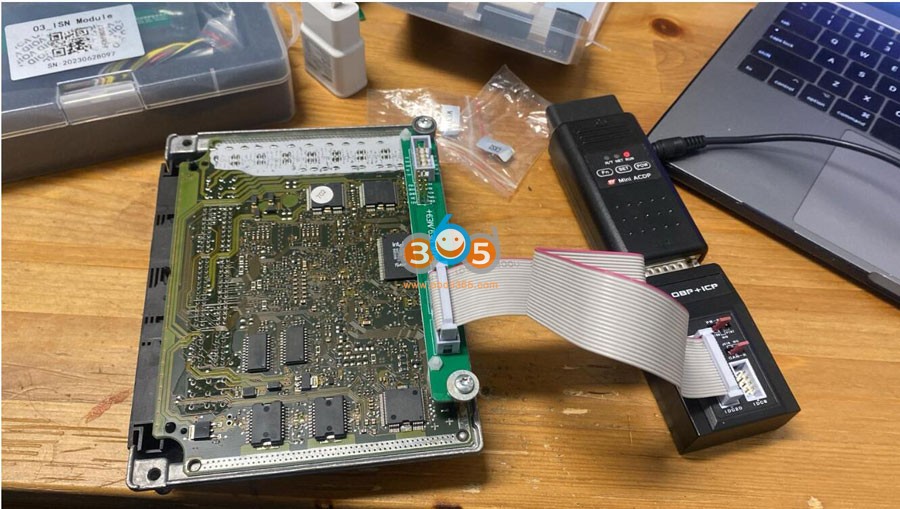
Solution:
Don’t use the interface board to read this DME.
Connection DME like this using the PCAN cable in module 3.


www.obdii365.com
How to Choose Among Londsor Autel OBDSTAR, Zed Full etc
There comes an unbiased review of some popular key programming tools by a real UK locksmith who has 10-year working experience.
When this device came out a few years ago it was popular in Asia and USA. However, in recent times there has been more clarity and frequent updates. It’s a good all rounder and excellent value for money. Particularly strong in Toyota, Volvo, Fiat and Chrysler and will handle Ford, PSA, VAG and Renault up until 2015 and has many other brands it will cover. Using the emulators, you can do many Toyota all keys lost via OBD.
Probably the best bang for buck programmer on the market today. A great all-round tool which is known to be strong on Renault, Ford, PSA and Mazda. For a tool of this price to be able to do 2020 Ford Focus and Transit, 2017 Renault lost keys and read a pin from practically any PSA you plug in is unbelievable. Updates are frequent and very much focused on the EU market.
Xtool X100 PAD2 & PAD Elite (PAD3) –
The model range is very confusing as there are many different versions of the same device. The updates are coming thick and fast, 2 years’ worth included from purchase. Really strong on Asian brands, in particular Hyundai, Kia, Honda and Toyota. The recent Ford and Renault updates have been impressive and I expect many more updates over the next few months. The Pad Elite (PAD3) is compatible with the KC501 and can program Mercedes keys very fast, so for the money it’s a good tool. Not quite as refined as some other devices but once you find your way around it’s a solid machine.
Autel IM608 Pro (IM608) –
I have mixed feelings on this device, in some respects I think it’s excellent as it has such a broad coverage and the user interface is great. It has without doubt some of the most powerful diagnostic capabilities available from an all round “scanner” (whether you would use even 20% as a locksmith is debatable). However, if you don’t need high end diagnostic functions, I think it’s a lot of money for a key programmer. As with most devices, there is a heavy reliance on server calculations and this is where Autel suffers. There are so many occasions where the servers are so overloaded that programming cannot be carried out, or takes extremely long.
BossComm KMAX-850 –
This is a new device in the UK that many haven’t seen. Some of you may remember a diagnostic tool many years ago by BossComm, it was a good device in its day and this is from the same developer. For the surprisingly low cost of this tool it is very reliable and has great coverage. I used it on a Ford Focus 2019 spare key as a test and was surprised how well it worked. It is based on the Linux platform and has less reliance on the internet so it’s a good tool as a backup and comes with a pre-coding device. It’ll do VAG, Ford, Fiat, Honda and many more brands quite easily.
Zed-FULL –
Every practising auto locksmith in the country should have heard of the Zed-FULL. For some people it is still the first tool they would plug in, for others it is a last resort. Without doubt it is a powerful device with a huge coverage, very easy to use and a plethora of functions. It is a token-based device and can work out very expensive, in today’s market I think token machines are only worth having if they do something other machines do not. A few years ago, that may have been the case with the Zed-FULL, but certainly not now. The other downside is that on some vehicles you must use an IEA key/remote so your hands are tied.
Smart Pro –
As most users found out the hard way, this device was released prematurely and left a lot of upset customers who had traded in a working device for a device still under development. I think that has changed now, it is much more reliable and has one of the best user interfaces of any of the devices mentioned. It is very good on Ford and can do AKL on Renault Trafic 2015- without bricking the BCM. It has a broad coverage and is easy to use, however it is token based so an expensive tool to use constantly. A good tool for a beginner, but still quite expensive for what it is actually capable of.
CG FC200 Adds Simos 12.x SIM2K240 SIM2K341
CG FC200 ecu programmer software update to V1.1.7.0 on November 23rd, 2023.
V1.1.7.0 NEW
Newly added Volvo Denso ECU
MB279700-9500, MB279700-9801, MB279700-9811
Newly added Audi ECU
Simos8.4x, Simos12.x
Newly added Hyundai ECU/TCU
SIM2K-240_ECU, SIM2K-341 _TCU
Fixed partial problems of ECU cloning failure
MED17.3.1/MED17.7.2/MED17.7.3/MED17.5.5 and general Exx series
Fixed partial problems of general ECU identify failure
E78/E39/E39A/E80, etc.
Newly Added Lovol ECU
EDC17CV43
Newly added BMW ECU
MEVD17.8.4
Newly added PFlash Checksum of ECU
MSV90, SID807EVO, EMS3110, SIM2K-240_ECU, SIM2K-341 _TCU, Simos12.x, Simos8.4
Newly added VIN modification ECU
CPGDSH1.21.6, CPGDSH2.2x.x
Optimized the PFlash verification algorithm of DQ380
Fixed some bugs and optimized software performance

Which Autel Scanner will Diagnose McLaren Vehicles?
Autel is one of the first mainstream tools to cover diagnostic functions for Mclaren.
Autel have released their first initial offering for Mclaren, it is the first release including diagnostic support for 19 models, inluding spider 675LT, 600LT Coupe, Coupe 650s, Spider 540c, GT, GTR, Coupe 625C, etc. Adds diagnostic support for models up to Mclaren 2022 MY. Supports functions for Mclaren Autoscan, Trouble codes, Ecu information, live data and hot functions which include service light reset and parking brake release.
Here is a listing of various Autel diag models. We would want to verify with Autel before purchase as to whether the reset function works!
With the Autel diagnostic connections, it will only improve with updates.
These Autel diagnostic functions are only available on Autel MS908S, MS908S Pro, MS908S II, MS908S Pro II, MK908 II, MK908 Pro II, MaxiSys Elite, Elite II, Elite II Pro, MS909, MS919, Ulta, Ultra Lite models.
**MX808, MK808, 906 series will not do McLaren diagnostic.

Check McLaren vehicle model, and function coverage on https://autel.com/us/vehicle-coverage/

McLaren, Service McLaren V1.00 software update
McLaren
1. It is the first release, supporting the diagnosis of 19 models: Spider 675LT, 600LT Coupe,
Coupe 650S, Spider 540C, GT, GTR, Coupe 625C, etc. Adds diagnostic support for models up to 2022.
2. Supports functions: AutoScan, Trouble codes, ECU information, Live data, and hot functions.Service.McLaren
1. Supports quick access for Service.
Service McLaren
1. Supports quick access for Service…

