

/image%2F1896381%2F20151209%2Fob_cb2b49_obd365-com.png)
OBDSTAR iScan Ducati Update Panigale V2 2020 Streetfighter V2 2022
OBDSTAR iScan Ducati diagnostic scanner released new software V40.10.
Add following models:
1199 Panigale 2012-2014
1199 Panigale R 2012-2014
899 Panigale 2014-2015
1299 Panigale 2015
Panigale R 2015
Multistrada 1200 Pikes Peak Brazil 2013-2015
Multistrada 1200 PS/T Brazil 2013-2015
959 Panigale 2016
1299 Superleggera 2017
1299 Panigale R Final Edition 2018
Panigale V2 2020
Streetfighter V2 2022


Will Autel XP400 Pro Work with OTOFIX IM1 IM2?
Question: Can anyone confirm xp400 pro from Autel im608 working with OTOFIX IM1 or IM2?
Answer:
It autel software but the hardware is just different which is why xp400pro isn’t compatible.
They are not cross-compatible. A few people already had confirmed it.

Working with xp1 pro

Programmer connection error when connecting OTOFIX with XP200

Programmer connection error when connecting OTOFIX with XP400 Pro.
The xp1 works with Autels windows based software.
Although some used IM1 with both xp200 and xp400, need luck. Better don’t use them interchangeably.
Is it Safe to Read SID208 SID209 with KESS3 by OBD
Is it safe obd on Ford/PSA SID208 and SID209 ECU with Alientech KESS3?

Yes, it is safe, Our customers done a lot of Transit and Ranger adblue/dpf/egr etc…no issue.
Kess 3 with battery stabiliser, SID208 or 209 don’t like battery voltage under 12volts when read or write, never had an issue. Need 14 volts power.
Use power supply with a good battery, not only alimentation stabilised. Internal resistor is too high for use with standart alimentation and pic voltage down are not allowed for this ECU.
May need battery reset after flashing.
Feedback:
1. 2020 ranger 3.2 done with kessv3 by OBD.
2. Did a 2016 66 transit custom today and it was a sid208
3. Ford Ranger 3.2 2016 done with kess 3 no problem.


If failed to work by obd so benched it in place, used power supply that came with kess, worked no problems
In boot you will avoid problems just need ECU out.
NOTE:
1.). If reading a Ford SID209 (i.e 2015 ford transit 3.2 diesel) with OBD and said reading preparation failed and now van won’t start.
It just went into boot mode. Disconnect battery and leave it for 10 minutes and it will work again.
2). If reading Sid 208 from PSA more than 1 hour of communication without success.
disable antivirus, turn off the pc, turn it back on, turn off antivirus and it worked.
3).
According to user reports, flex is better on SID209. Flex is great on these sid208/209 , full memory over obd even eeprom (like boot read)
OBDSTAR P003+ and P003 Difference
What is the difference between OBDSTAR P003 and P003+ adapter?

Both adapters are used with OBDSTAR DC706 to read ECM/ECUs.
The P003+ adapter handles up to 4 right inputs, the normal P003 only has two.
It is doubled on the P003+ and P003+ has faster clock frequency than P003.
That’s one of the main differences.
OBDSTAR P003+ is compatible with P003 and supports the following models that require a higher frequency clock during the decryption process (ME9.0, MED9.1, MED9.6.1, ME9.6.1, MED9.5.10, EDC16C39, EDC16CP35, EDC16C8).
If DC706 says the function only supported by P003+ adapter and MP001, you cannot use normal P003.

FYI:
OBDSTAR MP001 handles up to 12 inputs and it has a faster clock frequency than P003/P003+.
Also, the MP001 has other capabilities as well it can also read eeproms and a couple of other things.
Autel IM608 Failed to Read BMW Bosch 32-bit ISN solution
Problem:
Working on a 2012 BMW X5 CAS 3++ISTAP with Autel IM608.
Trying to read 32-digit ISN from BOSCH DME.
I have All the wires connected to the right pins. GBox2 is powered with 12v.
Jbox is connected to Gbox2.
First time around Gbox2 went through an update. Then I was hit with this screen, Any ideas what Can be the issue? Did Update mess up my gbox?


Solution:
Buy GBOX3 adapter. To read ISN from BMW Bosch DMEs, you will need g-box3 instead of Gbox2.
Or use gbox2 but give power to ecu from godiag breakout box or other sources…did i have same problem with my gbox2 dosent give 12v on output, i need to give from godiag bench tester to make it work.
unplugg all wires and 12v sources and try to reconect again, also on autel restart the process from 0. need to use 12v output from godiag.
Report:
Problem solved by gbox3.

Yanhua ACDP Exceed the Server Calculation Limit Solution
How to solve Yanhua Mini ACDP exceeding the server calculation limit problem?
Example 1:
I need to clone an old BMW DME msd87.2 and I bought Yanhua Mini ACDP and Module 27 to do this. Why am I being controlled with limitations?
“device has reached the number of calculations”

Example 2
I’m trying to read isn from BMW Msv80. Acdp said ‘the number of server calculations has exceeded the limit’.

Answer and solution:
The MSD8x MSV80 kind of DME’s need a special server calculation. After a couple times, it shuts you down. Up to 5 times per day.
Do it the next day.
If you are urgent, send the ACDP serial number to ACDP engineer to add 1-2 calculations.
How to Replace BMW Used BDC Module by Yanhua Mini ACDP?
Question:
Could help me program this BDC for BMW F15. The original is completely dead.
I have a used BDC. Is it possible to swap the eeproms?
I have Yanhua mini ACDP and AUTEL IM608pro.


Solution:
You cannot swap eeprom.
This unit contains 2 units. One is BDC containing immobiliser data and Coding data. Other is Gateway containing no Coding but FA table. Mini ACDP niether Autel have no access to Gateway Table. You can adapt immobilizer to the car using AKL procedure but car will remain with hunderd other communication problems. You need Abrites and using BMW online software you need to transfer Gateway table from old BDC to the used one. Or you can do that with ESys but you need to know how.
Do all key lost, and generate an FA from VIN and VO Code the FEM and that’s it.
You need to extract ISN from ECU first.
Follow steps below to replace used BMW FEM/BDC module by Yanhua ACDP:
1. Read isn from dme
2. Unlock bdc,preprocess used fem …be careful not to lose coding with acdp and write isn
3. Make keys AKL and add key using dme isn
4. Change vin and key frequency in FEM edit immo functions
5. Generate FA
6. Flash and code bdc using Esys. install on car and verify VO and coding using esys
Current Key is Not Lonsdor Dedicated JLR Key Solution
Problem:
Lonsdor special JLR key not being recognized as a lonsdor key, Any solution for this? This is the new version of the JLR key currently being sold.


Solution:
Update Lonsdor K518 machine to latest version.
Remove key shell and then put the key into K518 key slot to read key information again.
If still not working, post a video and send it to www.obdii365.com to analyze.
How to Solve OBDSTAR X300 Pro4 ‘Diag Abnormal exit! CODE:-3’?
Problem:
Hi, my OBDSTAR key master 5 (X300 Pro4) cannot do anything its showing error.
‘Diag Abnormal exit! CODE:-3’
How to fix it?

Solution:
1.Restart device.
2.If not working, delete current software and download software again.
Download software requires your device under subscription. If the subscription expires, need to renew and download.
1 year software subscription for key master 5.
Lonsdor K518 Pro Update VAG MLB Add Key Function
Lonsdor K518 Pro and K518ISE series released a super update on Dec. 26th, 2023.
Adds MLB platform key programming for Audi VW Porsche Bently and Lamborghini
Requires to use with KYDZ specific MLB key reading/writing tool.
*K518 will only add key to MLB system. Cannot do all keys lost yet.
.jpg)
Need to generate dealer key with KYDZ MLB tool first, then program key with Lonsdor K518 series programmers.
Original MLB key is recommended (more stable).

Menu path in Lonsdor K518 series:
Immo & Remote->Audi ->MLB ->Add key->Program key

Volkswagen Group MLB platform:
Volkswagen Group markets the strategy under the code name MLB, which stands for Modularer Längsbaukasten, translating from German to “Modular Longitudinal Matrix”. MLB is one strategy within VW’s overall MB (Modulare Baukasten or modular matrix) program which also includes the similar MQB strategy for its vehicles with transverse engine orientation.
The MLB platform includes the Audi A4 B8, A5, A6, A7, A8, the Porsche Macan and others. Cars using these platforms are more expensive to be produced since the engine needs to be engineered below the passenger seats. The MLB platform uses a longitudinal engine. This type of engines is used when the vehicle requires a larger engine and is usually used in rear-wheel vehicles even though some manufacturers like Audi has used it for front-wheel drive systems. Longitudinal engines are mounted down the central line of the car. In terms of driving dynamics there is a more even distribution which makes the car more predictable on the road. This type of engines is usually used for sports cars where the interior space is not that important and the car can take advantage of a more powerful engine. This is the reason why usually more premium cars use it.
The KYDZ MLB tool can generate dealer key for following MLB models:
Audi
A4L 2017-
A5 2017-
A6L 2019-
Q5L 2018-
Q7 2016-
A8 2017-
RS4 2019-
RS5 2019-
RS6 2019-
RS7 2021-
RS Q8 2021-
A4 2016-
A5 2017-
S4 2016-
S5 2017-
A7 2019-
S7 2020-
A8 2018-
A8 ne energy 2021-
S8 2021-
Q7 New Energy 2017-
Porsche
Taycan 2019-
Panamera 2017-
Panamera New Energy 2017-
Cayenne 2018-
Cayenne New Energey 2019-
911 2019-
VW
Touareg 2019-
Lamborghini
Urus 2018-
Bently
Flying Spur 2020-
Flying Spur Hybrid 2022-
Bentayga 2016-
Bentayga Hybrid 2019-
Continental 2016-


CG100 Update VAG MQB D70F35xx Decryption
CG CG100X Programmer software update to V1.3.6.0 on Dec. 24th, 2023.
V1.3.6.0 NEW
(2023.12.24)
1.Added 9 chips to Programer,can read the data of the encrypted state chip, after reading the encrypted data, please contact customer service.
2.Added 25 models to dashboard.
3.Added 1 models to read-write.
4.Added 1 models to Body repair.
Universal programmer adds the following chips to read encrypted data.
D70F3523 decryption
D70F3524 decryption
D70F3525 decryption
D70F3526 decryption
D70F3529 decryption
D70F3532 decryption
D70F3535 decryption
D70F3537 decryption
D70F3558 decryption
The following models are added for dashboard.
Ankai Electric Bus 24C08
Spring breeze 1250 93LC86
Sole Electric car 2018- R5F10DPEJ V3
DongFeng Fengxing Lingzhi M5 EV 2021- 9S12XHY256
DongFeng Fengshen AX7 PLUS 2022- 95160
DongFeng EM19 electric box transport vehicle 24C256
DongFeng Changxing D1L STM32F103VE
DongFeng Fengshen DV3 MB91F53BC
FOTON Oman Galaxy 24C08
Suzuki HaoJue MB96F673A
Geely geometry C 24C08
JAC E5 24C04
JMC HaoWei 24C02
JINPENG Jinpeng Electric car R5F10DPxxx
LonKing Forklift STM8S105S4
Chery Tiggo 8PIus 2020- 24C64
Chery X6HuoChe 2022- 24C16
Roewe W5 93C56
WEICHAI yingzhi G3 24C02
Electrodeless GT150 scooter R5F10xxx
ISUZU ELF 2023- 24C16
Hyundai Elantra 2022- MB91F061BS
Yutong BUS T7 9S12XHY256
YUEJIN Chaoyun 24C04
Sumitomo Digger 93C46
The following models are added for dashboard read-write.
Geely Emgrand GL 2017- D70F3523(read write)
The following models are added for Body repair.
BMW 3 series 9S08AC60 (read write)
Launch X431 IMMO Plus Repair Jaguar XF250 BCM
Launch X431 IMMO Plus and X-prog3 new test report:
JAGUAR XF250 BCM repair is done by IMMO Plus and Xprog3.

X-prog3 will show you wiring diagram.
Connect BCM module with x-prog3 via mcu cable


Repair BCM module successfully.


Where to Download KESS V3 Software?
How-to: register your Alientech Kess V3 (KESS3) ECU & TCU programmer and download software.
Procedure:
1.Visit https://www.alientech-tools.com/
Go to ‘Customer Area‘ tab

2. As a first-time user, you will need to create an Alientech_ID to work with kess v3
Press ‘Register Now‘ , then fill in the Registration by completing ALL blank fields and submitting the form
If have an existing Alientech ID, just login with email and password


3. After you have submitted the Alientech ID form, you will receive an email confirming receipt of your submission. *Check your Inbox (or Junk folder) for an email containing the confirmation.

4. Logging in using your Alientech ID credentials will bring you to the DASHBOARD.

5. On the left menu bar you will find the Download Area under the Useful Links. Go to the download area, download AlientechSuite_setup for Kess3


6. Install AlientechSuite setup until finished


7. One software is installed on your PC, plug in your Kess V3 hardware and launch the AlientechSuite software. It will connect to our servers and check for updates. If any new updates are found they will be installed*
Software is ready to use. Choose protocol and read ECU/TCU via OBD/Bench/Boot.

KESS V3 Module License Price List & ECU List
https://www.obdii365.com/service/register-and-download-kess-v3-software.html
How to Program Toyota 2017-2022 Smart Key with Tango?
Toyota Smart Systems 2018+ key programming manual using original Tango key programmer.
I. Supported Smart System types
In current Tango software version, dozens of Toyota/Lexus locked Smart ECUs (2017-2022) are supported for “All Keys Lost”. These span between 2017-2022 and apply to Toyota/Lexus DST AES
smart systems using Page 1 A8, A9 & AA keys. Coverage of vehicle models like, but not limited to, Camry, CH-R, Land Cruiser, Lexus ES, LX570, Prius, RAV4, RH450, RX350, etc.
All functions of Tango+ Toyota are performed directly through the OBD port of the vehicle via J2534 PassThru, without need for physical access to separate ECUs or additional wiring.
Requirements
• Tango programmer
• J2534 compliant PassThru OBD Adapter
• SLK-03/03E/04/04E/07 emulator
• Toyota maker*
• SLK-03/04/07 maker*
• Corresponding additional activation for the paid models (CHR, Prius, subscription, etc…)
* Functionality is included in Tango annual subscription.
SLK Emulators

II. Procedure
How To make a Smart Key
Briefly explained the goal of this software is to create a “dummy key” and get permission by the vehicle to register new Smart Keys in All Keys Lost situation.
The learning procedure consists of the two steps:
• Make the dummy key (emulator)
• Register new SmartKey(s)
Operating Procedure
1. Connect the J2534 Pass Thru adapter directly to the vehicle’s OBD port and to a PC
2. Connect Tango to the PC
3. Run the Tango+ Toyota.exe (double click on the icon, or start from Tango main software)
4. Click the Connect to Car button
5. Press Read Data from Car
6. Select Key position (KEY No: KEY1/KEY2/etc..)
7. Place the SLK-0x Emulator in Tango coil (make sure it has a battery)
8. Press Write Emulator
9. Once emulator is written it can be used to authorize the standard diagnostic procedure for
Key addition Tango+ Toyota-> Connect to Vehicle->Learn Key.
III. Additional functions
After connection to vehicle with Tango+ Toyota through the OBD plug, the following additional functions are available:
• Key Learn (including online types)*
• Erase Keys(including online types)*
• Register ID code & ESL

* For online models read data from a Smart Box using TangoPlus is required.
IV. Appendix
Alternative Connection diagrams
As of Tango+ Toyota update ver. 9.0 (October 2022) connection to vehicle is done directly through the OBD port of the vehicle. The following connection methods, remain alternative, particularly if on hand is only the Smart ECU and work on bench is needed.
1. Connection on bench for A9/AA Smart ECUs

2. Pinout of A8 Smart ECUs
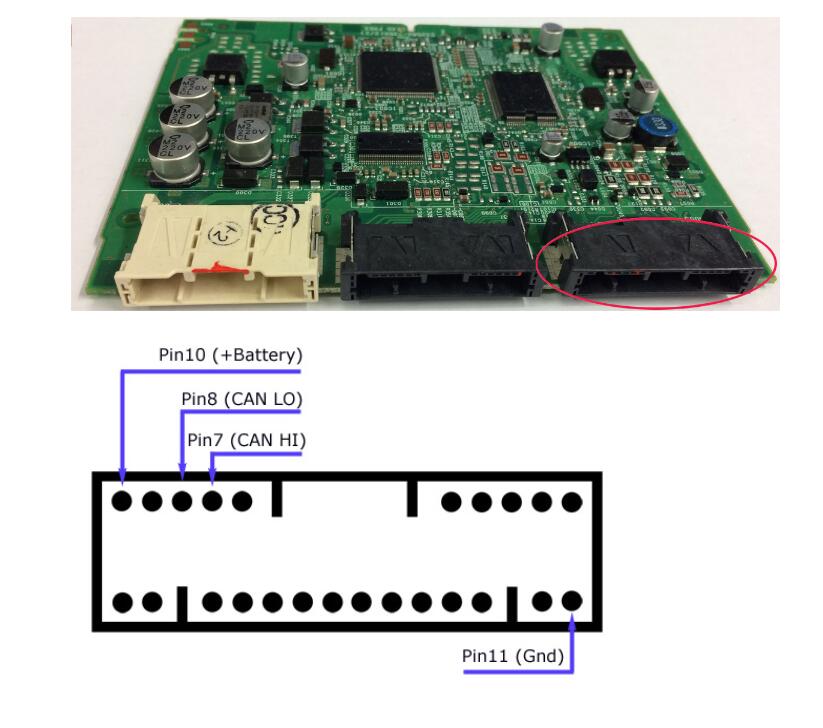
http://www.key-programmer.org/2023/12/20/program-2018-toyota-smart-keys-with-tango/
How to Fix Autel 2022 Toyota Tacoma Remote Not Working
Problem:
In a pinch 2022 Toyota Tacoma push to start using Oem keys not the new system. Program new key using Autel IM508 now both keys don’t work remotes but proximity works any ideas ??
hyq14fbb it’s Oem and it’s the right key. I can make the car beep during testing in one of autel’s function.
Or solutions I unhooked battery I don’t see a sync like the new ones if they lose remote functions.


Solution:
That’s not the correct sync that’s for a keyless entry remote. ECU learning to sync the remote.
Menu path:
-Control unit
-Keyless system
-Ecu synchronization
-Synchronize ID authentication box and steering lock
-Need to do it for each key (did a 22 GX460)
Sometimes only need to do it once. Not for each key. They will both work once done. In future, leave ignition on while programming and most of the time it won’t kick the remotes.
