

/image%2F1896381%2F20151209%2Fob_cb2b49_obd365-com.png)
Xtool AnyToyo SK1 Adds 2019+ Toyota 8A-BA Proximity
Xtool tech released new grand update- new functions for Xtool AnyToyo SK1.
XTOOL Key Programmers support:
• OBD key programming (add key/all keys lost) for 2018+ Toyota/Lexus models with 8A-82/8A-85 smart (proximity) keys
• Password calculation & key programming for 2019+ Toyota models with new 8A smart keys(8A-BA) and other models (8A-88/4A)
• More intuitive process for newer Toyota key programming, avoiding failure coming from wrong operations
Xtool AnyToyo Advantages:
• All keys (including original) are accepted in the programming process.
• Not modifying the data from the vehicle – after programming, the vehicle will still be accepted by original repairing shops and dealerships
• Free password calculation if you have the XTOOL smart key


OBDSTAR Adds Ducati Motorcycle Diagnostic till 2022
OBDSTAR IScan DUCATI motorcycle released new software version V31.50.
The entire vehicle series is supported until October 2022.
Highlights Added
• A/F self-adaptive reset
• ABS setting in EOL mode
• ANNUAL SERVICE
• Annual service warning light deactivation
• Anti-theft enabling/disabling
• Bat. volt, history display
• Bat. volt, history reset
• Bluetooth enabling/disabling
• DESMO service light reset
• DQS adaptive reset
• DRL Daytime Running Light enabling/disabling
• Enable/disable DQS
• Exhaust valve calibration
• Exhaust valve system maintenance
• Fuel level value reset
• GPS enabling/disabling
• Heated grips enabling/disabling
• Idle control adaptive reset
• Idle speed engine operation mode
• Key reset
• Knock sensor adaptive reset
• Odometer writing (totalizer)
• OIL SERVICE
• OIL service light reset
• PIN code reset
• Reset gears
• Reset the adaptive values of the throttles in a completely closed position
• Reset the debug packages
• Reset the transmission adaptive values
• Reset self-adaptive A/F parameters
• Storing keys
• Suspension rotary sensor calibration (rear)
• Throttle balancing
• TPMS code writing
• TPMS Registration
• TPS adaptive reset
• VALVE CHECK
• Variation of the current date in the dashboard
• Variation of the current time in the dashboard
• Variation of the next annual service date
• Vehicle statistical data reset
• Version set in the BBS

Program Subaru Outback 2022 All Keys Lost
Autel supports all smart keys lost function for some models as of 2022 Subaru Outback and Legacy with the large vertical dash screens.
Here is the user working experience on Outback 2020-2022 all keys lost programming:
1.
I was able to program a key using an Autel IM508 along with an APB112 smart key simulator without replacing any parts. I now have a working key which should allow me to use other functions on the IM508 like removing the old keys.
The process is relatively easy. Using manual selection, pick your manufacturer, model, and year range from the menu. Find the Generate Analog Key option in the Immobilizer section and follow the on-screen steps; as long as it let’s you save the EEPROM data you should be good to proceed. Once that is done, it should direct you to connect the APB112 where it will create a simulated key. If that goes well, you can then use the Add Key prompt to create a new key (do not disconnect the APB112 during that process).
For reference, my vehicle is a 2020 Subaru Outback (NA) with the following part numbers:
SMT: 88801AN000
ESCL: 83126AN00B
2.
Porsche Cayenne BMS Repair by Launch X431 IMMO Plus
Launch X431 tablets supports Porsche Cayenne and Taycan 2018-2022 12V lithium battery repair. X-prog3 programmer is required. It comes in default with Launch X431 IMMO Elite and IMMO Plus.
Here is an instruction to repair BMS on Cayenne with X431 IMMO Plus.
Go to Porsche Immobilizer software->BMS Repair->Cayenne-> 2018-2022


Connect x431 immo plus to G3
View wiring diagram


Remove the battery module, remove the case of the battery.
There is a SPC5644B processor in it that needs to be removed and repaired.
Connect battery module with g3 follow the wiring diagram


Choose Data recovery.
Writing completed. BMS reset is completed.

Which Tool to Correct Toyota CH-R 2018 Odometer?
What’s tool for Toyota CH-R hybrid 2018 odometer correction?

Toyota chr 2018 with rh850
I do it with obdstar, confirmed it is working.
2.Genuine Els27
It can do.
3. Russian s-tool does some.
Audi Hybrid Battery Repair with OBDSTAR P50
Audi Q5, A6, A8 hybrid P1609 crash shut-down problem can be solved by OBDSTAR P50.
Processor:
8R0915591 8R0 915 591
8R0915223 8R0.915.233
Problems:
- Engine don't start.
- Hybrid system is locked.
Battery Energy Control Module (Hybrid Battery Module)
Possible Causes
- Crash Signal activated (i.e. Accident with Airbag Deployment)
Fault Code
- 14806 - Crash Shut-Down Activated
- P1609 00 [039] - -
No need to replace battery. Two solutions.
1.ODIS.
Restart High Voltage system. First you need to remove crash data from the airbag module and then with odis you can disable the protection in the battery.
2. with OBDSTAR P50
OBDSTAR P50 will reset and repair 8R0915591 and 8R0915223 processor on bench.

Xtool AnyToyo SK1 Emulator FAQ
Xtool released a Xtool AnyToyo SK1 adapter to bypass 2013-2022 Toyta/Lexus 8A and 4A smart key pin code.
What is Xtool AnyToyo SK1 Emulator?
XTool AnyToyo SK1 is a data collector as well as a smart key emulator, allows you to do key cloning process in both add key / all keys lost situations for 2013+ Toyota models with smart key. AnyToyo SK1 can also do emergency start when there is no key available on your hand and generate new keys using AnyToyo smart key that comes with the set.

What is the difference between xtool anytoyo and other bypass solution (Autel OBDSTAR Lonsdor)?
- Protect data in smart box, still support OEM key programming after copy keys.
- OEM-level key chip with excellent compatibility

With this can I add key instead of all keys lost?
AnyToyo SK1 can do both add key and all key lost.
Can i use the ks01 instead of the AnyToyo SK1 data collector? Would this replace the xtool ks1 emulator?
No, it’s not a replacement. AnyToyoSK1 is an upgrade version.
What xtool tablets can i use with Xtool AnyToyo?
XTool AnyToyo SK1 you need works with
Xtool Key Programming Device: Must support KC100 / KC501.
Compatible with XTOOL Scanner+KC100/KC501:
For XTOOL D8, D8 BT, D9 PRO, D9 EV, A80 PRO Master, PS90, X100 PAD2, X100 PAD3, Inplus IP616, IP819, IK618, X100 MAX, Turbo Gscan2, etc.
Xtool AnyToyo SK1 supports following models
8A-82
2013 – 2018 Toyota Avalon
2012 – 2017 Toyota Camry
2012 – 2017 Toyota Camry Hybrid
2014 – 2019 Toyota Corolla
2013 – 2018 Toyota RAV4
2012 – 2019 Toyota Prius C
2016 – 2017 Toyota Prius V
2016 – 2018 Toyota RAV4 HV
2018 + Toyota Crown
2016 – 2019 Toyota MIRAI
2017 – 2019 Toyota Highlander
2016 – 2018 Toyota Land Cruiser
2012 – 2015 Toyota Prius C
2019 – 2021 Toyota Sequoia
2015 – 2021 Toyota Tacoma
2019 – 2021 Toyota Tundra
2020 – 2021 Toyota 4Runner
2013 – 2018 Lexus ES300h
2013 – 2017 Lexus ES350
2013 – 2020 Lexus GS350
2013 – 2016 Lexus GS450H
2016 – 2018 Lexus GS-F
2019 Lexus NX300
2015 – 2019 Lexus NX300H
2015 – 2019 Lexus NX200T
Late 2016 – 2019 Lexus LX570
2014 – 2019 Lexus RCF
2014 – 2016 Lexus IS250
2014 – 2018 Lexus IS350
2015 – 2016 Lexus RC350
2016 – 2017 Lexus IS200T
2017 – 2017 Lexus IS200
2013 – 2018 Lexus ES300h
8A-85
2017 + Toyota Alphard
2017 + Toyota Vellfire
2019 – 2020 Toyota RAV4 (US production)
2016 – 2021 Toyota Prius
2018 – 2020 Toyota Camry (US Production)
2018 + Toyota CH-R
2020 – 2021 Toyota Land Cruiser
2018 + Lexus RX
8A-88
2019 + Toyota Avalon
2018 + Toyota Camry
2018 + Toyota C-HR
2018 + Toyota Izoa
2019 + Toyota Crown Kluger
2019 + Toyota Hiace
2019 + Toyota Highlander
2019 + Toyota Kluger
2021 Toyota Mirai
2018 + Toyota Prius
2019 + Toyota RAV4
2019 + Toyota Wildlander
2021 Lexus ES250
2019 – 2020 Lexus ES300h
2019 – 2020 Lexus ES350
2019 – 2020 Lexus ES350h
2018 – 2020 Lexus LS500
2018 – 2020 Lexus LS500h
2019 – 2022 Lexus UX200
2019 – 2022 Lexus UX250h
2021 – 2022 Lexus GX460
2018 + Lexus GS
4A
2019 + Toyota Corolla
2019 + Toyota Corolla Touring
2019 + Toyota Corolla Sport
2019 + Toyota Corolla Cross
2019 + Toyota Corolla Altis
2019 + Toyota Levin
2019 + Toyota Auris
2019 + Toyota Allion
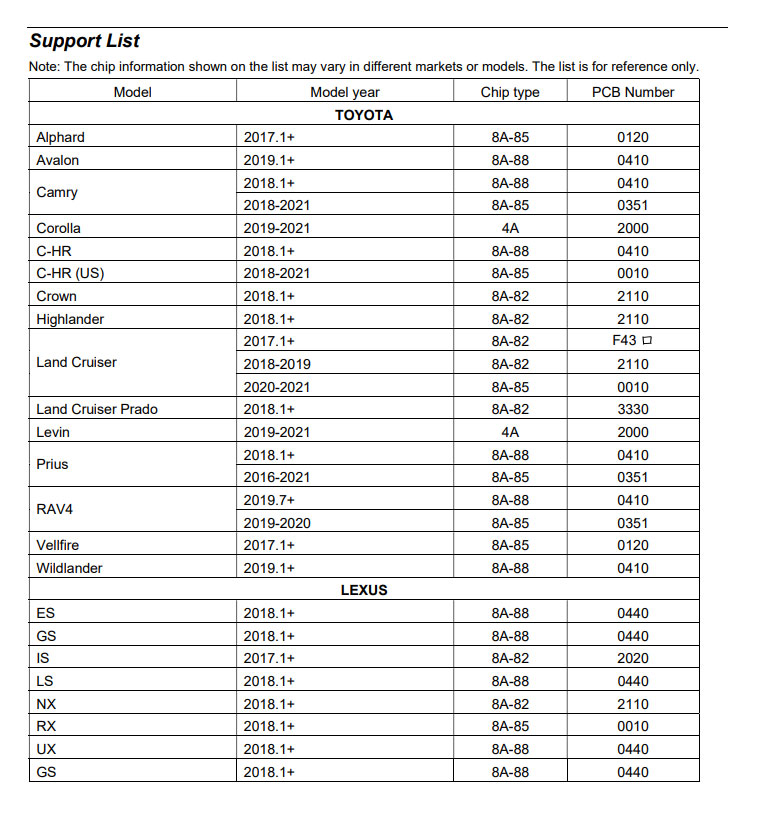
How to use AnyToyo SK1 emulator?

How to program Toyota smart key using xtool tablet and AnyToyo?
Here is a video demo guide
https://youtu.be/JXGF5iQ34DY
Autel IM508 AutoProPad Pros and Cons
Thoughts on the AutoProPad Basic (APP)? Worth the $1K for an American/Asian daily programmer or is money better spent on a Autel IM508 with XP400Pro ?
.jpg)
First comes some unbiased reviews of both devices:
1. Autel can help get his foot in to European with other autel accessories. The APP basic has no European support.
2. I love my AutoPro Pad basic for certain vehicles especially ford. The ford 10 minute AKL bypass is a good feature. It does many Fords nicely (no 10 min wait), and many other cars. also no internet required for the APP. No internet to do dodges on the APP. Just wish there was a chevy 12 min bypass.
3. Km100 will give him similar functionality to Im508 without the ongoing subscription. Autel is weak on Honda but his topdon will cover that. the km100 would’ve been good as a first programmer as it can tackle most USA domestic vehicle.
4. I love Autel IM508. It can bypass the rolling code on new Toyota, AKL on a Hilux bladed through GBox and add key directly on Golf V without a working original, plus can generate Autel Prox and chips on the super chip in a pinch.
5. The IM508 newest system update removed the need for hotspot connection to do all cars. My IM508 is my main programmer and it hasn’t let me down.
6. The Autel KM100 would be a good choice, being very similar in immo to the 508, but relatively cheap, and also good for doing autel universal fobs, which can contribute to a versatile inventory for cheap. The 608 will be able to do this, yes… But switching systems on it is a little clunky and tedious, so generating on the km100 and then programming on the 608 is faster and more convenient, so it’s still worth having around.
7. My first programmer was the APP full version. Bought the IM508 later. Each has its own benefits, but the 508 does more.
8. We have both. AutoPad can do new gms but I’d take im508 over it everyday of the week.
9. Then AutoProPad for it’s ease of use. And APP basic is non subscription, no tokens – no Internet so that will get scooped up while they still offer it.
10. I Started with a ProPad Basic ( affordable covers a good amount of vehicles ) but I picked up the skills very quick 2 months in I needed something more advanced then I purchased IM508 with XP400 Pro ( I got a good deal.)
11. Autel IM508 to start then upgrade it with the following items Gbox2, apb112, xp400 pro programmer. You get a kick ass set that maybe costs $1500. You will be able to 95% of keys.
In sum:
Use both, a great team. You’re going to need more than 1 programmer to fill gaps in coverage.
AuoPropad Pros:
No network
No subscription, no token
Fast
Will bypass new Fords with active alarm
Autel IM508 Pros:
large coverage than APP
Generate autel universal keys
bypass Toyota proximity pin code
slower than APP
AutoPropad works without network, it is faster and covers new Fords. Autel does more, it will bypass new Toyotas, it can generate autel universal keys but it is slower.
CGDI CG100X Adds MQB D70F3525 Mileage Reset
CGDI CG100X Programmer software update to V1.1.6.0.
V1.1.6.0 NEW
(2023.06.18)
1.Volkswagen MQB added “D70F3525+95320” meter adjustment models
2.Added 10 chips to Programmer.
3.Added 31 models to airbag.
4.Added 5 models to read-write.
The following chips are added for Programer.
D70F3556
D70F3550-5 lines
D70F3551-5 lines
D70F3552-5 lines
D70F3553-5 lines
D70F3554-5 lines
D70F3555-5 lines
D70F3556-5 lines
D70F3557-5 lines
D70F3559-5 lines
The following models are added for airbag.
BAIC A512C00112(E00098305) R7F701A033
Benz A166 900 20 3 95128
Honda 77960-3K0-P810-M1 TC234-24F
Honda 77960-T81-H220-M4 SPC56AP54
BYD AUTO SCEA-3658100F(SEC30) Step One95640
BYD AUTO SCEA-3658100F(SEC30) Step TwoSPC560P50L3
MAXUS C00100169 95320(H320)
MAXUS C00224537 95320(H320)
Toyota 89170-42D40 R7F701A223
Toyota 89170-F4560 R7F701A223
FuDi 36581000K8AA SPC560P40L1
FuDi 36581000K8AB SPC560P40L1
Ford HP5T-14B321-AE R7F701A033
Ford GV4T-14B321-DE 95640
Ford JD8T-14B321-CE R7F701A033
Ford MR3T-14B321-EA XC2336A-72F
Ford FL1T-14B321-AC XC2361A-56F
Redflag 3607115-E16 R7F7010093
Geely 6600003684 643572100 XC2336A-72F
Geely 1304285 635665100 XC2366B-40F
Geely 641533200 95320(H320)
Geely 641604100 95320(H320)
Geely 645937000 95320(H320)
Geely 11300244 R7F7010093
JAC 5824901U7105 95160(H160)
JAC 5824901V5002 R7F701A033
JAC 5824901V5003 R7F701A033
JMC MS1-14B056-AB 95320(H320)
Hyundai 95910-DQ000 95512
Chevrolet 13529157 SPC56AP54
Citroen 9851129380 TC222-16F
The following models are added for dashboard read-write.
Peugeot 9850073680 XC2336B-40F(read writer)
Toyota 89170-50L53 R7F701A223(read writer)
Cadillac 25832109 95160(read writer)
Nissan 98820-6XJ0A TC222-16F(read writer)
ChangAn 3658100-CD21 TC224-16F(read writer)
BMW ICOM Firmware File 1.49 Free Download
Super ICOM Pro N3+ BMW diagnosic tool firmware can be updated online. Firmware upgrade procedure is the same as the original ICOM or high quality ICOM clones.
Preparation:
1.Open ITool Radar tool on desktop and check your current icom firmware version, it is v147


2. Free download latest icom firmware update files- bootimage and applicationimage (149 June 2023 version)

Firmware Update procedure:
1. Connect the Super ICOM Pro N3 to a computer with USB cable and power on ICOM with a 12V power adapter

2. Open the IE browser http://169.254.92.38:60080/, input user name: boot and password: NZY11502 (capital letters)

3. Click “update firmware” and you will see the version information of ICOM firmware


4. Select icom-bootimage bin file, set the image type to system and click “send the file”


5. When it says “write the image file to the flash”, click Yes and the Super ICOM light will turn red

6. When it prompts “the system image update was successful”, click “update firmware”

7. Select icom-applicationimage bin, set the image type to application, and click “send the file“, the file will take a few minutes


8. When it says “write the image file to the flash”, click Yes and the ICOM light will turn red again

9. Firmware update completed. Click “reboot”

10. Check current firmware version


Done.
https://www.obdii365.com/service/super-icom-pro-n3-firmware-update.html
Super ICOM Pro N3+ USB and WiFi Connection Guide
Super ICOM Pro N3+ diagnostic tool supports USB and WiFi connection.


GMC Canyon 2011 is Toy43R or ID49 Key?
Car model: GMC Canyon 2011/2012
Canadian market car.
keydirect and UHS showed it is a Toy43R key with Subaru G chip/ But another side showed it is a ID49 chip.
I don’t know who is right. Which will help me in all keys lost situations.
There are in fact id49. I just cloned the chip using vvdi super chip.
Fastest option. Regular GM add a key doesn’t work for this car. Adding a key through programmer need to wait for 12 min.
Interesting is xhorse mini keytool can’t point out chip type but keydiy kd-x2 can tell it was 48.
Hope it helps.

Honda HDS 3.015.012 Download Free
[June 2023] New version Honda HDS (Honda Diagnostic System) software version 3.105.012 download free, no password.
The i-HDS software is full of functions and features all while giving the user a layout somewhat familiar to the legacy HDS software. i-HDS supports vehicle models starting from the 2017 model year, for all Full Model Changes and new models.
Honda HDS 3.015.012 + iHDS +J2534 ECU Rewrite [2023.06]
Version
HDS 3.015.033
iHDS
J2534 Rewrite
Immobilizer Setup Tool

Language: English
Year/Release Date: 06.2023
Operating system: Windows 7, Windows 8, Windows 10
Support diagnostic interface: vxdiag vcx se series, vcx plus/vcx doip series, godiag j2534 etc
Honda HIM double board has not been tested.
i-HDS support J2534 passthru devices, Other devices are free to test by your side.
How to Install Honda HDS 3.105 software?
1. Install HDS setup
2. Install iHDS setup
3. Install J2534 Rewrite setup
4. Install ImmobilizerSetup Tool
5. Install device driver (install vx manager if using vxdiag scanners)
6. Run iHDS
Will Autel IM608 Program VVDI Super Chips?
Question: I would like to know if Autel IM608, IM508 and km100 can program xhorse super chips?

Here is the clue.
It can program key but can’t generate. so you have to generate the key on xhorse tool.
They need to need generated as the proper chip type with a vvdi device first, then yes, you can program them with a different programmer. May work on some random id46 stuff as they are id46 as default.
I used super chip to successfully generate a dealer key for a 4th gen audi, but it has to be set to the correct transponder type first, in this case it was id8E, but of course it will vary from brand to brand. It’s a great idea to keep some oem transponders because it can fail.
CG100X Adds Volvo Lithium Battery CAN Repair
CGDI CG100X software update to V1.1.5.0 on June 10th, 2023.
V1.1.5.0 (2023.06.10)
1.Added Volvo lithium battery CAN repair internal test model to BCM.
2.Added 26 models to dashboard.
3.Added 2 models to airbag.
4.Added 9 models to read-write.
The following models are added for dashboard.
Honda X-NV 2020- MB91F060BS
DongFeng Jingyi X5 2020- 24C02
DongFeng 360 2015- 9S12HA32
DongFeng Fengguang 370 2016- 24C04(4G04)3plates and 2 needles
DongFeng ruiqi EV 2019- 24C04
FOTON Family 2017- 9S12XHZ512
FOTON MP-X 2017- 24C08(ATMLHXXX08)
FOTON Rowor little Diamond 2020- 24C16(4G16)
FOTON Times lead5 2021- 24C08(ATMLHXXX08)
FOTON Times lead6 2020- 24C08(ATMLHXXX08)
FOTON XiangLing V3 2021- 24C16(4G16)
guojin Automobile junbxing 2022- 24C16
HEIBAO AUTO pantherQ3 2015- 24C04
JAC I5 2021- 24C04
JAC newKangling 2021- 24C04
JAC Sunray 2019- 24C08(ATMLHXXX08)
JMC shunda 2019- R5F10DSKL(small screen(Dashboard)s)
LINCOLN DaLu 2017- 24C32
Chery Tiggo 5X 2021- 24C16
Hyundai Hongtu300 2020- 9S12XHY128
YAMAHA MT-09 2019- 93C86
FAW Jiefang Dragon VH 2018- 24C04
FAW Jiefang Dragon VH 2020- 24C16
Iveco DeYi 2016- 25040(25LC04)
CNHTC WANGPAI W1 2018- 24C04(4G04)
Zongshen Electric four wheel 9S12ZVH128
The following models are added for airbag.
Honda 77960-THA-H120-M2 R7F701A223
Toyota 89170-78270 R5F61797
The following models are added for dashboard read-write.
BYD AUTO Qin EV 2022- 24C16(read write)
Iveco Ousheng 2018- 25160(Dashboard)+95640(BCM)(read write)
ChangAn EADO PLUS 2021- 24C16(read write)
Toyota 89170-BZ390 95640(read write)
FOTON J38580738 R7F701008(read write)
FOTON J38580738(P1360010011A0) R7F701009(read write)
Chrysler 68068 616AD 95128(read write)
Roewe 10836975-01 R7F701009(read write)
MAXUS C00215300 A2C18993700 R7F701009(read write)
