

/image%2F1896381%2F20151209%2Fob_cb2b49_obd365-com.png)
How to Reset Audi Q7 2018 Airbag with OBDSTAR P50?
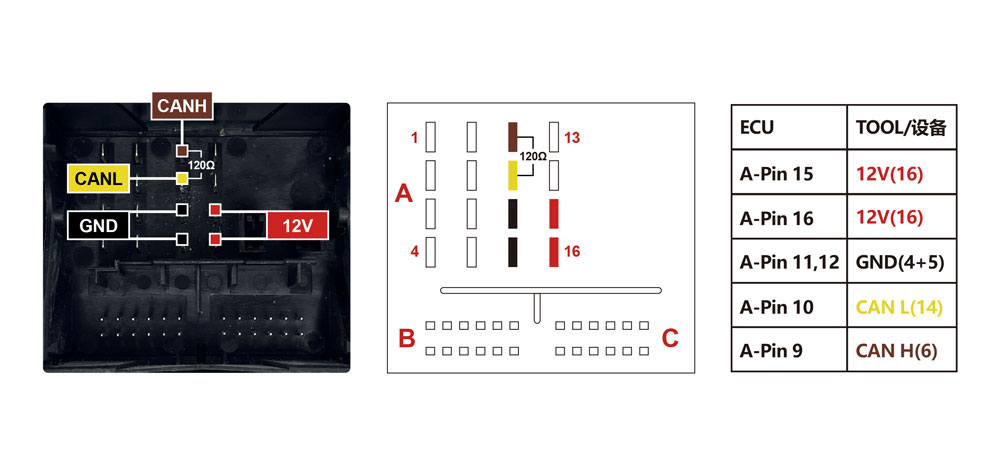
I have successfully reset Audi Q7 2018 airbag using obdstar p50 airbag reset tool on bench.


Here is the bench pinout

Works perfectly.


Free Download Subaru SM4 2019.07 Full
Free Download Subaru Select Monitor SSM4 2019.07 Full diagnostic software
Password: carspecssm2019
Compatible devices: vxdiag subaru, openport 2.0 and other j2534 adapter. Test by your side.
Change the date to 2019.07 before installation and select the region after installation. then there is the possibility of change.

How to Add Land Cruiser 2023 8A Smart Key by OBDSTAR X300 DP Plus
We have an original working remote key and we need to add a spare 8A Texas Crypto 128-bits smart key (original key) to a Land Cruiser 2023 using OBDSTAR X300 DP plus.

Go to Immobilizer-> Toyota Lexus Scion->Latest software version->Manual Sselect system->Proximity->Type 8 (CAN)


Read key numbers, there are 2 keys already. We are going to make 3rd key.

Select Add key function

The function requires network connection
Turn on ignition switch with working key.

x300 dp plus asks for 12-digit security code.
You can get the code from 3rd party. Here we have the security code, you can also try to backup immo data via obd, if failed, use the security code.


Place a programmed key close to Start button

Program key completed.
Test the remote.


*OBDSTAR will add key and program all keys lost on Land Cruiser 2022-2023 if page is 8A-AA or 8A-A9. It cannot do 8A-BA.
How to Conect X-prog3 with Launch X431 IMMO Tablets
Here is the instruction on connecting Launch X431 IMMO series tablets (IMMO PAD/IMMO PRO/IMMO PLUS/IMMO Elite) with DBScar and X-prog3 immobilizer programmer.
*DBScar & x-prog3 are included in the immo tablet package.

Connect DBScar VCI with main cable

Connect DBScar VCI with X431 IMMO tablet via USB cable

Connect DBScar VII with X-prog 3 with the extension cable ( the cable with the port to connect the power )

if have MCU V3 cable, connect MCU adapter via DB26 diagnostic connector of X-PROG3

Connect power cable. The power cable needs to connect X-PROG 3 well ( use the cable in Step 3, if you connect MCU-V3 board , just connect MCU-V3 board directly ) , then connect the Bench model Cable connect to X-prog 3 or MCU-V3


How to Register OBDSTAR iScan Scanners?
OBDSTAR iScan motorcycle and marine diagnostic scanner has no software when you receive the device. Users have to register device and download software to use it.
Check registration and update instructions. The procedure can be applied to all iScan series tablets.
Power on machine
Go to Personal Center
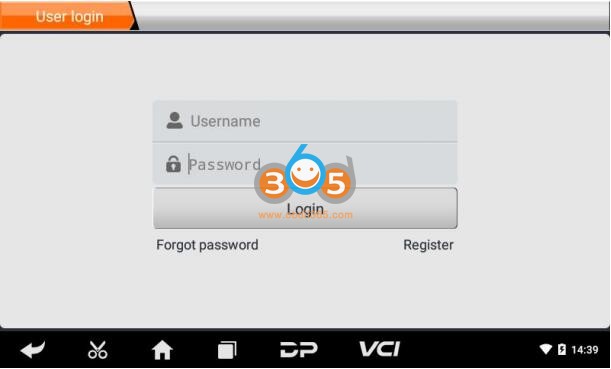
Click "Register"
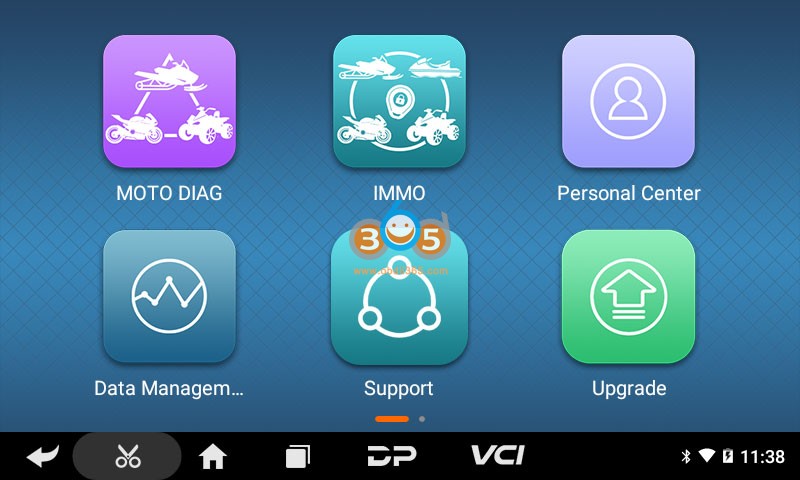
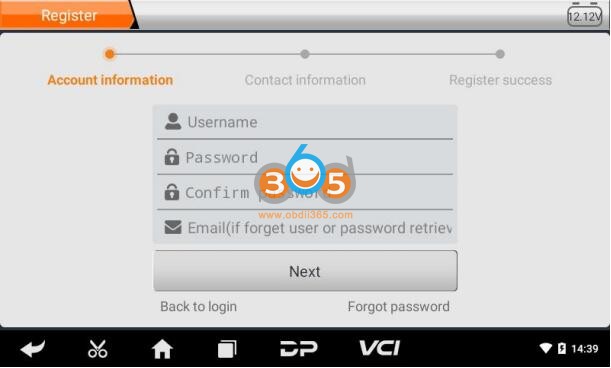
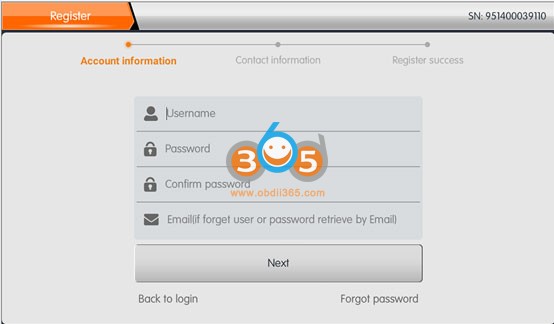
Register an account with user name, password, email and other contact information
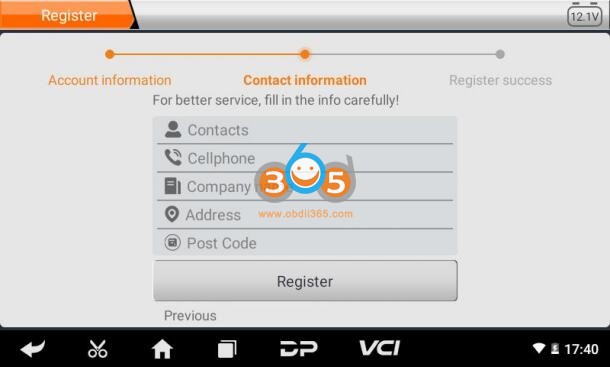
Fill in the information in each field. After that, the registration is successful, click “Login now!”
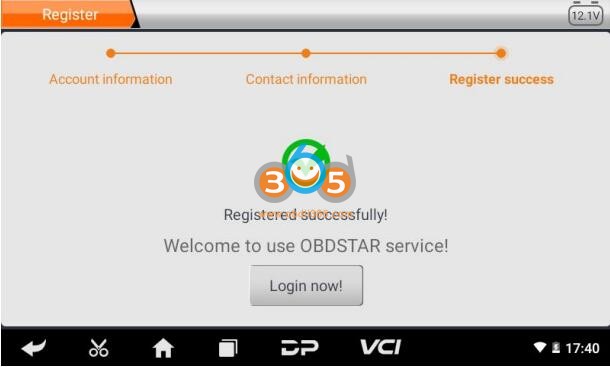
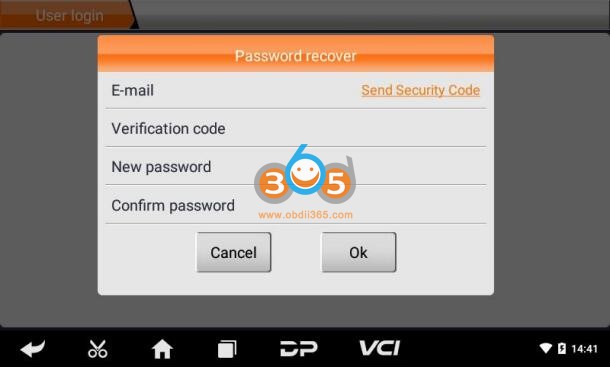
If you have registered to be a member, click “User login” to enter user login page, as following picture shown:
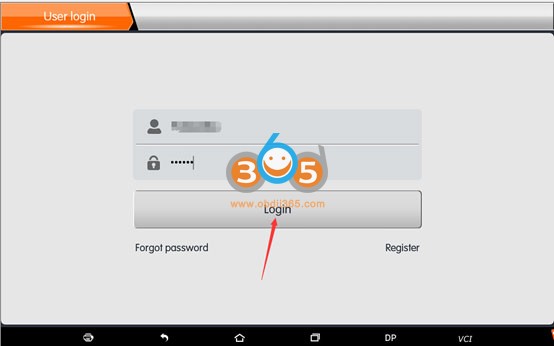
After the registration is completed, fill in the account number and password and click login.
Display personal basic information and modify information and password.
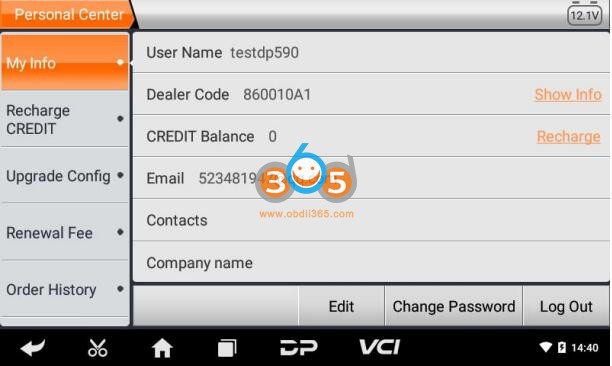
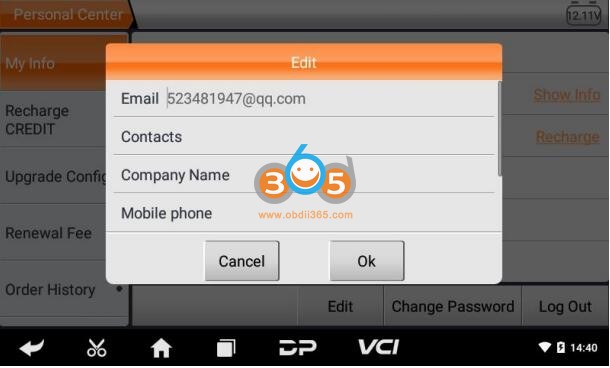
Modify information
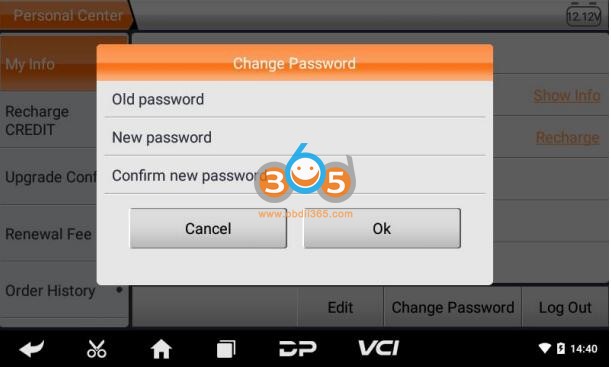
Change password
Recover password
Click on the forgotten password in the login interface to enter the password recover interface, fill in the relevant information to recover the password.
After login account, you can download and update iscan software.
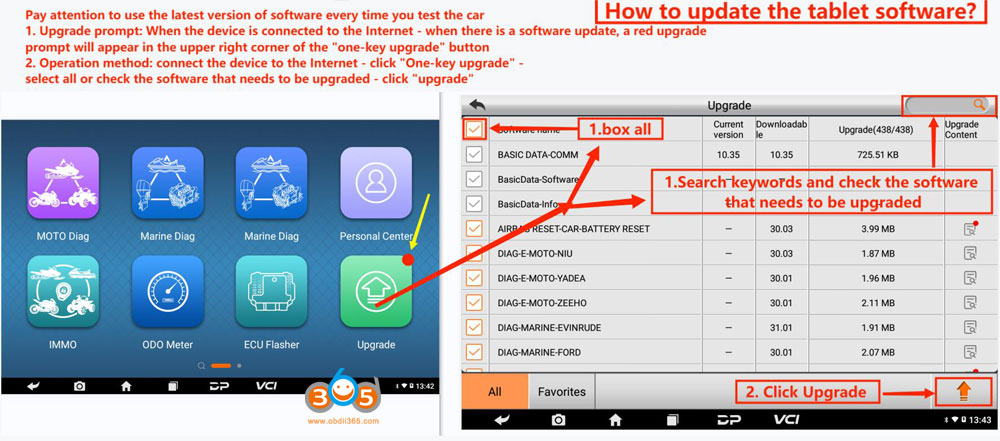
More details, check OBDSTAR iScan user manual on the webpage.
How to Transfer Data from OBDSTAR DC706 or P50 to PC?
Here is the instruction for importing/exporting data file from OBDSTAR DC706 or P50 airbag reset tablet to PC.
Insert a USB Disk into the USB port of the DC706 tablet.
Go to Data Management->My Data->Local Data


Tick files you need to transfer
Long press files you need to transfer and press Copy

Paste Files to USB Disk.

If the device says copy successfully, remove USB disk after 10 seconds.
Honda iHDS ECU Package 07.2021 Free Download
Free download Honda Diagnostics Reprogramming IHDS-ECU Package 07.2021.
Honda HDS 3.104.026+ iHDS 1.006 + J2534 Rewrite
Software:
Installer 1.006.023
i-HDS software 1.006.029
HDS software:3.104.026
Immobilizer Setup Tool 1.3.12
J2534Reprogramming DBVersion 04/15/2021
Multi-language
OS Support: Windows 7 SP1/8/10 (x64 bit)
Compatible VCI: DST-i, GNA600, VXDIAG Honda, Honda HDS HIM double-board, SM2 Pro USB
Software display:


SVCI J2534 Ford IDS Unregistered Software Error Solution
STIC has discontinued the SVCI-FVDI device and stopped updating it from the Ford-Mazda IDS V125 version.
But when you use Ford IDS V125 with Patch "SVCI J2534 for Ford". You will have "Unregistered software. Expired date 2019.7.12” Error.

* Solution 1:
- Change date "2 or more" month ago from now. "SVCI J2534 for Ford" will work.


* Solution 2:
- If you want use STIC - SVCI - FVDI with Ford IDS, Mazda IDS lastest version. Choose software from OBDII365.com We can support you solve this.
How to Activate Toyolex 3 with Keygen?
ToyoLex 3 software, supports binary files of all 3 generations of Toyota and Lexus Denso Engine Control Units on the market, gasoline, diesel, and hybrid engines.
Here we share ToyoLex3 software for free.

Free resource. Free to test by your side. You are at your risk.
Free download Toyolex 3 with keygen
password: windforce1977
Disable anti-virus program before downloading.
How to use:
1 – open toyolexMek then close and open toyolex copy hardware id and name
2 – open keygen fill hardware id + name keep click ok untill you see the key and done

We do have Toyolex3 with Keygen safe resource with activation, $60 per PC locked.
If interested contact
WHATSAPP:+86 18150118226
Skype:OBDII365.com
Email:Sales@obdii365.com
Features:
– New algorithm that recognizes Generation 3 DTC tables structure embedded in Denso Generation 2 files.
– Added a new algorithm that allows DTC erase function on Hybrid engine vehicles.
– Adblue / SCR System disable function.
– DieselParticulate Filter [DPF] disable the function for all Denso Generations ECUs.
– Vehicle speed limiter [Vmax] correction function for 1GD-FTV, 2GD-FTV, 1KD-FTV, and 2KD-FTV Diesel engines.
– Catalyst System [CAT – Lambda sensor] disable the function for 1GD-FTV and 2GD-FTV diesel engines.
– Catalyst System [CAT – Lambda sensor] disable the function for all gasoline engines.
– Exhaust Gas Recirculation [EGR] disable function.
– Intake Manifold Valve [IMV] disable function.
– Intake Manifold Runner [IMR] disable function.
– Immobilizer disable function [IMMO OFF] on 1KD-FTV, 2KD-FTV, 1GD-FTV and 2GD-FTV with Denso GEN 2 ECUs.
ToyoLex 3 supports binary files from the following flashing tools:
– KTAG.
– New Trasdata.
– New Genius.
– Kess.
– BitBox.
– VF 2 Flasher.
– Flex by Magic MotorSport.
– ECUF Flasher by Alex.
– PCM Flasher.
– Toyota Lexus ECU Flasher‘
ToyoLex 3 FAQs
Q: What generations of Denso ECUs does ToyoLex 3 support?
A: ToyoLex 3 supports binary files of all 3 generations of Toyota and Lexus Denso Engine Control Units on the market, gasoline, diesel and hybrid engines.
Q: Which flash tools support files from?
A: ToyoLex 3 supports binary files from the following flashing tools:
– KTAG.
– New Trasdata.
– New Genius.
– Kess v2.
– BitBox.
– VF 2 Flasher.
– Flex by Magic MotorSport.
– ECUF Flasher by Alex.
– PCM Flasher.
– Toyota Lexus ECU Flasher.
Q: ToyoLex 3 works with a physical interface?
A: ToyoLex 3 is an application whose function is to automatically edit binary files from ECUs, therefore it does not require any interface.
Q: Does ToyoLex 3 support .CUW calibration files?
A: ToyoLex 3 supports only binary files (.bin). We offer a .cuw to .bin file conversion service if necessary.
Q: What is the price of a ToyoLex 3 license and what does it comprise?
A: The price of a ToyoLex 3 license(Paypal fee is included). License is valid for one PC and updates are free for 1 (one) year. License is enabled only by e-mail (Software-based license).
Q: Once the license is acquired, how long do I have the key to enable the application?
A: The key to activate the application will be available in your email account within 2 working days.
Q: What family of microcontrollers does ToyoLex 3 support?
A: ToyoLex 3 supports binary files from the following microcontrollers:
– Denso Generation 3: R7F701202 AND R7F701216 (4Mb Flash).
– Denso Generation 2: D76F0199GD (1.25Mb Flash), D76F0196F1 (1.5Mb Flash), D76F0219F1 (2.0Mb Flash).
– Denso Generation 1: NEC 76F00XX series (368 Kb, 512 Kb, 736 Kb, 768 Kb, 992 Kb, 1Mb Flash).
Q: Windows is compatible ToyoLex 3?
A: It run without any problems on W7 and W10.
OBDSTAR P50 Software Update Guide
The procedure to update OBDSTAR P50 airbag reset tool software is the same as Odomaster.
Note: Keep charging and connect to the network before registering & upgrading
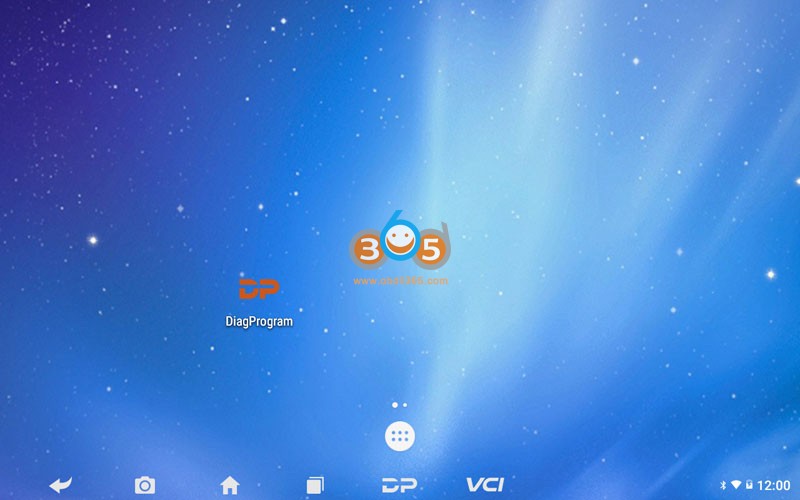
1. Click DP
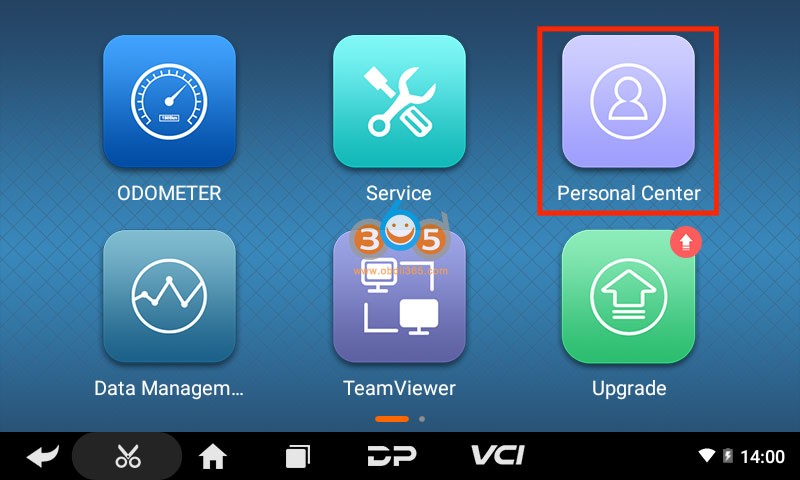
2. Click Personal center
3. Click Register
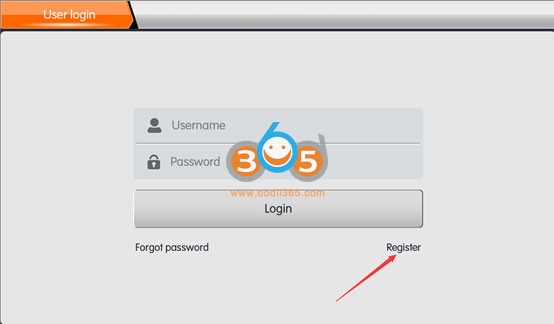
4. Fill in user information
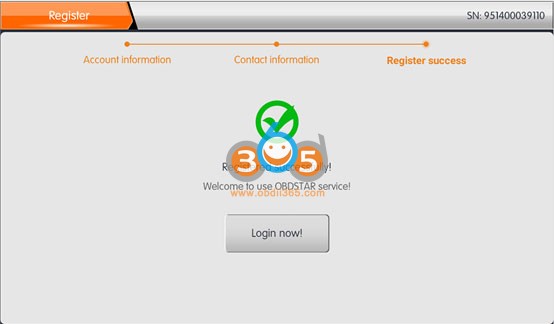
5. After successful registration, log in to your account
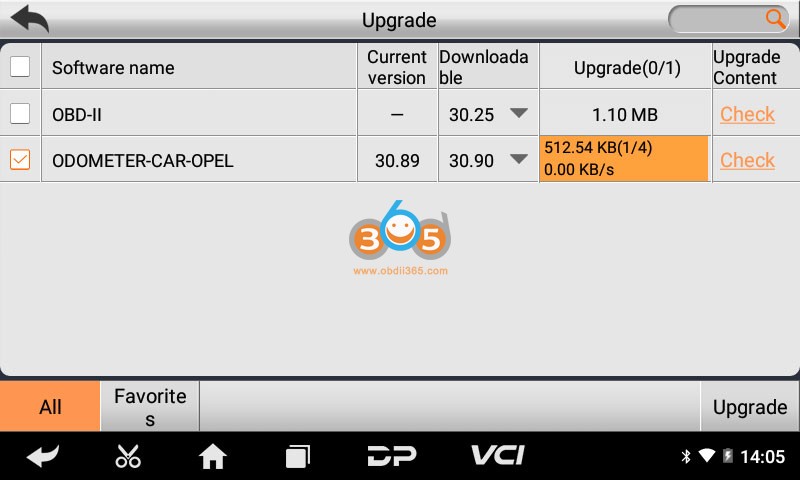
6. Click upgrade
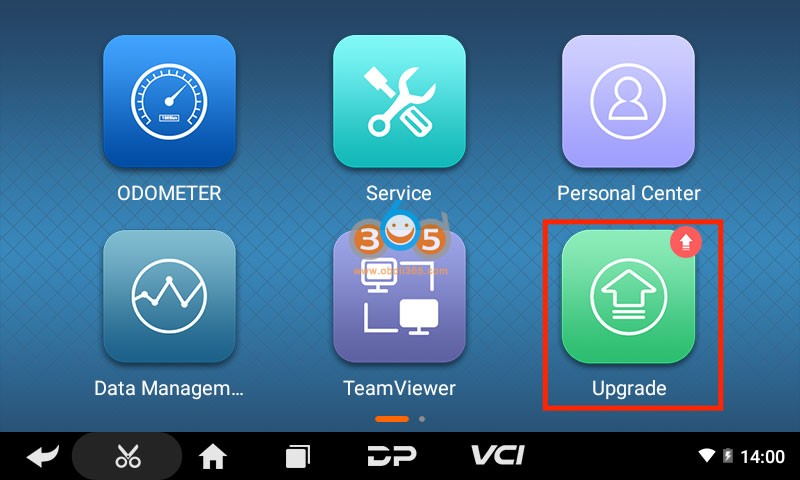
7.Select software to update
OBDSTAR MT200 Ford VW Skoda Radio Pinouts
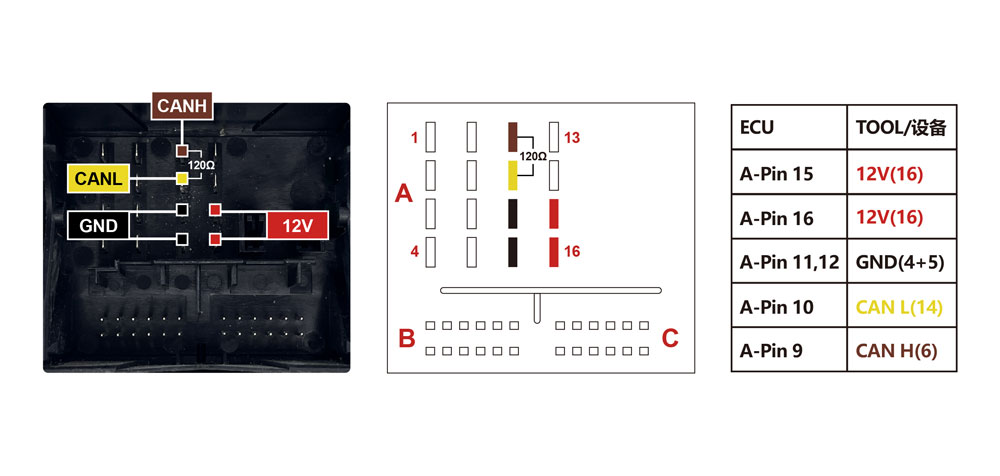
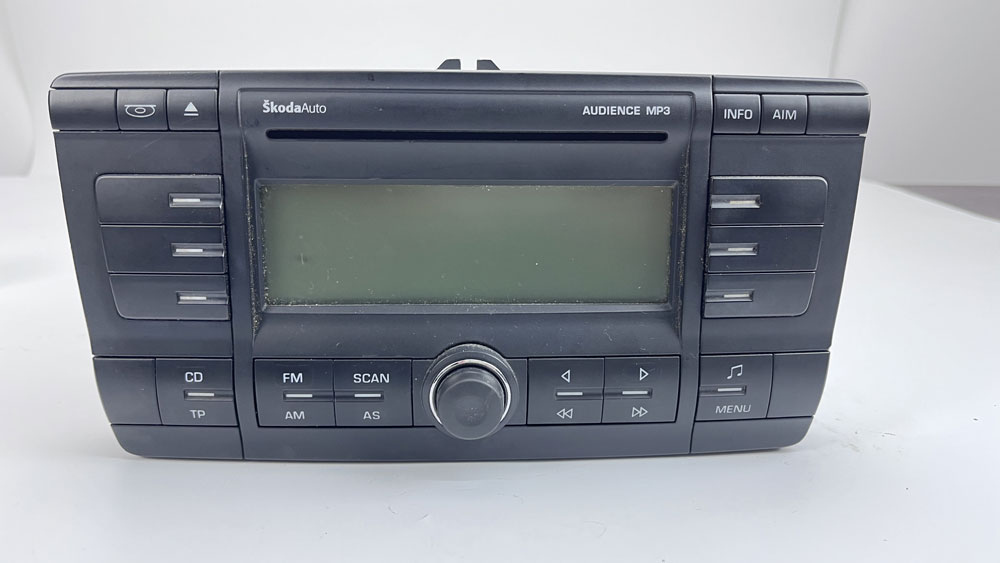
OBDSTAR MT200 will decode Ford, VW, Skoda radio code by OBD or Bench.
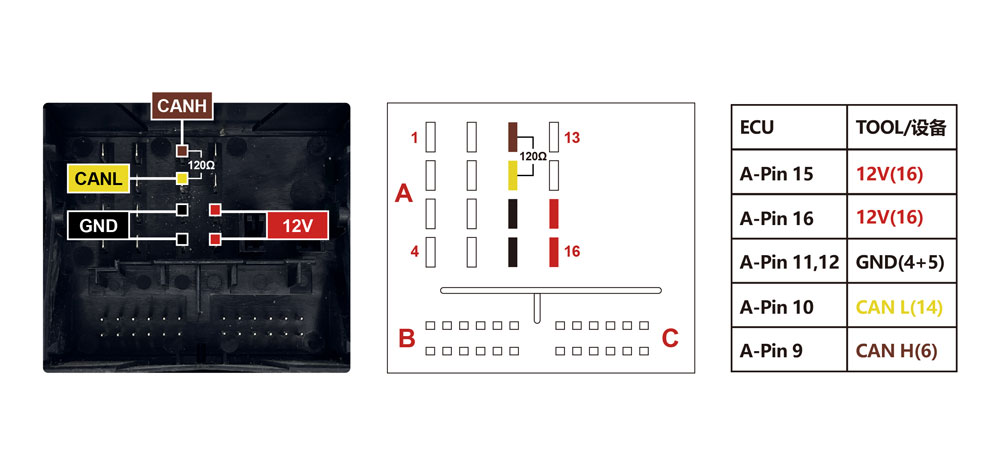
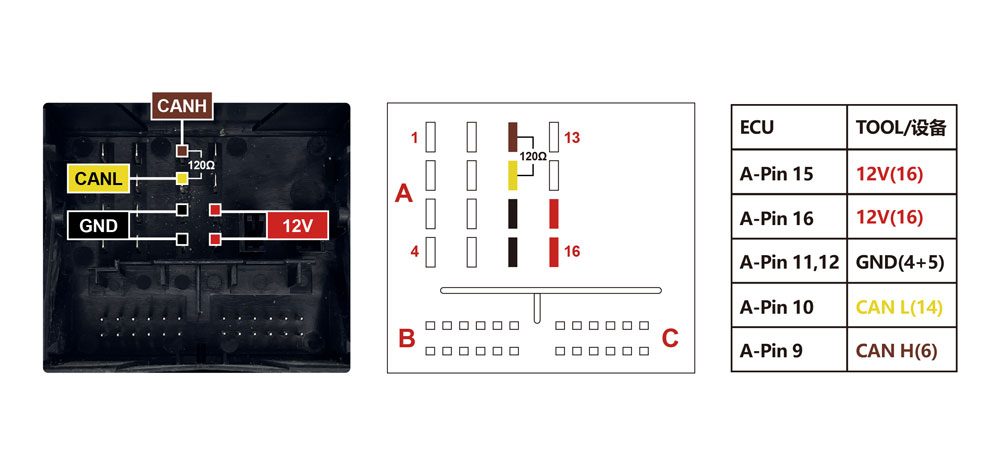
Here are some radio bench pinouts. You can check pinout in OBDSTAR App as well.

FORD-Visteon 6000CD(NEC70F3357)
FORD-Visteon 6000CD(TMS470)
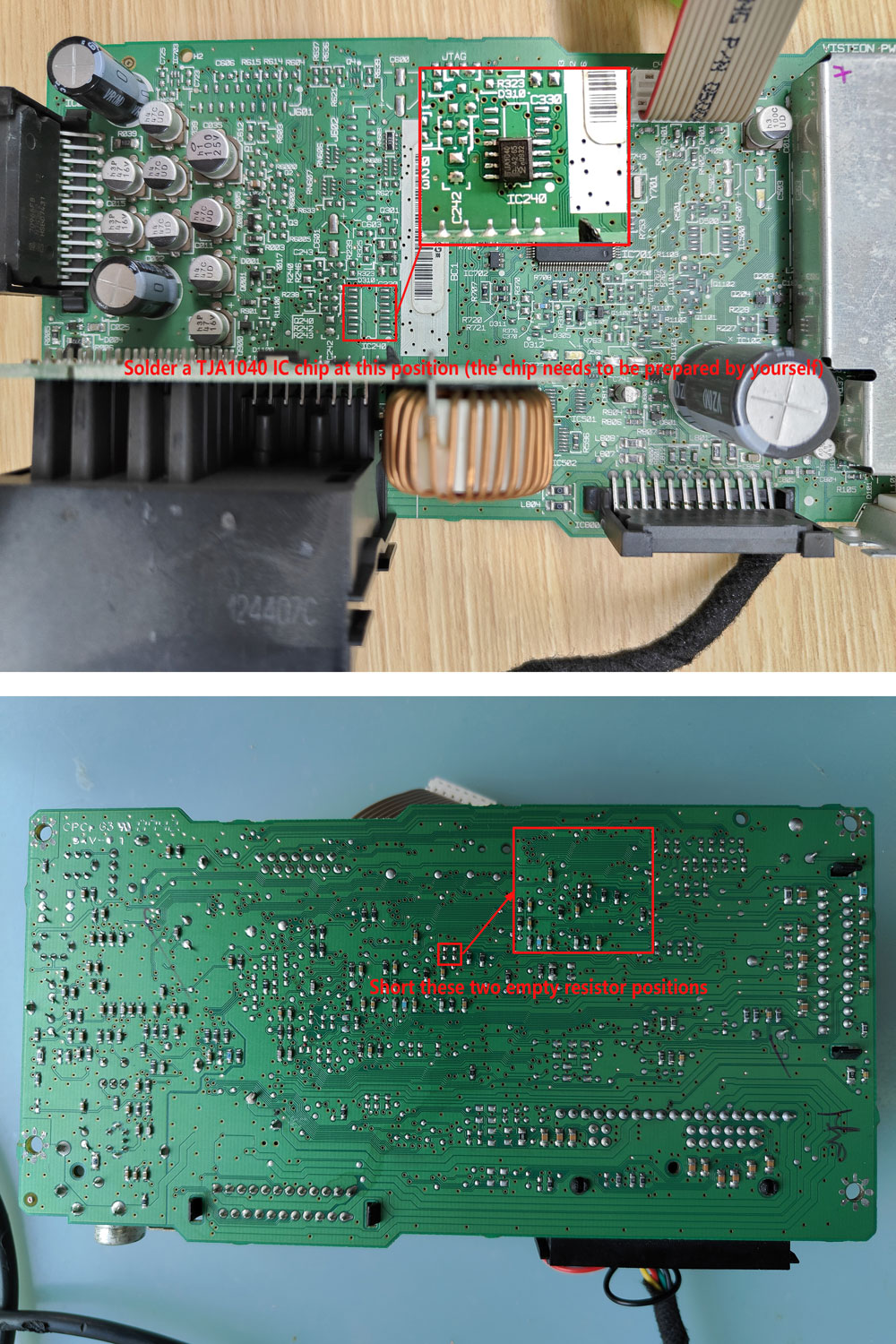
FORD-Visteon Sony(NEC70F3357)
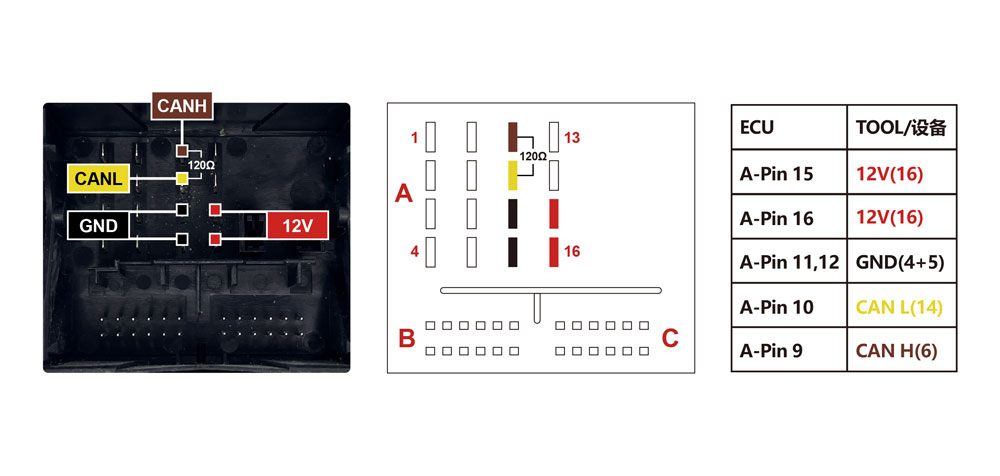
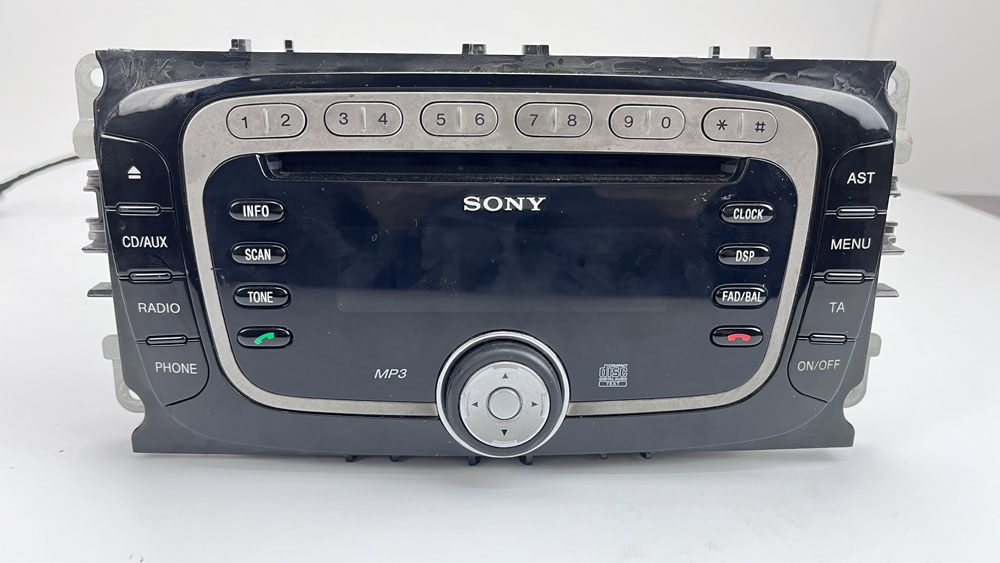
FORD-Visteon Sony(TMS470)
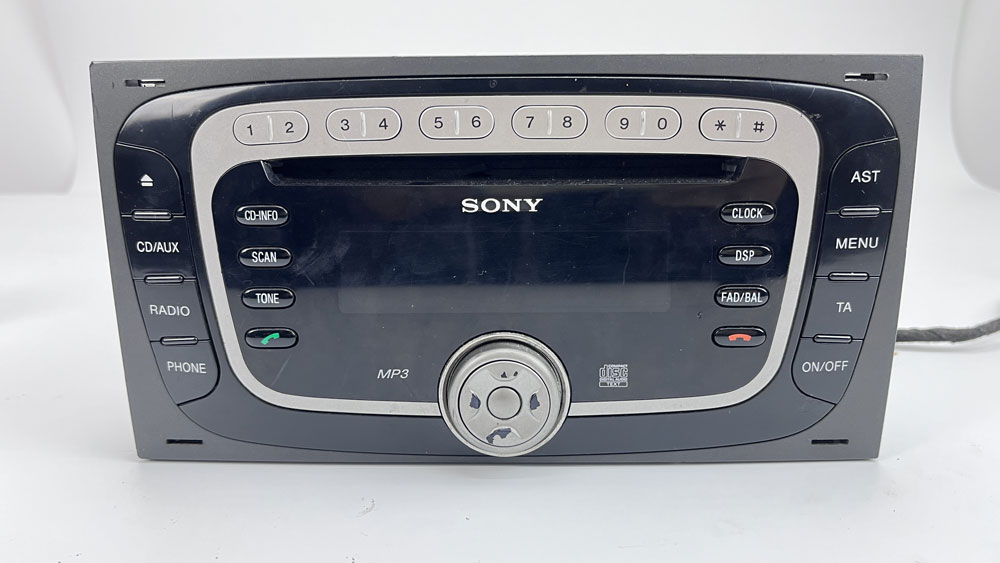
FORD-Visteon Sony 6CD(TMS470)
SKODA-Visteon Audience
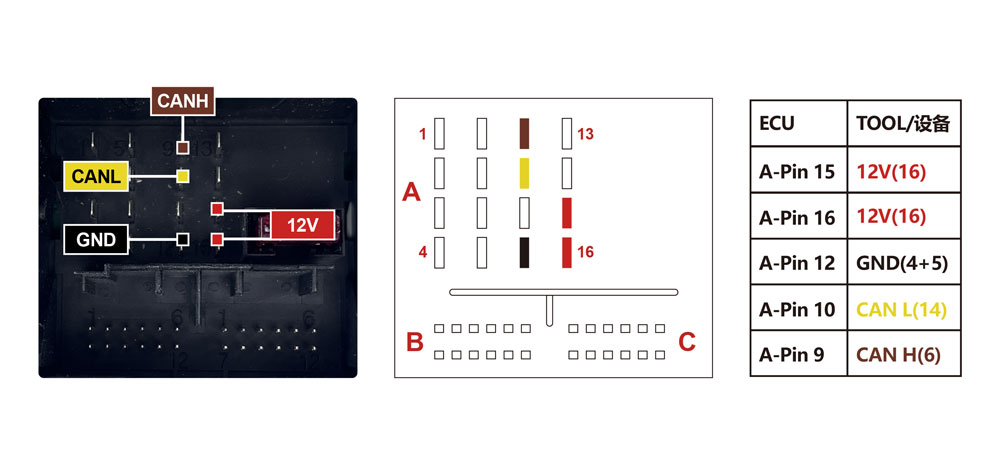
SKODA-Visteon Stream
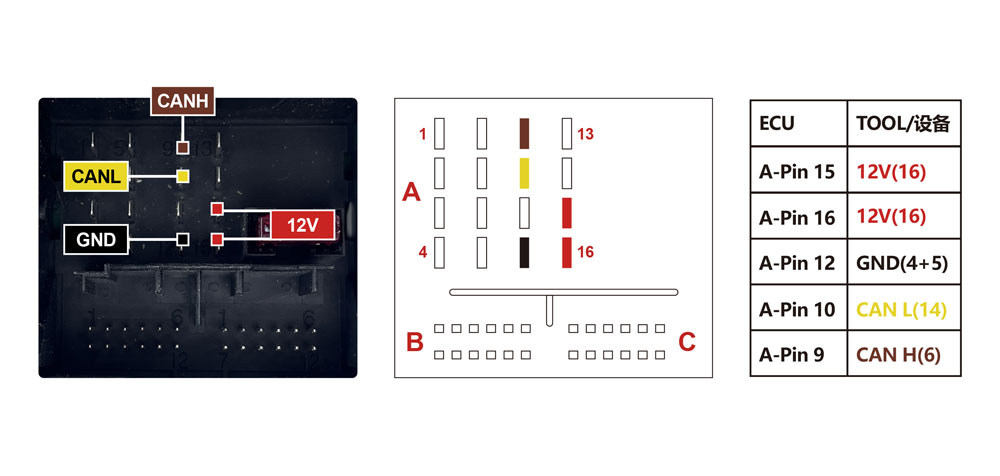
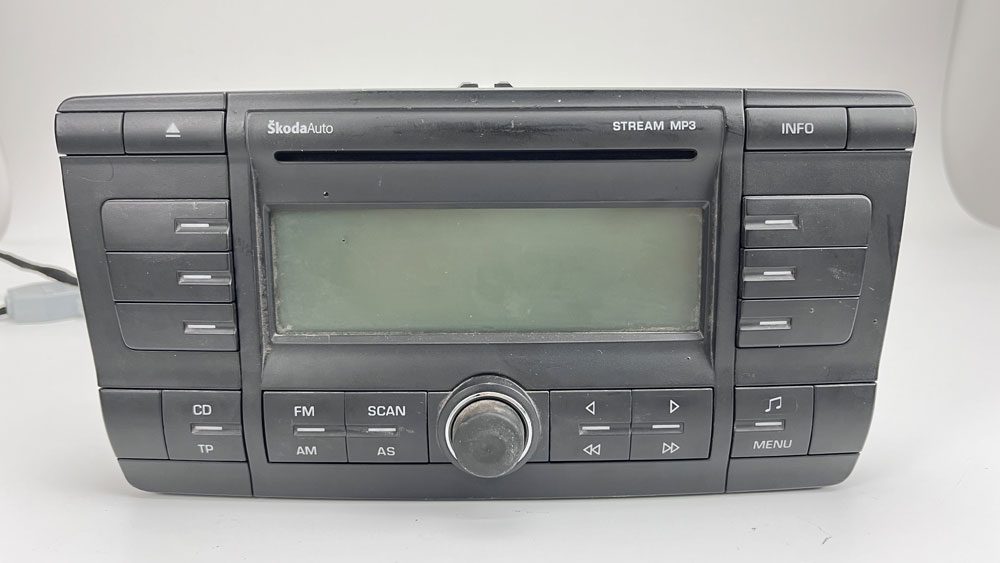
VW-Visteon RCD300
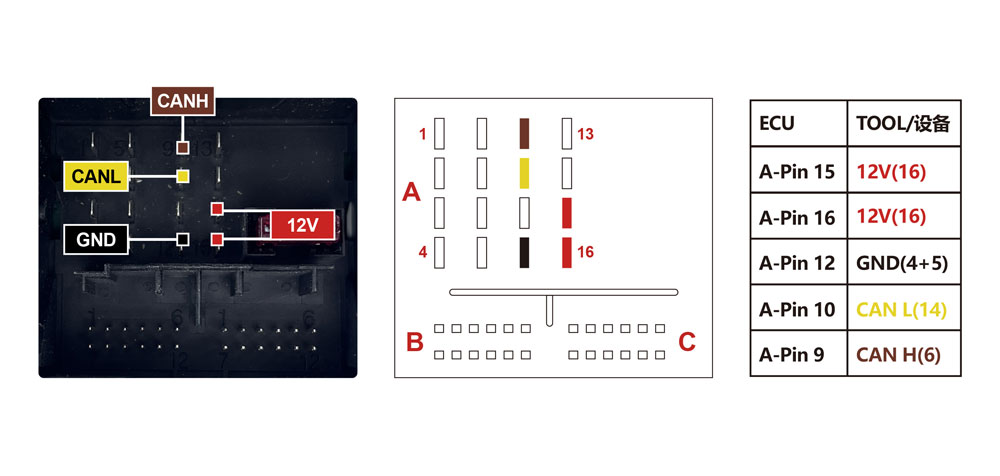
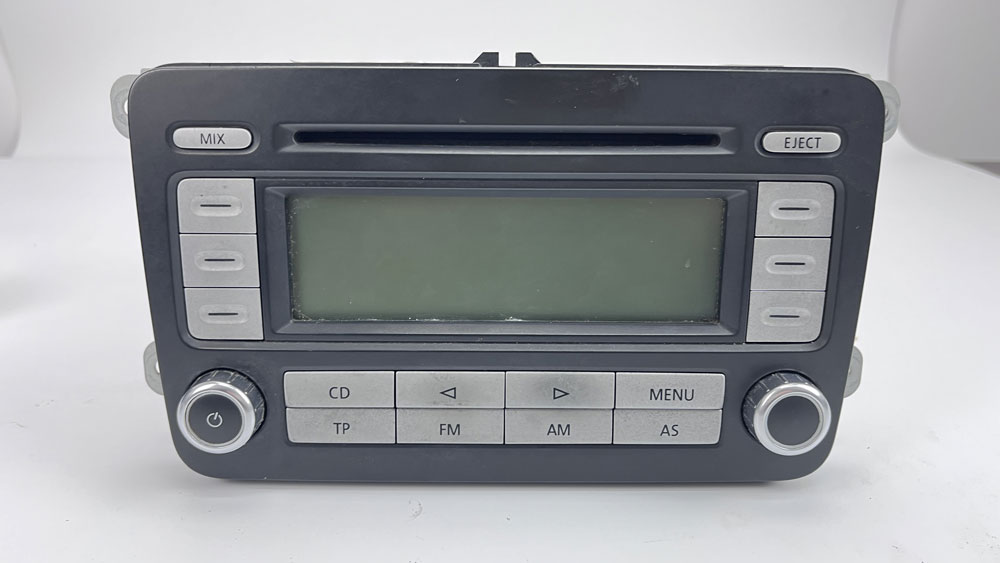
https://www.obdii365.com/service/obdstar-mt200-radio-pinout.html
Nissan Sentra B18 2021 Add Key Not Start Solution
Problem:
Lonsdor K518ISE Nissan Sentra B18 2021 while adding key procedure in the process of pin code reading ignition was off automatically. Then communication failed. Now ignition cannot be on. Remote also not working. How to solve this. I used the 16+32 gateway cable.

Solution:
The BCM is bricked. No way to fix it. It has to be replaced now.
Visit dealer and be prepared to pay $1900.+
We had the same about 6 months ago
But, we were lucky because, was a salvage car being sold only for parts. Motor and Trans, etc. Nothing electronic at all.
But, when we checked with dealer this is what they said.
Very common problem. The Autel IM608 killed the BCM from 2021 Nissan Sentra, even I used the adapter for new Nissan.
Precode Jeep Compass MQB48 Chip Key by OBDSTAR or Autel
What tool to program Jeep Compass 2018 MQB48 chip key?
OBDSTAR:
Obdstar cannot precode this transponder.
Jeep Compass 2018 like you see MqB48 chip, I ordered this mqb48 chip to do an add key on this car.
The car does not have SGW.
I enter in car not by compass but by renegade. Read flash ok with obdstar x300 dp plus.
Read pin ok.
Precode key failed.
I when precode it ask for the P001 but when I’m in obd the p001 doesn’t get enough power.
I remove the obd and plug it on power supplier 13v than I can enter in the procedure.
But like you see it failed.


Autel IM608: Yes
Autel walks these.
Solved.
Update.
I could do whole procedure with autel im608 without any problem. Precode dealer key see picture.

Smart Pro:
Smartpro can do Jeep Compass 2018 if it is start-stop smart key.
It does not work if it is a blade key. Doesn’t work if locked with a remote does it so need to remove and eeprom. Same as active alarm on fiat.
D3, Digiprog3 or OBDSTAR for Benz W212 Mileage Correction
Which tool corrects Mercedes W212 mileage?
For easier w212 (none facelift model) digimaster 3 can do directly via OBD, no CAN filter.
Late 2013- 2014 Mercedes W212 facelift models you need to correct odometer and install CAN Filter (EZS nothing). The can filter goes near the cluster.
It can be done with Yanhua Digimaster 3. By the way, take backup from eeprom first.
Digiprog 3 work fine ,
First ESZ KM and seconds dash bord KM change.
If it is full color dashbaord, digiprog3 cannot do it.
If it’s not facelift model (so before 2013) and use digiprog 3 v4.94, then you don’t need can filter/blocker.
But a can blocker is better to use all times, because if dealer reads the EZS it shows same mileage as in tacho, if you don’t use can blocker then EZS shows 999999km.. (but normally dealers don’t read EZS, they only read ‘assyst manager’ when serviced).
To change mileage you need to use option ‘EZS’ in menu of mercedes w212 of digiprog III.. then it blocks ezs and changes tacho automatically.
If you roll back odometer to a lower mileage off last service, its best to delete service history in car. use option ‘assyst manager’. enter ‘744’ days and ‘25000’kms for next service warning, and press ‘V’ when it asks to delete service history.
When you have a diesel it probably gives DPF error in car. and the car will run in emergency-mode, only drives max 80kmh. digiprog can’t reset this. You have to go to dealer or someone else who can reset dpf.
When some other errors turn up in display use the ‘clr error’ option to reset.
no tool will lower mileage on the EZS, but Diagprog3 or AVDI will flash the Sam to fool Star Diagnosis and instead of read the mileage of EZS will show the mileage of dash.
mercedes w212 obdstar odomaster full changes the mileage without any problem.
if mileage goes back to old value after correction, here is the OBDSTAR engineer solution:
After working on the car’s odometer for 16 km. And then reprogram the meter, the correction is done. You need to walk the car 16 kilometers, and then reprogram it.
Odomaster support mileage correction for following Mercedes chassis.
*If it says unknown software, this version is not yet supported.

Top Tools to Read and Write Chrysler GPEG2A ECU
How to unlock FCA Chrysler Jeep continental 2015+ GPEG2A ECU to use hptuner for tuning? What tool is used?
Here’s the clue.
Hptuner: No
Original hptuners also can’t unlock gpec2a, need send ecu for unlock.
So does the clone MPM tool.
Foxflash/KT200:
Recent update adds FCA GPEC2 GPEC3 GPEC4LM GPEC2A ECUs.
foxFlash is now able to perform the following operations:
Boot Read
Boot Write
within your documents folder search gpec2a
\Program Files (x86)\FoxFlash Manager\foxflash\DFB Technology\DOCUMENTS\help
CONTINENTAL GPEC2A – FCA, Dodge [ SPC5674 ] Pinout
Connect with the multifunction cable the CNF1 on the pcb.
Use the driver:
→ TOOLS BOOT MODE
→ MOTOROLA FREESCALE BAM
→ CONTINENTAL GPEC2A
![foxflash CONTINENTAL GPEC2A – FCA, Dodge [ SPC5674 ] Pinout](https://blogger.googleusercontent.com/img/b/R29vZ2xl/AVvXsEiLgeNJNC9R52b3pwg-vCB6SMIJRH-TL1aHH8KBBLVhTb_f9KmvYgRjTRWbhOd_dc17HFrQiLk8E1HV3_0G4FLCahhzSJn-i2VDy7sgbiQ8ArNl5sex7D1vqsS5ohO_D4LNXvlXVhX-aBUSdklEkCsplgxfXk4Jdg22bOMx-cKFf3DxFxOa9bcP2uCr/s791/foxflash%20fca%20gpec2a%20pinout.jpg)
Bibox:
Bibox has a module that unlock the tuning protection for these ecu.
BitBox FCA Petrol Gen2 CAN Module $342
FCA group vehicles (Chrysler/Dodge/Jeep/Fiat) with ECUs Continental GPEC2 LOCKED, GPEC2A, GPEC3, GPEC4, GPEC4LM
At this moment we support this ECU types:
Continental GPEC2 2013+ MPC5566 3Mb (FID: 20)
Continental GPEC2 2015+ MPC5566 3Mb (FID: 21)
Continental GPEC2A MPC5674 4Mb (FID: 19)
Continental GPEC2A 2018+ MPC5674 4Mb (FID: 131)
Continental GPEC3 MPC5674 4Mb (FID: 18)
It is for bitbox only. Unlock done on int_Flash. Bitbox patch works only for writing by bit box. It is unlocking bootloader, and HP tuner is making it via flash,so cross flashing will brick Ecu.
if you unlock with bit box and try with hp tuners it will brick the ecu.
but some succeeded by trying to update pcm by CDA.
Dimsport transdata
New trasdata will read them.
You can use transdata to unlock them but you have to open the ecu.
Cloning eeprom will take care of immo and Vin.
Flex:
Flex can read it on boot.
It’s readed in bootmode with Flex (3x1kohm resistor).
Ktag:
The original ktag will do it in boot mode.
