

/image%2F1896381%2F20151209%2Fob_cb2b49_obd365-com.png)
Autel MP808 and Xtool D8 Scanner Comparison
Both Autel MaxiPro MP808 and Xtool D8 are competitive bi-directional diagnostic scanners? Which one to choose? Check comparison below:
Table 1: Parameter Comparison
| Item | Autel MaxiPro MP808 | Xtool D8 |
| Screen | 7.0″ LCD; 1024×600 | 8” Touch Screen + 1024*762 Resolution |
| Operating system | Android 11 | Android 5.1 |
| RAM | 4G & 64G | 2G/64G |
| Processor | ROCKCHIP RK3566 Quad Core | Quad-Core 1.8GHz Processor |
| Battery | 5000mAh | 10,000mAh |
| Multilingual | Yes,English, French, German, Spanish, Portuguese, Dutch, Polish, Swedish, Korean, Japanese, Russian, Italian. | Yes,English, Spanish, German, French, Italian, Finnish, Arabic, Japanese, Korean, Polish, Portuguese, Vietnamese, Russian, Simplified Chinese and traditional Chinese. |
| Full system diagnostic | Yes | Yes |
| Bi-Directional | Yes | Yes |
| ECU Coding | Yes | Yes |
| Service Function | 30+ | 38+ |
| Videoscope | Yes with MV108 | Yes, XV100 |
| IMMO Addon | No | with KC501/KC100 for key programming, with M821 for MB AKL |
| Update | 1 Year Free Update | 3 Years Free Update |
| Price | $539 in obdii365, software update $280 per year | $579 in obdii365 |
Table 2: Model Year/System/Function Coverage
| Brand | Vehicle Coverage | System Coverage | Function Coverage |
| VAG | D8 supports year till 2022, MP808 supports year till 2023. | MP808 has one more system than D8 | 1. Automatic scan: MP808 includes automatic scanning and fast scanning, and the scanning speed is comprehensively leading 2. Basic functions: MP808 has one year system more than D8 system 3. Special functions: MP808 has multiple anti-theft systems/battery matching/throttle valve matching/odometer/control unit reset/air conditioning learning/online security login, etc. |
| Benz | D8 supports year till 2022, but 2022 missing 294,295,296,297,206,223,232 models) MP808 supports parts of Mercedes till 2023. |
D8 missing 2022 models, does not support LIN system. MP808 covers all system by 2023. |
1. Automatic scan: D8 does not support the LIN system, and there are a large number of systems missing 2. Basic functions: MP808 supports more systems than D8, such as RSG48V1, MCMS_RR213, etc. The basic functions of the system supported by D8 are not as good as MP808, such as host data flow and action test functions 3. Special functions: The function coverage of D8 is not as good as that of MP808. MP808 supports functions such as GPF, Adblue reset, suspension calibration and tire pressure, etc., but D8 does not support |
| Benz_Sprinter | D8 supports year till 2022, but does not do 2022 T420, X471 etc MP808 supports year till 2023 |
D8 missing 2022 models MP808 covers all car models by 2023 |
1. Automatic scan: D8 32s scans 18 systems, MP808 takes 48s to scan 34 systems 2. Basic functions: support LIN system more than D8, such as EDIFF470 VG906, etc. 3. Special functions: The function coverage of D8 is not as good as that of MP808. MP808 supports functions such as suspension calibration, tire pressure, and speed limit, while D8 does not support |
| Ford | both support year till 2023 | MP808 covers all systems by 2023,D8 missing system in latest models | 1. Automatic scan: Autel’s scan speed is more than 1 times faster. 2. Basic functions: D8 new car has no action test, and some systems lack data flow 3. Special features: D8 new car less relative compression, fuel economy and OBD test |
| Chrysler | D8 support year till 2021, MP808 supports till 2023, MP808 better than D8 | D8 missing system i.e SGW, AFLS, TBM2 in 2021 vehicles MP808 covers all systems by 2023 |
1. Automatic scan: MP808 50 seconds, 30s faster than D8 2. Basic functions: Some models in 2021 support 15 more systems than D8, such as AFLS, LBSS, RBSS, SGW, etc.; 3. Special functions: MP808 supports full functions until 2023, D8 supports special functions until 2018 4. MP808 has authorized security gateway |
| Toyota | D8 support year till 2023,MP808 supports year till 2023 | MP808 has one more system than D8 | 1. Automatic scan: MP808 scan speed is 50% better than D8 2. Special functions: D8 lacks many key special functions such as evaporation system inspection, vehicle operation history record, etc |
| Nissan | D8 only North American year till 2023, Other regions Almera, Qashqai, Kicks, X-trail supports till 2022. MP808 supports year till 2023 for all regions |
Compared with D8, MP808 has the latest ECUID of 20 systems including engine, airbag, heating and air conditioning, and vehicle information. | 1. Special functions and action tests: D8 lacks a large number of special functions and action tests, such as under the engine: target idle speed, engine support, storage of data required for CPU replacement, body control module: BCM diagnosis when the door lock is faulty, etc. |
| Honda | D8 supports 10 models till 2023. MP808 supports 11 models till 2023 | D8 missing some 2023 systems, such as PADAS, SFD, CAN gateway (for security) and other 8 systems MP808 covers all car models by 2023 |
1. Automatic scan: MP808 1 minute 20 seconds, faster than D8 2. Basic functions: MP808 compared to D8 multi-support 8 systems, such as PADAS, EAS, SFD, etc.; 3. Special function: MP808 special function, operation test coverage over 99%, ratio D8 multi-support part special function and operation test 4. Special functions: D8 supports 12 kinds of common special functions, MP808 supports 24 kinds of common special functions, and D8 supports many functions such as TPMS, A/F reset, HV Battery, etc. |
| Hyundai | D8 support year till 2022, MP808 supports year till 2023 | D8 missing some systems in 2023 models MP808 covers all systems by 2023 |
1. Automatic scan: the scan speed is basically the same 2. Basic functions: D8 missing system coverage for 2023 models, and does not support many motion tests 3. Special functions: special functions cover more than 99%, and support some special functions more than D8 (some D8 models have no special functions or a small number of special functions, such as ENG, ABS, AB, etc. |
| Porsche | D8 support year till 2020, MP808 supports year till 2022 | almost same system coverage | 1. Automatic scan: the scan speed is basically the same 2. Basic functions: all support version information, code reading and clearing, freeze frame, data stream, and MP808 supports more action tests 3. Special functions: MP808 supports more special functions than D8, such as the airbag of Cayenne_9YA |
| JLR | D8 supports year till 2020. MP808 supports year till 2023. D8 cannot access some engine modules after year 2016. |
D8 missing some systems after year 2017 | 1. Automatic scan: same 2. Basic functions: basic functions of MP808 models for more than three years 3. Special functions: D8 only supports common special functions of 2016 and earlier models, and D8 does not support many special functions of engine systems after 2017 |
| PSA | D8 supports year till 2020, 7 models less than MP808. missing new cars 308, 408 and 408X after year 2021. MP808 supported until 2023 |
D8 missing some systems, for example 208 (P21) missing 10 system, 206 and ION missing 1 system | 1. VIN code analysis: There are situations where the VIN code analysis fails, and some ECUs cannot recognize it. 2. Automatic scan: The scanning speed of MP808 is more than 1 times faster. 3. Basic functions: D8 has no action test, and there are a large number of data flow items missing 4. Special function: D8 has no special function |
| Fiat | D8 supports year until 2022, no 2023 model year MP808 covers year 2023 |
D8 missing all 2023 model system, and missing some systems such as ESM, ETM, PIM etc on pre-2023 year models. MP808 covers all systems for model year 2023 |
1. Auto Scan: D8 takes 18s to scan 6 systems, MP808 takes 26s to scan 12 systems, and MP808 scans faster in a single system 2. Basic functions: MP808 supports 7 more systems than D8, such as ESM, ETM, PIM, etc. 3. 3. Special functions: The function coverage of D8 is not as good as that of MP808. For example, MP808 supports more functions such as ECU replacement and data migration than D8. |
| Maserati | D8 supports year till 2018. MP808 support years till 2022. | D8 missing 2018-2022 model systems | 1.Auto scan: same 2. Basic functions: D8 supports less action tests, such as Ghibli’s ECM, BCM and other systems in 2018 have no action tests, while MP808 supports action tests” |
2. System coverage: MP808 system coverage is complete, and the scanning results are consistent with the original factory (for example, some models of Chrysler 2021 support 15 more systems than D8, AFLS, LBSS, RBSS, SGW, etc.; Honda supports 8 more systems, PADAS, EAS, SFD, etc.); and there are few systems in D8 (for example, BENZ does not support LIN system, and the number of systems is lacking; PSA, such as 208 (P21), has 10 systems less, and 206 and ION lack 1 system);
3. Basic functions: Xtool D8 has problems such as lack of action test support and missing data streams. For example, Ford has no action test and some systems lack data streams; PSA also has no action test, and there are a large number of missing data stream items;
4. Special functions: MP808’s special function support is generally better than D8’s. For example, Hyundai’s special functions in MP808 cover more than 99%. Some D8 models have no special functions or a small number of special functions, such as ENG, ABS, AB, etc.;
5. Security gateway: Autel MP808 supports FCA (limited to European and American regions), Renault (global) security gateway authorization, D8 does not support;
6. Automatic scan: The average scanning speed of MP808 is significantly ahead, the scanning time of a single system is less time-consuming, and the product experience is better;
7. Software Update: MP808 has 1 year update only, but D8 has 3 years free update. It is bonus of xtool device.


How to Add Opel zafira 2001 Key by Autel KM100
Opel zafira 2001 add key by dump successfully with Autel MaxiIM KM100.
Had to read dump with a different tool and then made a key by dump using the km1oo.
That is a tms chip and data can be read with orange 5, xprog or vvdi prog.
You can upload file to km100 with Memory card or usb with OTG adapter.
The km100 didn’t give option to write back file he told me the chip can run the car. pcf7935 generate as ID40.
Car starts perfectly.
You can also read pin code and program via OBD with Autel im508.


How to Fix Autel IM608 Blocked Installation?
Problem:
I try to install Autel MaxiIM IM608 apk, but it does not allow me. It gave error “blocked installation, for more security, your tablet blocks the installation of applications from unknown sources.”
Any solution?

Solution:
Go to Setting> Security & safe> unknow source click allow to install.
Honda HDS 2006 S2KI Airbag SRS Reset Review
Question: I need to reset the airbag light in my Honda s2ki MY06. Any idea of what scanner I need for that? I don't really want to go to the dealership.
Answer:
You probably need Honda HDS software and an OBD-II dongle. I purchased those things late last year with success to re-calibrate the passenger airbag sensor in my 06. It was < $110.
You may be able to clear SRS codes with a normal OBD-II machine but I'm not sure. To access all of the Honda software BS in the 06+, you need Honda HDS. You're probably going to pay that much if you go to a Honda dealership to clear it anyways.
HDS software installed and I ran the Seat Weight Sensor (SWS) Initialization process and everything is working as it came from the factory. SRS light on dash is off. Seat belt light comes on the dash if I sit in the pass. seat without buckling my OEM receptacle. Pass. Airbag "Off" light displays when I buckle the seatbelt and have no weight in the seat. "Off" light goes off once I sit in the seat. So happy it all worked.
Onto the Ballade rail. First of all, I'm stoked they make it and it's a good product that could use some fine tuning.
- Pros
- First in, best dressed as the only product currently available for side mount seats with weight sensors
- OEM Weight sensors work!
- OEM sliders are smooth
- Fits great. Idk if it's Pole Position specific but it bolted to the seats perfectly and lined up great once put in the car. Yes, it's OEM rails but they're 2 pieces and I was worried it may be difficult. Very easy and great fit.
- You re-use your factory SRS box under the passenger seat. I later learned that you actually have to and even with the HDS, the documentation indicates you can't use one out of a different car. People who sell their OEM seats should know this.
- Ballade did a great job getting the little SRS box/bracket as low as possible. I think it's lower than OEM and will allow a bucket to sit pretty low without interfering. It's positioned the best it can be.
- For parts, pretty much same as my PCI rail. Ballade also includes nylon washers/spacers for the seat's side mount to protect it from the metal rails.
- Cons
- Seat belt receptacle bracket on trans tunnel side is not located where it should be. It is located forwards of the harness holes in the seat. It should be back further for ideal safety. I'm not a safety engineer or knowledgeable enough to comment on how good/bad this is. It looks and feels fine in the car and I think it works but it's not ideal. I think this may be because the passenger trans tunnel sticks out further as it goes back. I'm not sure there would be enough room for a belt mount properly far back.
- Rails could use some finishing. Ballade removes some rivets from the OEM rails to bolt on their own side brackets. That space left some bare metal. I shared feedback with Ballade and they claimed that's how it is from the factory. That is likely true but I did take mine apart and sand/paint them.
- I had to drill a hole in my passenger seat belt receptacle mount to allow for mounting the slider's cable. I'm not sure if this is specific to mine or if it is generally an oversight of the product. The back story is that my rails did not initially ship with the seat belt receptacle mount on the trans tunnel side. I emailed Ballade and they had one shipped out to me quickly. Maybe when they do assembly, they typically drill it themselves. Not sure, but I had to do it myself.
The finishing stuff is not a huge deal but it is an expensive product that I think could be better refined. The seat belt receptacle mount is really the only part that has not been easily remedied. I'm not sure if that's oversight or if it's not possible because of the shape of the trans tunnel.
It works! Paying for HDS software + a HIM cable was probably cheaper ($110) than going to a dealer. I also am not confident I could go to a dealer and demand they run the SWS initialization without them doing their own assessment.
Vapon VP996 Adds Ford 2019- Smar and Blade Key
Vapon VP996 key programmer released new software update on June 5h, 2023-adding Ford 2020 onwards key programming by OBD.
Vapon VP996 KEY PROGRAMMER FORD SOFTWARE UPDATE
Supports both add key and all keys lost.
June 5th, 2023.
|
Area
|
Model
|
Year
|
Remote type
|
|
Asia
|
Edge
|
2021-
|
Smart Key
|
|
Asia
|
Escape
|
2019
|
Smart Key
|
|
Asia
|
Expedition
|
2020-
|
Smart Key
|
|
Asia
|
Explorer
|
2020-
|
Blade Key
|
|
Asia
|
Explorer
|
2020-
|
Smart Key
|
|
Asia
|
F-250
|
2020-
|
Blade Key
|
|
Asia
|
F-250
|
2020-
|
Smart Key
|
|
Asia
|
F-350
|
2020-
|
Blade Key
|
|
Asia
|
F-350
|
2020-
|
Smart Key
|
|
Asia
|
F-Series Super Duty
|
2020-
|
Blade Key
|
|
Asia
|
F-Series Super Duty
|
2020-
|
Smart Key
|
|
Asia
|
Focus
|
2018-2019
|
Smart Key
|
|
Asia
|
Mustang
|
2020-
|
Blade Key
|
|
Asia
|
Mustang
|
2020-
|
Smart Key
|
|
Asia
|
Transit
|
2020-
|
Blade Key
|
|
Europe
|
Kuga
|
2019
|
Smart Key
|
|
Europe
|
Transit
|
2020-
|
Blade Key
|
|
Europe
|
Transit Custom
|
2020-
|
Blade Key
|
|
South America
|
Transit
|
2020-
|
Blade Key
|
|
USA
|
Edge
|
2021-
|
Smart Key
|
|
USA
|
Escape
|
2019
|
Smart Key
|
|
USA
|
Expedition
|
2020-
|
Smart Key
|
|
USA
|
Explorer
|
2020-
|
Blade Key
|
|
USA
|
Explorer
|
2020-
|
Smart Key
|
|
USA
|
F-250
|
2020-
|
Blade Key
|
|
USA
|
F-250
|
2020-
|
Smart Key
|
|
USA
|
F-350
|
2020-
|
Blade Key
|
|
USA
|
F-350
|
2020-
|
Smart Key
|
|
USA
|
F-Series Super Duty
|
2020-
|
Blade Key
|
|
USA
|
F-Series Super Duty
|
2020-
|
Smart Key
|
|
USA
|
Focus
|
2018-2019
|
Smart Key
|
|
USA
|
Mustang
|
2020-
|
Blade Key
|
|
USA
|
Mustang
|
2020-
|
Smart Key
|
|
USA
|
Transit
|
2020-
|
Blade Key
|
|
Worldwide
|
LINCOLN Aviator
|
2020-
|
Smart Key
|
|
Worldwide
|
LINCOLN Navigator
|
2020-
|
Smart Key
|

How to Update Vapon VP996 programmer?
Free Download Vapon software update tool
Connect vp996 with laptop via USB cable
Download and open update tool to run upgrade.
TPMS Tool Launch TSGUN vs Autel TS508
Both Launch X431 TSGUN and Autel MaxiTPMS TS508 are very efficient TPMS tools for tires.

This is a TPMS sensor. Both of them can program the sensor. Here we make a comparison to tell you the plus and the minus of both.
They have different prices. Autel TS508 this one can work alone. It does not need a tablet or software. You have everything included but also the price is double at this moment.
The price is really double the launch product the TPMS TSGUN.
I like TSGUN more because when you forget to program a sensor you can also program it after that when the tires have pressure inside.
With TS508 if you have pressure on the tire you cannot program the sensor. You should program the sensor before install it on the on the tire and charge it pressure.
This is one plus from the launch, the price is also second plus from the launch. But TS508 it can run alone, we don’t have the tablet. You know it depends which option it shows on your tablet, it can be from 1K euro to 5K euro. But Launch x431 tablet has many other addon modules, videoscope, immobilizer programmer, ADAS, battery tester etc. You can also run Diagzone. With Autel you have to buy separate devices with different functions.
Both of them have the same functionality, both of them make good work.
Launch tsgun is much cheaper and is the most that i use it because I don’t need to pre-install the sensor on the car.
Let’s see how these things work. You know how these programmers work actually when you try to install a new TPMS sensor in the car this one will not be able to program it.
programming is too much thing they have the database from all of the cars inside. for example each car they have at least 8 sensor inside for the summer in the winter.
If you have already in his memory for example TSGUN. let’s say eight sensors for Audi and also another one eight sensor for Audis and all the time units are actually the same.
Serial number for this sensor try to look when you program a sensor try to look when you program on different cars and on the same cars, you will see he will give you the same ID number of this sensor like most of the time I pay attention on the cars it will allocate me for five series the same ID number of that sensor and then the car who will believe its original sensor, but it’s not true it’s just a fake sensor they just use the data from original sensor and you you’ll be able to put it inside on the sensor this is the way how it works.
Actually both of them they are not programmable both of them they are tools who can clone the original sensors.
Launch TSGUN Pros and Cons
Pros:
It has great battery life and fast speed.
Makes TPMS calibration work much easier
You can scan, program and diagnose TMPS sensor.
program (clone) Launch RF sensor
Quality construction and feels good in the hand
The owners manual was easy to understand
Connect with Bluetooth
It is sturdy, well built, with simple and straightforward functionality
Cons:
It is not a stand alone unit, have to pair with X431 tablet ( you need to select the car first . You have to exit the diagnostic program before you can use the tpms function)
Failed work on some models (i.e Opel Astra K, Nissan Juke 2016, 2012 Chevrolet Camaro.)
Autel TS508 Pros & Cons
Pros:
Has a powerful rechargeable battery
Enables user to manually input OE ID into MX-Sensor.
It has a 4 MX-Sensor programming options for convenience
Connects with the TPMS module intilizing OBD2 cable for sensor ID relearning
Indicated vehicle specific relearn procedures.
Offers faster and smarter TPMS repairs with two service modes.
Free sofware updates.
Cons:
It is somehow challenging to update
But both of them make good work and of course we can use it if you think logically they are not programmers they are tools who clone the TPMS sensors.
Programmers is the OEM from the factory and who can allocate the different ID numbers.
It now depends on you which tool do you have. If you have launch x431 product I recommend you the TSGUN if you don’t have it and you must buy separately just buy TS508.
How to Calibrate Screen for Yanhua Digimaster 3?
If you have problem with the screen of Yanhua digimaster iii mileage programmer, you can calibrate it.
Path menu:
Management
Pull down menu and select Stylus Proffreading


How to Fix Autel IM608 BMW FEM All Keys Lost Car Not Start?
Here comes a similar problem:
Autel IM608 PRO programs BMW 420d 2014 all keys lost, everything went nice and smooth extracting all info from FEM and also getting ISN code from ECU, now keys are programmed but car didn’t start. I had these errors after I run a test. but unsure what problem would be.


Solution:
FEM module is not encoded which is shown on picture 1.


Restore coding to FEM.

Restore original coding file to FEM module.

CG FC200 Adds Continental PCR2.1 SDI7 DPS6 ECUs
Q: I got the CG FC200 programmer software updated to latest V1.1.3.0, but Continental TC17 and bench MPC5xx license are missing. How to activate it?


A: The authorization will be activated uniformly in two days. License are free, but need to use an extra adapter.

FC200 bench MPC5xx adapter
FC200 software V1.1.3.0 update feature
May 24th, 2023
1. New Function
(A) VAG TCU Mileage Repair
DQ200
DQ250
VL381
DL382
(B) Immo Off
EDC17C53
EDC17C63 / EDC17C81
2.New ECUs
(A) Continental ECU
PCR2.1
SDI7
DPS6
(B) BOSCH ECU (Add BOSCH MPC5xx platform mode ECU)
ME9.0
MED9.1
MED9.5
MED9.5.10
EDC16C2
EDC16C8
EDC16CP31
EDC16CP35
(C) KEFICO ECU
CPEGD2.20.x
(D) DELPHI ECU (Add Mercedes Benz CRD2. x MPC556x engine platform mode)
CRD2.x
3. Checksum correction
(A) DELPHI ECU
TC17 series chip
(B) BOSCH ECU
ME7.4.5
(C) GM TCU
6T30
6T80
6L80
How to Change CGDI CG100X Software to English?
Users provide their CGDI cg100x device serial number to www.obdii365.com customer service to get the device activated.
If you have sent CG100X SN number to your dealer and they got your device authorized, but your tool still shows in Chinese language and can not be activated,
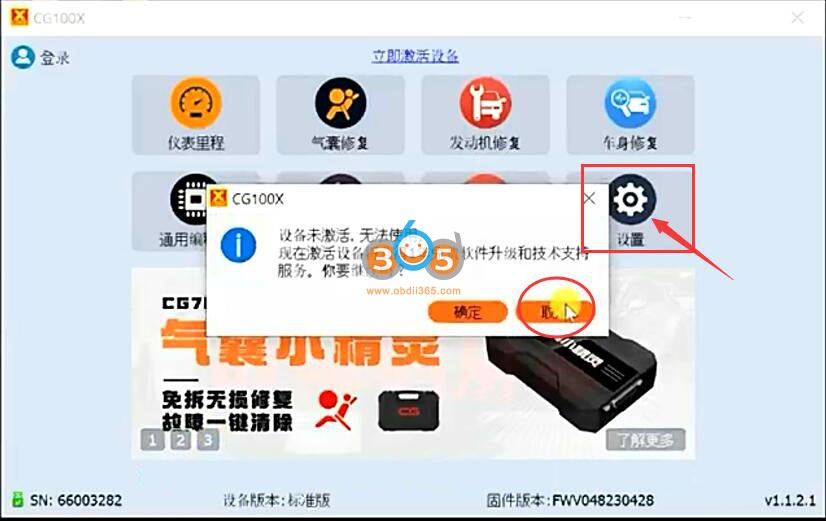
Press Cancel button, go to Settings marked arrow above.
Go to “Network” -> choose server as “China Mainland” and go back. The device now is in English.

Then follow instructions below to activate cg100x programmer.
Run CG100X software.
Software says device is not activated, press OK to proceed.

Press OK to login CG account.

Login CG account with user name and password. If does not have one, Create a CG account.

Sign in account.

Press OK to combine CG100X with CG account.


Combine device successfully.

Now we finish activation.
CG100X software is ready to use.


Tips to Set up Mini VCI Techstream V12 on WIn10 64bit
I have a Mini-VCI J2534 cable which worked happily with my Techstream 10 install on 64 bit Windows 7, after some faffing. Anyway, had to give that laptop back last month when I left the job I'd acquired it from.
Windows 10 has a few more challenges. You need at least Techstream 12 (you could hack about with the registry to get Techstream 10 to work, nit don't waste your time). And you need to get Windows 10 to load 64 bit drivers for the cable. Windows 10 really doesn't want to let you load old, unsigned drivers. You can do it, but it'll make it hard for you.
So a bit of googling and a bit of trial and error and these steps seem to work.
http://blog.obdii365.com/2017/12/03/toyota-techstream-12-30-017-download-and-install/
Follow the steps under : Techstream install Windows 10.
Step 2. You want to run this from the cmd prompt as the admin user. (type "cmd" in the Type here to search box in the bottom left of your screen)
Step 4. Copy all of the contents of the file in the link to notepad (dont copy and paste from the steps, there are extra spaces in there), and save as filename.reg
You then import that file using Regisitry Editor (type "registry" in the Type here to search box). Select the import option from the File menu (top of the screen).
Some instructions suggest running a firmware update tool to confirm the cable install has worked; but the tool doesn't work in Windows 10. Don't waste your time like I did!
Step 7. You can get Techstream 12 online. I did virus check this, but .. at your own risk. To extract this file you need to copy it to the desktop then open it with a zip program, such as Winzip. You may need to download that from somewhere.
Check the instructions.txt in the unzipped files. Theres a few simple steps to complete the install.
Which Tool Program Iveco Daily 2021 All Keys Lost?
Any idea what tool to make all keys lost for Iveco Daily 2020 onwards? Avdi, smart pro or autel im608? There is no communication with bcm via OBD. Maybe they blocked the bcm through the OBD. How to program all keys lost?
Try do it by eeprom dump.
AVDI abrites will do it but not by obd but from the dump, you will need to read the bcm dump via eeprom or with abprog , then use the keymaker tool on abrites fca software to precode the key and get pin , you can then program the key to the vehicle , iveco daily after 2020 was part of the newly released functions.
“With the latest version V8.9 of the ABRITES Diagnostics for FCA vehiclesyou are now able to prepare transponders for Fiat Ducato, Iveco Daily and Fiat 500L, manufactured after 2020. You need to read the external EEPROM from the BCM module using the ABPROG Programmer, then load the file in the Transponder Maker to prepare a key. The prepared key can then be programmed via the Key Learning menu.”
Feedback:
The car finally started, using abrites by reading the eeprom.
The BCM in my case is Magneti Marelli, 10 to 15 minutes max to remove BCM. The only thing this take care about the pins when you try open the plastic cover. Very fragil.
Some pointed out that it can also be done using autel im608.
How to Activate ECUHelp HTProg Software
ECUHELP HTprog is an ECU Chip tuning Tool, a Bench Programmer, EEPROM Programmer, a Key renew tool.
HTProg configureation:
HTProg KT200 Clone Adapter Only (Must use with ECUHelp KT200)

HTProg Adapter + Cables (Must use with ECUHelp KT200)

HTProg Full Pack with Dongle (stand-alone)
The package comes with clone adapter, cables and encrypted dongle, it works stand alone without connecting to KT200 ECU Programmer.

HTProg Function:
Chip Tuning / ECU Cloning
With HTprog you can read and write P-Flash,D-Flash, External Flash and external EEPROM with the option of automatically checksum correction, you will have many methods in most of ECUS :
1. Factory mode (On Bench for most of ECU/TCU): with this option you don’t have to open the ECU cover. Just plug some wires for power and signals and you are ready to go.
2.Tricore Boot Mode for all Tricore ECU: Opening the ECU is mandatory to connect the boot wire on the ECU board.This method is useful when the ECU is not responding
3.BDM (Background debug mode)
4.JTAG for Renesas and Freescale
BDM Read / Write
With HTprog you are able to break the protection of immobilizers like CAS in BMW. EIZ / EIS in Mercedes Benz. BCM in Volkswagen and Porsche.etc.
Built in Editors
With HTprog you can edit many Flash data like:
Edit CAS3+ VIN, ISN and keys
Edit CAS4,CAS4+ VIN,and ISN
Edit mileage for BMW instrument clusters
Other functions
You can do key reset for many brands like Audi, BMW,MIN, Porsche, Toyota,Fiat, Renault…etc.
Read/Write a wide range of SOP8 EEPROMS.
Works side by side with Autohex to make keys.
Key Features
Master version. One License for all protocols on bench.
Supports one of the largest ECU/TCU list in Cars and Trucks for ECU cloning and Chip Tuning. Supports both old and latest ECU / TCUs from Bosch,Continental, Delphi, Marelli,Denso, Tenic,TRW and Valeo.etc.
Reads all BMW long ISN from BMW DME and DDE including MD1 and MG in F/G series
IMMO BDM Read/Write
With HTprog you are able to break the protection of immobilizers like CAS in BMW, EIZ / EIS in Mercedes Benz.BCM in Volkswagen and Porsche…etc.
Download HTProg Software
Free download HTProg software
Current software version: 1.0.45
How to Activate HTProg Software?
To activate the HTprog clone adapter for KT200, follow the steps below:
1. Connect HTprog Clone Adapter to KT200 device, and then to the comptuer.
Like this

2.Download the htprog software needed for the adapter
3.Install the software on your computer.
4.When the HTprog software starts, it will prompt you to enter your email address.

5.Enter your email address and wait for the activation link to be sent to you.

That’s it! Once you’ve activated your HTprog clone adapter for KT200, you can start using it to program your vehicles. If you have any questions or issues during the activation process, don’t hesitate to reach out to the HTprog support team for assistance.
HTProg ECU List
LAUNCH X431 PRO3S+ vs X431 V 4.0 Which to Choose
For the last two years, I have been extensively using a Launch X431 V Pro. It has worked flawlessly across car brands and models. I work mostly on BMW, which has some of the most complicated electronics. The Launch software has never failed me, including working on BMW diesel vehicles.
Over the past two years I’ve also received excellent support from the vendor, obdii365, through both their Facebook Page for customers, as well as individual one-on-one support. So when I was ready to upgrade my hardware, I was interested in sticking with Launch and obdii365's support.
With help from Obdii365 I selected the new 2022 V2.0 Launch X431 PRO3S+. Arrived in 2 days. Hardware was a huge leap forward from my prior X431 V Pro. In connecting and performing diagnostics, I would say the PRO3S+ is easily twice as fast as my prior model. The new Launch is built on the Lenovo TAB M10 TB-X605FC - a 10-inch touch screen, Android 9, and 1.8 GHz octo-core CPU account for the improved speed, visibility and useability. The PRO3S+ includes HAPTIC feedback, which is a great feature for operating the tool with tactile positive input feedback. The upgrade from the V Pro also adds 5 GHz WiFi speeds - updates easily took ½ to ⅓ the time for the prior model. The 7,000 Mah battery goes all day in the garage, without issue, in spite of increased screen size and processing speed.
There are a variety of new capabilities with the PRO3S+ (the feature set is impressive for a 3rd party product working on native brands). I’ve used the bi-directional capabilities, brake service, oil service, and several others. Simply at this price point, this really becomes the cheapest tool in the toolbox when I consider its utility against the cost.
There is no doubt in my mind that the upgrade was worth the cost. For anyone that uses their Launch tool with any frequency, it is a no brainer. For potential new Launch users, I can say that several years ago several professional mechanic friends recommended I look at the Launch as my multi-model car diagnostic tool. I am glad I took their advise!


Yanhua Mini ACDP Gearbox Module and Function List
Yanhua Mini ACDP not only release modules for keys and odometer but also for gearbox reflash/cloning.
Here comes the ACDP gearbox module list.
| No. | Module | Support Gearbox Model | Car brands |
| 1 | Module 11 BMW EGS Reflash | 1. BMW E series 8HP
2. BMW F/G series 8HP 3. BMW F series 6HP |
BMW |
| 2 | Module 13 VW/Audi Gearbox clone | DQ200 (0AM/OCW)
DQ250 (02e/0D9) DL382 (0CK) DL501 (0B5) VL381 (0AW) |
VW Audi Seat Skoda |
| 3 | Module 14 MPS6 gearbox clone | Volvo C30, C70, S40, S80, V40, V50, V60, V70, XC60, XC70 etc gearbox clone | Volvo |
| 4 | Module 16 Mercedes Benz gearbox clone | 1. VGS-FDCT/VGS2-FDCT gearbox clone (dual clutch)
2. VGS2-FCVT 722.8 gearbox clone 3. VGS2-NAG2/VGS3-NAG2 (722.9-2, 722.9-3) gearbox reflash |
Mercedes Benz |
| 5 | Module 19 SH725XXX gearbox clone | All, ZF 8HP, VW 0DE, 7DCT and DKG | BMW, Benz, Land rover, VW, Audi, Rolls-royce, Porsche, Bentley, Aston Martin, Lamborghini, Maserati, Jeep, Chrysler, Buick, |
| 6 | Module 22 GM 6T/6L Gearbox Clone |
|
GM, Buick, Chevrolet |
| 7 | Module 26 Ford DPS6 gearbox clone | Ford DPS6 gearbox clone | Ford Focus Ecosport Fiesta Aspire Figo, etc |
| 8 | Module 28 ZF 9HP gearbox clone | Support Jaguar, Land rover, Chrysler, Dodge, Fiat, Honda, Jeep and other models of the ZF-9HP gearbox boot mode cloning. | Jaguar, Land rover, Chrysler, Dodge, Fiat, Honda, Jeep etc |
| *All modules require ACDP host to work with. | |||
