

/image%2F1896381%2F20151209%2Fob_cb2b49_obd365-com.png)
Will Xtool A30M OBD2 Scanner Program Keys?
Xtool A30M is definitely a great option for a bi-directional scanner without the need for subscription fees especially if you’re on a budget.
Can it program keys?
For example, under the 2017 Honda Accord, under the immobilizer ECU the option for key programming was available, made multiple attempts to program keys to this
car but it just kept on filling, also hooked up the a30m to a Toyota, there wasn’t any support for key programming.
key programming isn’t listed under special functions for the a30m. For the price of the A30M it’s sure it’s not available.


You don’t need to invest in the a30m if your sole purpose is to use it for programming car keys.
But a30m definitely remains a solid device and offers a lot of value without the need for a subscription license.
The A30M is the lite version of D7. The D7 has around 36 special functions now, while the A30M has 21. Another difference is that the D7 gets more updates and understandably so, since there’s an annual update cost after subscription expires.


OBDSTAR DC706 Clone Opel SIMTEC 71 on Bench
Opel Astra simtec 71 cloning easier with obdstar DC706 cloning tool in less than 10 min.
Connect simtec 71 ecu with dc706 follow wiring diagram in device
Read dflash and flash ok
Write dflash and flash ok.


Lonsdor K518 Update 2020- Subaru BRZ Forester Outback
Lonsdor K518ISE and K518S series released new Subaru immobilizer software on September 26th, 2023.
Support add key for following models via OBD without PIN code.
Middle East, Europe, Australia, Africa
BRZ 2022-, Forester 2022-, Legacy 2020-, WRX 2022-, Outback 2020-, Levorg 2022-, Liberty 2021-
Aisa
BRZ 2022-, Forester 2022-, Legacy 2020-, WRX 2022-, Outback 2020-, Levorg 2022-, Liberty 2021-
Canada
BRZ 2022-, Forester 2022-, Legacy 2020-, WRX 2022-, Outback 2020-
MY2020- All keys lost is not yet supported.

Program BMW F20 FEM All Keys Lost with Autel IM608 and Godiag
User feedback: He successfully programmed a working key (all keys lost) into a BMW 1 Series F20 FEM (M95128) Unit.
Tools used:
Autel IM608 with XP400 and Gbox2
Autel APA103 (Clip for the EEPROM so don’t have to solder it)
GoDiag FEM/BDC Test Platform
And here is a breakdown of method:
Step One – Connect the Gbox2 to the DME on bench and read the ISN Code and make note of it
Step Two – Dismantle the FEM and connect the APA103 Clip to the M95128 EEPROM Chip
Step Three – Go to Immo>BMW>System Select>EEPROM Operation and Read the EEPROM Chip (save the file of course)
Step Four – In the same Menu, modify the saved EEPROM data and re-save the new the file
Step Five – Write the new modified file back to the EEPROM chip
Step Six – Connect the FEM to the Test Platform and connect it to the Autel via OBD
Step Seven – Select IMMO>BMW>System Select>Immobilizer>Immo System Scan
Step Eight – Wait for it to finish loading and then select “Add Key” at the bottom
Step Nine – The Autel will begin “programming” and will take a few minutes to complete
Step Ten – The Autel will prompt to re-attach the APA103 Clip and write the original file (from Step Three) back onto the EEPROM Chip
Step Eleven – Connect the FEM back to the Test Platform and connect the Autel via OBD
Step Twelve – Go to IMMO>BMW>Smart Select and let it load the vehicle details
Step Thirteen – Select Key Learning, then select a free key slot and select Read Password
Step Fourteen – Enter the ISN Code from Step One
Step Fifteen – Place the key in the Test Platform Slot and wait for it to be programmed
Step Sixteen – Hold the key near the Steering Cowl and hold the Start button for 10 seconds
So basically those are the steps I used to complete the job and the key worked perfectly afterwards.
When you write the modified file to the 95128 EEPROM you are putting the FEM into ‘boot mode’ to patch the processor with the tool and test platform. You need to put the original file back which contains some of the original information back to get the FEM to boot properly again. I’ve not done this job with Autel before and I don’t know if it saves all the relevant security keys(there are more than DME ISN) for programming at a later date. Yes the FEM can be flashed back to a standard version by tools such as BMW dealer tool or Autohex.
Yanhua ACDP2 Update BMW BDC IMMO and Mileage via OBD
Yanhua Mini ACDP released module 31 for BMW BDC IMMO key programming and mileage correction via OBD!!!
Module 31 works with both Yanhua ACDP 1 and ACDP 2.
No removing BDC module off car, you can do preprocess via OBD, then program new keys or correct mileage.
Module price is $100, including license and DoIP adapter.
more stable, safer, and faster. It will not work with FEM – ONLY BDC.
2 Ways to connect BMW BDC module:
OBD CAN Method

OBD DoIP Method

Select BDC OBD (F chassis)

Function:
Detect vehicle information
Module initial programming via OBD
Add key
All keys lost
Reset mileage
Read immo data
Write immo data
Read ISN from working key
Modify VIN
Delete key
Enable Key
Disable key


CG100 Reset Honda Civic Airbag SPC56AP54
My scanner gives airbag related fault codes on the Honda Civic. I need a airbag reset using CG100 Prog III programmer.


Part number: 77960-TFN-W020-M4.

In CG100 software select Asian car->Honda->Honda SPC56AP54L3 Series->SPC56AP54


How to Add 2022 Toyota Tundra Key with Autel IM508?
It’s a 2022 Toyota Tundra, another 30 pin car. This one’s easy. Here we add a new spare key to this model with Autel IM508 and OBDSTAR 30 pin cable bypass pin code.
Device used:
Old customer key
New OEM key to be programmed
This is a driver’s Dash panel side panel, just pops right down. It’s the top plug a little tough to see but top plug of that module.


Select vehicle, read and decode VIN.


Select Control Unit->Keyless System CAN
Then Backup immo data.
Make sure device has good network connection.


Read and save eeprom
Select Add smart key function
Perform 2 steps to complete key programming.
Step 1: PIN Verification
Step 2: Key Learning

Read and confirm VIN number
Upload eeprom saved to verify PIN


Read pin completed.
Then learn key.


Test both keys.
Done.
How to Fix Lonsdor K518 “Device Fault9fff” Error?
Problem:
My Lonsdor K518ISE shows device fault9fff error on the screen. Any idea what could be the problem. And it has a continuous clicking sound.

Solution:
Unplug obd cable and restart device.
Or change OBD cable.
If all not working, contact us, we will consult Lonsdor technician to check if your device needs repair.
Foxflash Fix Bosch MED17 Checksum on Sept 14th, 2023
Foxflash tool released a small update for MED17 checksum fix on September 14, 2023.
Update checksum for mcu TC1766 TC1793 TC1797 TC1724F TC1767
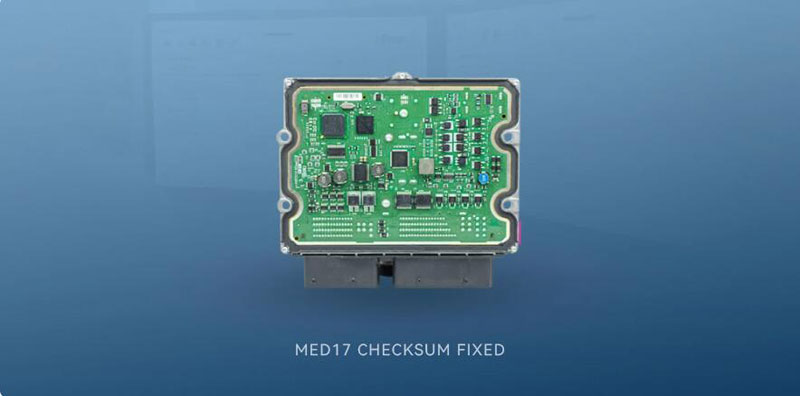
foxFlash is now able to perform the following operations:
software calculate checksum
On the following ECU reference:
Audi Bosch MED17.5 TC1766
Audi Bosch MED17.5.5 TC1766
Audi Bosch MED17.5.20 TC1766
Audi Temic VL381F TC1766
BMW Bosch EDC17C76 TC1793
Honda Bosch EDC17CP50 TC1797
Hyundai Bosch ME17.9.21.1 TC1724F
Jaguar Bosch MED17.9.7 TC1797
Kia Bosch ME17.9.21.1 TC1724F
Land Rover Bosch MED17.9.7 TC1797
Mercedes Bosch EDC17CP01 TC1796
Mercedes Bosch MED17.7.7 TC1793
Mercedes Bosch MED17.7.7 TC1797
Renault Bosch EDC17CP58 TC1767
Seat Bosch MED17.5 TC1766
Seat Bosch MED17.5.5 TC1766
Seat Bosch MED17.5.20 TC1766
Skoda Bosch MED17.5 TC1766
Skoda Bosch MED17.5 TC1766
Skoda Bosch MED17.5.5 TC1766
Skoda Bosch MED17.5.20 TC1766
Toyota Bosch EDC17C60 TC1793
Volkswagen (VW) Bosch ME17.5.6 TC1766
Volkswagen (VW) Bosch MED17.5 TC1766
Volkswagen (VW) Bosch MED17.5.5 TC1766
Volkswagen (VW) Bosch MED17.5.20 TC1766
Update method: Click the download button in foxFlash manager till all file donwload complete.
Autel IM608 2019 Silverado Car Starts IMMO Light Stays on Solution
Problem:
Any idea why the theft light won’t go away? Truck starts and runs but theft light stays on? It is a 2019 silverado LT programmed by Autel IM608.
Fault code: B3031 security controller in learn mode.

Solution:
If you did all keys lost you need to program 2 keys in. If you did add key and light is on just disconnect the battery for about 20-30 seconds (or 3 to 5 minutes).
Car is stuck in learning mode til 2nd key is added. Need 2 keys so it comes out of security mode.
If there are not 2 keys programmed to this vehicle that light will stay on. If there are 2 keys programmed then perform a battery reset and it should go away.
Feedback:
I figured it needed a 2nd key just had to get my hand on a 2nd key luckily my order came in today and we No longer have a theft light on anymore.
Xtool D8 BT vs Autel MS906 Pro vs Launch X431 Pro DYNO
What’s your thoughts on these 3 popular 8 inch diagnostic scanners?
First comes with a table comparison
| ITEM | XTOOL D8 BT | Autel MaxiSys MS906 PRO | Launch X431 PRO DYNO |
| Image | |||
| Firmware | |||
| VCI | IVCI-II | V200 | DBSCar VII |
| CPU | 1.8GHz 4-core | 2.2GHz+1.8GHz 8-core | 2.0GHz 4-core |
| OS | Android 5.1 | Android 10.0 | Android 10.0 |
| RAM | 2GB | 4GB | 4GB |
| Memory | 64GB | 128GB | 64GB |
| Screen | 8-inch | 8-inch | 8-inch |
| Resolutoin | 1024*768 | 1920*1200 | 1280*800 |
| Front Camera | 16Million Pixels | ||
| Rear Camera | 8Million Pixels | 16Million Pixels | 8Million Pixels |
| Temperature | -10 to 50℃ | 0 to 50℃ | 0 to 50℃ |
| Connection | Bluetooth/USB | Bluetooth/USB | Bluetooth/USB |
| Size | 274*175*33.8mm | 260*170*30mm | 234*166*39.5mm |
| Battery | 10000mAh, 3.7V | 11600mAh, 3.7V | 6300mAh, 7.6V |
| Software | |||
| All-system Diagnosis | √ | √ | √ |
| Special Function | 38 | 36 | 37 |
| Active Test | √ | √ | √ |
| Guided Function | √ | √ | √ |
| ECU Coding | √ | √ | √ |
| Repair Data | × | √ | √ |
| Remote Diagnosis | √ | √ | √ |
| DOIP | × | √ | √ |
| CAN FD | √ | √ | √ |
| Online Feedback | × | √ | √ |
| Software Mall | × | × | √ |
| ADAS | × | √ | √ |
| TPMS | × | × | √ |
| Key Programming | √ | √(Only IMMO in Special Function) | √ |
| IMMO Programming | × | × | √ |
| Oscilloscope | × | √ | √ |
| Sensor | × | × | √ |
| Digital Inspection | √ | √ | √ |
| Battery Test | × | √ | √ |
| FCA | × | √ | √ |
Summary:
1.Autel has the most powerful firmware including memory, battery capacity, camera.
2.Only Autel and X431 supports DOIP protocol.
3.X431 will be added key& immo programming function
4.Autel and X431 support DOIP, CAN FD, FCA.
5. X431 Pro Dyno has similar function as MS906 Pro, but x431 is much cheaper than MS906 pro.
Launch X431 Pro Elite and CRP919 BT Comparison
What's the difference between Launch X431 Pro Elite and CRP919E BT scanner?
Check the table comparison below:
| Item | Launch X431 Pro Elite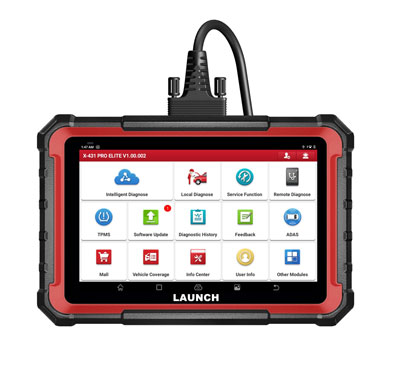 |
Launch CRP919 BT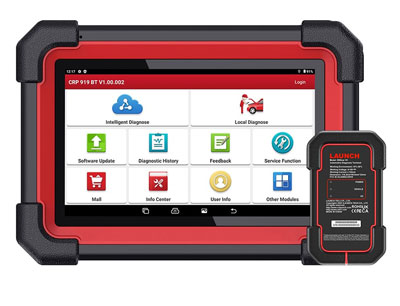
|
| Processor | 2.0Ghz 4-core | 2.0Ghz 4-core |
| RAM | 4GB | 4GB |
| ROM | 64GB | 64GB |
| Battery Capacity | 6000mAh/3.7V | 6300mAh/3.7V |
| Android version | Android 10.0 | Android 10.0 |
| Screen size | 8 inch | 7 inch |
| Screen resolution | 1280*800 | 1024*600 |
| WiFi | 2.4GHz/5G | 2.4GHz |
| Camera | Rear 8.0MP | Rear 8.0MP |
| Communication | USB | Bluetooth |
| VCI | DBScar VII | |
| Basic Functions (Read & Clear the codes and data stream) |
Yes | Yes |
| Full system diagnostic | Yes | Yes |
| Service Functions | 32+ | 32+ |
| Active Test | Yes | Yes |
| Auto VIN | Yes | Yes |
| Scan VIN/License | Yes | Yes |
| Remote Desk | Yes | Yes |
| Online Programming | No | Yes |
| Online Coding | Yes | Yes |
| Guided Function | Yes | Yes |
| TSGUN TPMS Add-on | Yes | Yes |
| BST360 Battery Tester Add-on | Yes | Yes |
| X-prog3 IMMO Add-on | Yes | No |
| Videoscope VSP600 Add-on | Yes | No |
| ADAS Calibration with add-on | Yes | No |
| Oscilloscope add-on module | Yes | No |
| Wi-Fi printer | Yes | Yes |
| FCA AutoAuth | Yes | Yes |
| CAN FD protocol | Yes | Yes |
| DoIP protocol | Yes | Yes |
| Multi-language | Yes | Yes |
| Update | 2 Years Free Update | 2 Years Free Update, $165 per year later. |
In Sum:
They have almost the same function. CRP919BT is the Bluetooth version alternative of Pro Elite.
Pro Elite is a 8 inch tablet, it is also compatible with X-prog3, videoscope, Oscilloscope, ADAS add-on modules, CRP919BT only compatible with BST360 and TSGUN TPMS modules.
Both have Global and EU/UK version. EU/UK has IP limitations and it is cheaper.
If need USB version, check Pro Elite, or CRP919 BT vice versa.
How to Use Launch SmartLink C with Toyota Techstream V18.00.008
oyota Techstream V18.00.008 software was tested working with Launch X431 SmartLink C J2534 passthru device.
First of all, download and install SmartLink C J2534 driver here
http://blog.obdii365.com/2023/04/12/download-launch-x431-smartlink-c-j2534-passthru-driver/
then download and install Techstream 18.00.008
http://blog.obdii365.com/2023/02/01/free-download-toyota-techstream-v18-00-008/
Run J2534Plus passthru check device is connected

Run techstream software, go to VIM Selection, select VCI as J2534Plus


Software is ready to use


How to Program Toyota Prius 2012 All Keys Lost with Autel KM100?
Toyota Prius C 2012 all keys lost is done.
Board 5290, 314.3mhz
Used XH 4D (not XM38) . Xhorse 4D is the first version of the Toyota smart key (xm28) never really worked for dual frequency or 8A/H chips, they took that old design and just made it for 4D single frequency Prox.
Generated on Xhorse VVDI Mini Key tool.
Gain Entry with Lishi Toy48. Used Direct read method (there is a guide on Youtube)
Once your in, plug in Autel KM100. Connect to phone hot spot as you need wifi for this.
Go Toyota/ System selection/Keyless CAN/Keyless Can (Again)
Back up immo data by OBD. Need to connect VCI to Km100 with the cable for this.
Save Immo dump and use it to generate analog key. Use km100 aerial to contact start button during add key operation. Job done.


Foxflash Update Peugeot Citroen MEVD17.2.7 BENCH BOOT
Foxflash tool released new software update on Sept. 6th, 2023.

BMW MINI BENCH BOOT READ & WRITE
September 06, 2023
BMW INSTALL Bosch MEVD17.2.7 Bench read/write
foxFlash is now able to perform the following operations:
- Bench Read
- Bench Write
- Boot Read
- Boot Write
On the following ECU reference:
Bosch MEVD17.2.7
- BMW Bosch MEVD17.2.7 BENCH BOOT
- Citroen Bosch MEVD17.2.7 BENCH BOOT
- Mini Bosch MEVD17.2.7 BENCH BOOT
- Peugeot Bosch MEVD17.2.7 BENCH BOOT
Update method: Click the download button in foxFlash manager till all file donwload complete.

