/image%2F1896381%2F20151209%2Fob_cb2b49_obd365-com.png)
How to Read and Wirte EDC16C34 with KT200/
KT200 Reading an old edc16c34 calculator in bdm with ktag bosch adapter to avoid welding.
eeprom/flash reading
Check cheksum written file with perfect Lsuite


Try and find shorter cables, as with BDM these need to be as short as possible
you can also make small start to place KT200 hardware above you bdm holder


Does Autel IM608 do BMW Benz Online Coding?
Does Autel IM608 have the ability to do online scn coding/programming for Mercedes and online programming for BMW ?
IM608 diagnostic function is the same as MaxiSys MS908S.
Programming No. The Benz and BMW Cloud based programming is not part of the IM608 functions, not thru the Autel clound server.
BMW online coding Yes and no Benz online SCN coding. It does the ecu coding, not much ECU programming, only few SCN and BMW module programming.
Check IM608/IM608 Pro diagnostic function, same as MS908.
| Function | Yes or No |
| Auto VIN | Yes |
| Scan VIN | No |
| Scan license | No |
| Remote Desk | Yes |
| Pre & Post Scan | Yes |
| WiFi printing | No |
| Main functions, Read/Clear DTC, Datastream | Yes |
| Service function | Yes |
| Special functions | Yes |
| Active test | Yes |
| Coding Function | |
| Benz online SCN coding | No |
| BMW online coding | Yes |
| Porsche online coding | Yes |
| VW online coding | Yes |
| Audi online coding | No |
| BMW idrive | Yes |
| VW Audi Skoda flash hidden functions | Yes |
| VW Audi Skoda Seat Guided function | Yes |
| Bentley guided function | Yes |
| Programming | |
| Benz online programming | No |
| BMW online programming | No |
| McLaren diagnosis | Yes |
| Tesla diagnostic | No |
| TPMS function | No |
| Oscilloscope MP408 | Yes |
| Endoscope MV105 MV108 | Yes |
How to Fix Autel IM508 IM608 Error Code 9?
Here comes the solution to Autel IM508/IM608 “Authorization check failed Error Code 9” problem.
.jpg)
Common solution:
Delete specific car software and download again.
Path: data manager> uninstall app> delete, update
Error code 9: Asian cars, Delete sd>scan>vehicle immo>Asia>Talos, then update
Error code 9: Chinese cars, Delete sd>scan>vehicel immo>Domestic>Conqueror, then update
Error code 9; Programmer, data manager> uninstall app> delete, update
KT200 Read FCA GPEC2A in Boot Mode
KT200 read Chrysler Dodge FCA GPEC2A all in boot no problem.
NEW BOOT MODE (BAM) for CONTINENTAL GPEC ECUs/PCMs used on 2015+ FCA Fiat, JEEP, Chrysler, Dodge
CONTINENTAL GPEC2A, GPEC3, GPEC4, GPEC4LM
Complete reading and writing Micro
Complete reading and writing Eeprom
Recovery and checksum available
Review 1:
I read and write gpec2a with kt200 full no problem on newest version 11.01.
Modified flash file into different format, modified flash dtc off with hptuner and reformatted back to dfb format. Checksum ok. no problems
Select Tool boot->Motorola Freescale bam->gpec2a protocol.
works good. Read took maybe 15 mins


this wire is cnf1 for kt200


Review 2).
I have tested in those PCMs (GPEC2A, GPEC3) with KT200 and read well but I did test writing to see if correct checksums.


NOTE:
KT200 only works with some PCMs with SPC5674 processor. It does not work with all, like original Dfox. “Unlock Patch” is required to unlock ECUs with different processors.
If there is no unlock function, genuine products such as Alientech and Dimsport are required.
KT200 BMW MSV80 MSV90 Pinouts
KT200 reads and writes BMW MSV80 and MSV90 without problem but work in boot mode (must open ecu). It is not working by OBD.
KT200 ecu programmer supports SIEMENS MSV70 Kline only, for BMW MVS80 is canbus not Kline.
MSV90 MVS80 should also be boot option.

SIEMENS MSV80 Vers.1 [ TC1796 INT.F.] – BMW
First of all you need to check which hardware version is in your hand. Version 1 is recognized by the presence of the NXP component shown in the figure:

Step 1: Password Search
To find the password, connect via OBD to the car.
Use the driver:
→ TOOLS BOOT MODE
→ INFINEON TRICORE Tool Password
→ OBD PASSWORD MDV80/90 BMW
→ Click on “Find Password” and follow the
software messages.
The password can also be found on the desk by connecting the following pinout.

Now that the password has been found it’s possible to read and write the control unit. See next step.
Step 2: READ AND WRITE ECU
Connect with the multifunction cable the following
pinout and the boot showed below.
Use the driver:
→ TOOLS BOOT MODE
→ INFINEON TRICORE Boot
→ SAK TC1796

SIEMENS MSV80 Vers.2 [ TC1796 INT.F.] – BMW
First of all you need to check which hardware version is in your hand. Version 2 is recognized by the absence of the NXP component shown in the figure:

Step 1: Password Search
To find the password, connect via OBD to the car.
Use the driver:
→ TOOLS BOOT MODE
→ INFINEON TRICORE Tool Password
→ OBD PASSWORD MSV80MSV90 BMW
→ Click on “Find Password” and follow the software messages.
The password can also be found on the desk by connecting the following pinout.

Now that the password has been found it’s possible to read and write the control unit. See next step.
Step 2: Read and Write ECU
Make two links as shown:
Move the component and the resistance as shown in figure:

Connect with the multifunction cable the following pinout and the boot shown below.
Use the driver:
→ TOOLS BOOT MODE
→ INFINEON TRICORE Boot
→ SAK TC1796

At the end of the work, before reconnecting the control unit on the car, restore the previously moved components and desolder the two links.
SIEMENS MSV90 [ TC1796 INT.F.] – BMW
Kit to use:
– Multifunction cable
– resistances of 1000 Ω
– 1 resistance of 2700 Ω
– OBD Cable (if password is searched on car)
Step 1: PASSWORD SEARCH
To find the password, connect via OBD to the car.
Use the driver:
→ TOOLS BOOT MODE
→ INFINEON TRICORE Tool Password
→ OBD PASSWORD MSV80/90 BMW
→ Click on “Find Password” and follow the software messages
The password can also be found on the desk by connecting the following pinout.

Now that the password has been found it’s possible to read and write the control unit. See next step.
Step 2: READ AND WRITE ECU
Connect with the multifunction cable the following
pinout and the boot shown below.
Use the driver:
→ TOOLS BOOT MODE
→ INFINEON TRICORE Boot
→ SAK TC1796


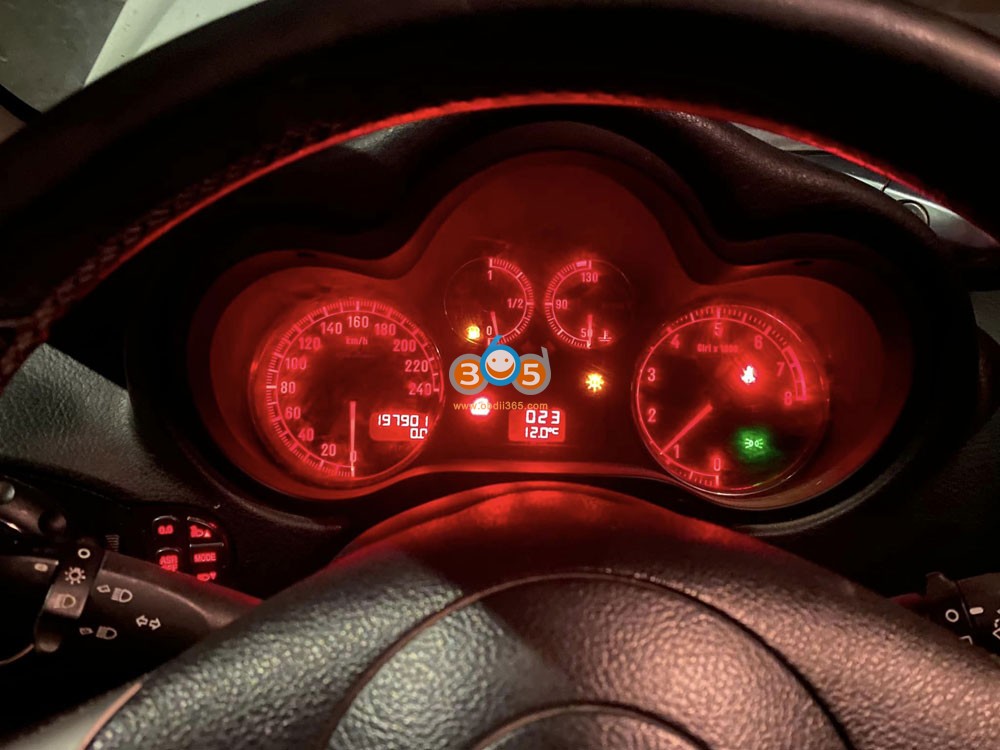
Alfa Romeo 147 2008 All Keys Lost with Autel KM100
First job of Autel MaxiIM KM100. Program Alfa Romeo 147 2008 ID48 system all keys lost successfully via OBD.


How to Add Brazilian AU Indian Cars to Autel MaxiIM?
Autel MaxiIM series KM100, IM508, IM608, IM608 Pro global versions don’t have Indian, Australian, Brazilian, and Malaysian car brands.
How to add these brands to MaxiIM devices?
1).
If need to activate Australian brands to MaxiIM, contact sales01@autel.com.au
For AU: Ford, Holden
2). If need to activate license for Latin American, Indian and Malaysian car brands, visit https://www.autel.com/wheretobuy.jhtml
Select the corresponding region and agent to pay for the license
Indian agents for: Maruti Sukuzi, Mahindra, TATA , Indian Datsun

Malaysian agents for Perodua, Proton

Brazilian, Latin American, South American agent for Fiat Brazilian, GM Brazilian, Maruti Suzuki, Mahindra


http://www.key-programmer.org/2022/11/08/how-to-add-indian-australian-brazilian-cars-to-autel-km100-im508-im608/
What Tool to Program Renault Captur II 2019- All Keys Lost?
Can Autel IM608 make Renault Captur 2021 all keys lost?
No, Captur after 2019 is Captur II. All keys lost is not supported. Add key is possible on OBD.

Which tool will do?
OBDSTAR X300 DP Plus will do this 100%. Confirmed.
OBDTSAR Renault server is back to normal. Just make sure you have the following.
With the green adapter, stable internet and stable battery power supply.
Followed every step.


Yanhua ACDP BMW FEM/BDC Mileage Reset Guide
Here is the instruction to reset BMW FEM/BDC mileage with Yanhua ACDP.
NOTE: Only resets mileage in BMW FEM/BDC system.
What’s required:
Yanhua mini acdp host
Module 2 interface board for FEM/BDC immo and mileage
Yanhua BMW FEM/BDC clip adapter
Procedure:
Remove and disassemble FEM/BDC module
Locate and clean eeprom chip 95128/95256


Connect FEM/BDC interface board and FEM clip adapter with FEM module and ACDP host

The new Yanhua FEM clip adapter is recommended, no easy to slip off
Go to BMW Programming BMW FEM/BDC-IMMO Mileage


Perform BMW FEM/BDC initial programming process
2 methods are provided to perform this process
Here we prefer method 1 Automatic ICP programming


Read Key FEM system information
The green indicator on the FEM interface board turns on
Detect VIN, mileage, key frequency and software info


Then it will auto check pin status connection

Once well connected, press OK to continue
Reading coding info.
Auto backup coding data

Downloading data and preprocessing FEM/BDC
This process will take about 20 minutes


Yanhua ACDP write coding data and save
Automatic ICP programming is completed.
Auto save new coding data.


Go back and select Reset Mileage
Make sure you finish BMW FEM/BDC initial programming process


Reset FEM/BDC mileage succeeded
Auto save new mileage data


Restore BMW FEM/BDC module.
https://www.obdii365.com/service/reset-bmw-fem-bdc-mileage-with-yanhua-mini-acdp.html
How to Convert Lonsdor Hyundai Kia 8A Smart Key Versions?
Lonsdor released Hyundai and Kia 8A smart key programming using PS6000B and PA7800B smart keys.
Here is the Hyundai Kia 8A smart keys supported vehicle list and shell.
Software and Frequency are convertible.
Supports P4 versions:
0000A3A3 / 000000D3 / 0000D3D3
0000B3B3 / 00002323 / 0000CECE
0000D0D0 / 0000D2D2 / 0000CDCD
Supported Models:
Chinese Hyundai/Kia
Sonata 9/15-17
Sonata 9 Hybrid/15-17
Beijing Hyundai 1X25/17-19
Kia K3/16-18
Beijing Hyundai IX25/-16 front
Beijing Hyundai 1X35/18+
Elantra leads 16-19
Global Hyundai/Kia
HYUNDAI Sonata 2015-2017
HYUNDAI Sonata Hybrid 2015-2017
HYUNDAI IX35 2018+
HYUNDAI Elantra 2016-2019
KIA K3 2016-2018

How to Program Hyundai Kia 8A Smart Key with Lonsdor K518?
Go to Special Functions-> Key Settings-> XD smart keys-> Smart key conversion
Convert PS6000B or PA7800B smart key to your original key version
Then go to the immobilizer menu, select corresponding models and program 8A smart key.

Autel IM608 Adds GM US 2020-2022 CAN FD Proximity
Big shout out to Autel MaxiIM IM608/IM508 tech support. It was super great to work with. MaxiIM new update GM CANFD 2020-2022 smart key programming. Autel CAN FD adapter is required.

Cadillac (US):
Sierra (2021) with smart key (CANFD)
(2021 -2022) with smart key (CANFD)
Chevrolet (US): Blazer with smart key, Camaro with smart key, Colorado with blade key, Equinox with smart key, Express with blade key, Malibu with smart key, Silverado 1500 with blade/smart key, Silverado 2500 with blade key (L83/LC8 engine), Silverado 3500 with blade/smart key. Spark with blade/smart key, Trailblazer with blade/smart key, Traverse with smart key and Trax with smart key. etc
How to Solve KT200 EDC17 OTP Protected Not Write
Some people have problems reading EDC17 with OTP protected. For example Corsa D EDC17C18, OTP protected and KT200 ecu programmer not write other file.


EDC17 OTP ERROR solution:- think due to try to write FULL flash not partial. Please read password before writing file for test.
Must read password first to write full flash.
If you have other editor that you can do compare on Original and Modified file to see if any noticeable differences i.e. address location shift, if want send KT200 technician both files as would like to address this problem.
Autel IM608 Cayenne Kessy Key Not Start Solution
Problem: Today i try to add a key to a Porsche Cayenne 2008 with Autel IM608.
Read data from ecu me7 -ok
7th bytes from working key – ok
Make dealer key – ok
Program key – no ok
Lost communication with car when i want to program.
The original key can always start the car. Any solution?
Possible solutions:
Solution 1)
Just went through this a couple days ago. I had to jump fuse 26 and 36 to wake up car gateway aka cluster and then used VVDI2 to do key learn with pin I got from Autel, because Autel kept losing communication, if you go under diagnostic and talk to Kessy you’ll see it talks just fine but some glitch in the learning process.
just put power to the car normally and then jump the power from a full time fuse like 36 to the one that needs to be powered up 26.

You might be able to do it through diagnostic mode using same instructions as vcds and a PIN code like you would with earlier Volkswagens.
Solution 2:
the solution was to pull kessy and eeprom it then make key on bench.. ended up being quicker than trying to add the key obd2.
Read and Write Opel ME7.6.2 with KT200 on K-line
KT200 ecu programmer read and write Opel Meriva Z14XEP k line full system eeprom and flash, checksum ok. Let me add that no other Chinese programmer (kess, mpps, galletto) was able to read ME7.6.2 on k line.


KT200 Opel Bosch ME7.6.2 bench pinout

KT200 will read Opel ME7.6.2 in boot mode as well.

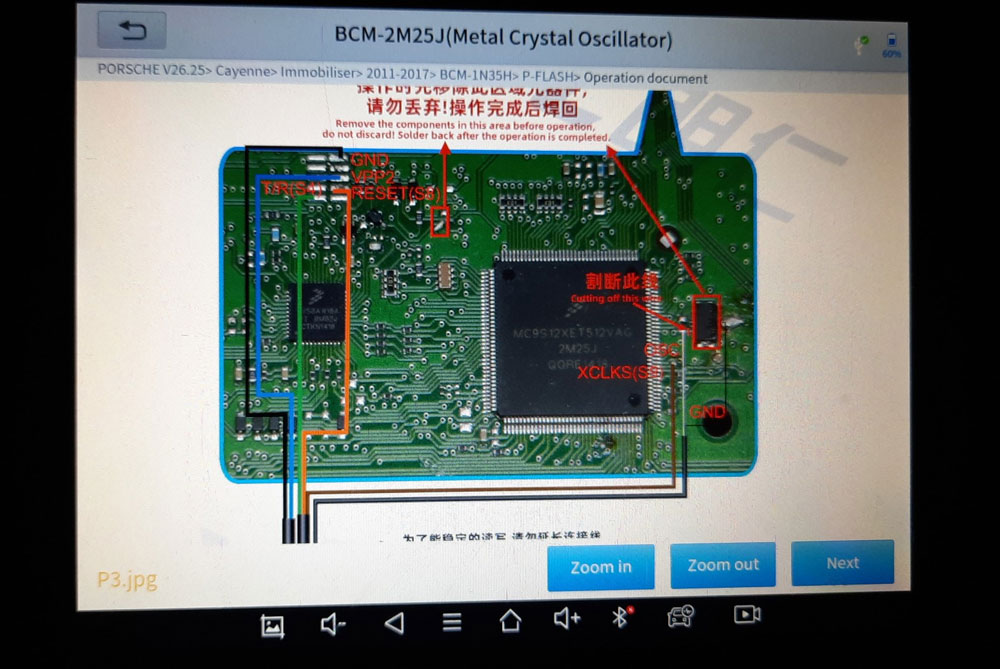
Tips to Program Porsche Cayenne 2020 Key
Porsche Cayenne 2020 year, is it possible to add a new key and what tool will do?
Yes, you must read bcm2 on bench to make dealer key and add you key via obd on car easy.
it is like this in the pictures
You can read BCM2 with vvdi prog, autel im608 xp400 or other programmers, then add key via OBD.