

/image%2F1896381%2F20151209%2Fob_cb2b49_obd365-com.png)
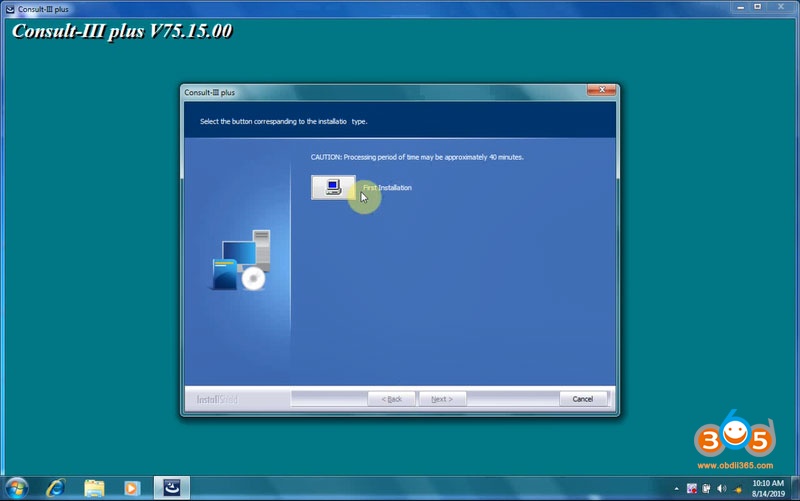
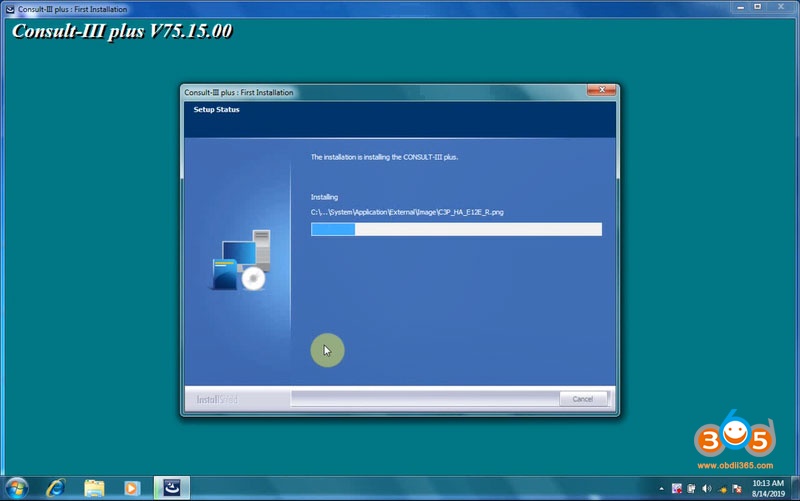
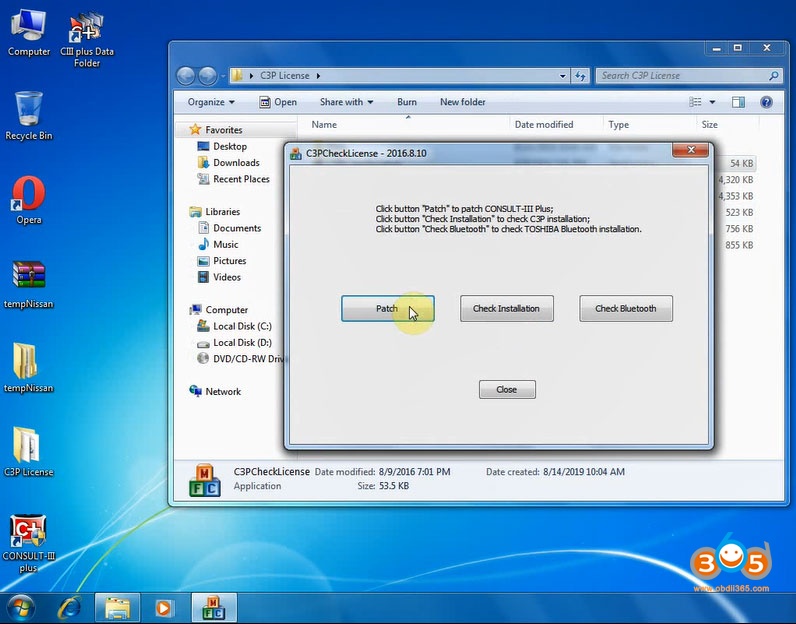
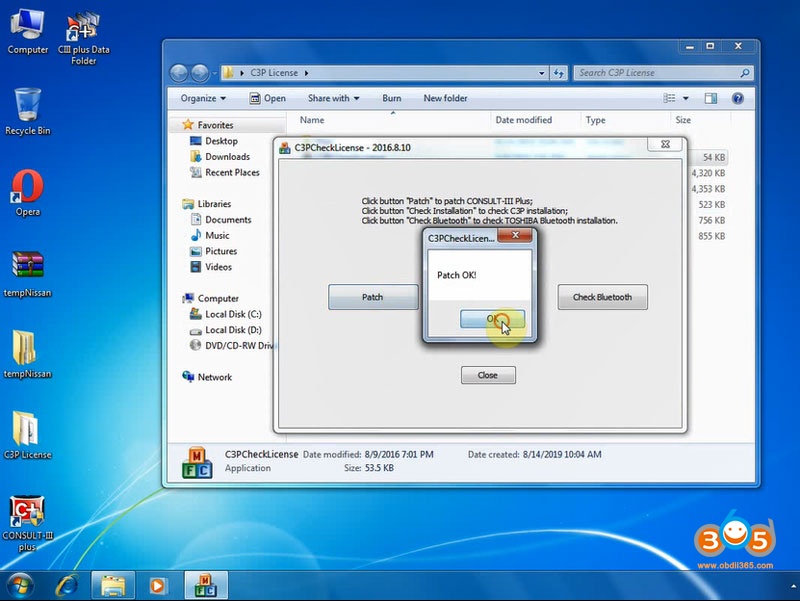
Consult III Plus V75.15 Software Installation Guide










Lonsdor K518ISE Opel Vauxhall IMMO Vehicle List
Here comes the Opel and Vauxhall immobilizer key programming list of Lonsdor K518ISE/K518S key programmer.
(Note: Models update till June 2019. Keep updating. Functions marked red below are under subscribed menu)
Opel IMMO Vehicle List
| OPEL\Read PIN code | Switch ignition on,Read pin code type1,Read pin code type2(via BCM),Read pin code type4,Read pin code type5,Read pin code type6,Read pin code type7,Read pin code type3, |
| OPEL\IMMO\Select from type\Type 1\Smart key | All smart key lost,Add smart key,Read key count,Clear fault code,Read PIN code, |
| OPEL\IMMO\Select from vehicle\Insignia\2009-2016\Smart key | All smart key lost,Add smart key,Read key count,Clear fault code,Read PIN code, |
| OPEL\IMMO\Select from type\Type 1\Immobilizer | All key lost,Add key,Read key count,Clear fault code,Read PIN code, |
| OPEL\IMMO\Select from vehicle\Insignia\2009-2016\Immobilizer | All key lost,Add key,Read key count,Clear fault code,Read PIN code, |
| OPEL\IMMO\Select from type\Type 2 | Clear fault code,Program key,Delete key,ECU immobilization,Program engine ECU,Reset immo ECU,Reset engine ECU,Turn on burglar alarm system,Read PIN code, |
| OPEL\IMMO\Select from vehicle\Agila | Clear fault code,Program key,Delete key,ECU immobilization,Program engine ECU,Reset immo ECU,Reset engine ECU,Turn on burglar alarm system,Read PIN code, |
| OPEL\IMMO\Select from vehicle\Astra\Astra-G | Clear fault code,Program key,Delete key,ECU immobilization,Program engine ECU,Reset immo ECU,Reset engine ECU,Turn on burglar alarm system,Read PIN code, |
| OPEL\IMMO\Select from vehicle\Calibra | Clear fault code,Program key,Delete key,ECU immobilization,Program engine ECU,Reset immo ECU,Reset engine ECU,Turn on burglar alarm system,Read PIN code, |
| OPEL\IMMO\Select from vehicle\Combo\1998- | Clear fault code,Program key,Delete key,ECU immobilization,Program engine ECU,Reset immo ECU,Reset engine ECU,Turn on burglar alarm system,Read PIN code, |
| OPEL\IMMO\Select from vehicle\Corsa\Corsa-B | Clear fault code,Program key,Delete key,ECU immobilization,Program engine ECU,Reset immo ECU,Reset engine ECU,Turn on burglar alarm system,Read PIN code, |
| OPEL\IMMO\Select from vehicle\Corsa\Corsa-C | Clear fault code,Program key,Delete key,ECU immobilization,Program engine ECU,Reset immo ECU,Reset engine ECU,Turn on burglar alarm system,Read PIN code, |
| OPEL\IMMO\Select from vehicle\Meriva\Meriva | Clear fault code,Program key,Delete key,ECU immobilization,Program engine ECU,Reset immo ECU,Reset engine ECU,Turn on burglar alarm system,Read PIN code, |
| OPEL\IMMO\Select from vehicle\Movano\1998-2001 | Clear fault code,Program key,Delete key,ECU immobilization,Program engine ECU,Reset immo ECU,Reset engine ECU,Turn on burglar alarm system,Read PIN code, |
| OPEL\IMMO\Select from vehicle\Omega-B\Immobilizer\Type 1(KWP) | Clear fault code,Program key,Delete key,ECU immobilization,Program engine ECU,Reset immo ECU,Reset engine ECU,Turn on burglar alarm system,Read PIN code, |
| OPEL\IMMO\Select from vehicle\Sintra | Clear fault code,Program key,Delete key,ECU immobilization,Program engine ECU,Reset immo ECU,Reset engine ECU,Turn on burglar alarm system,Read PIN code, |
| OPEL\IMMO\Select from vehicle\Tigra-B | Clear fault code,Program key,Delete key,ECU immobilization,Program engine ECU,Reset immo ECU,Reset engine ECU,Turn on burglar alarm system,Read PIN code, |
| OPEL\IMMO\Select from vehicle\Vectra-B | Clear fault code,Program key,Delete key,ECU immobilization,Program engine ECU,Reset immo ECU,Reset engine ECU,Turn on burglar alarm system,Read PIN code, |
| OPEL\IMMO\Select from type\Type 3 | Program key,Delete key, |
| OPEL\IMMO\Select from vehicle\Astra\Astra-H\Immobilizer | Program key,Delete key,Read PIN code,Read PIN code(type 6), |
| OPEL\IMMO\Select from type\Type 4 | Read key count,Program key, |
| OPEL\IMMO\Select from vehicle\Agila B\-2009 | Read key count,Program key, |
| OPEL\IMMO\Select from type\Type 5 | Read key count,Program key, |
| OPEL\IMMO\Select from vehicle\Agila B\2009- | Read key count,Program key, |
| OPEL\Remote system\Astra-H | Delete remote,Program remote, |
| OPEL\Remote system\Zafira-B | Delete remote,Program remote, |
| OPEL\Remote system\Vectra-C/Signum | Delete remote,Program remote, |
| OPEL\Remote system\Corsa\Corsa-D | Delete remote,Program remote, |
| OPEL\IMMO\Select from vehicle\Astra\Astra-H\Smart key\Program key | Immobilizer,Delete key,Key count, |
| OPEL\IMMO\Select from vehicle\Astra\Astra-H\Smart key\All key lost | All key lost, |
| OPEL\IMMO\Select from vehicle\Astra\Astra\2007\Smart key | Learn smart key,Delete all smart keys, |
| OPEL\Remote system\Astra\07 | Program remote,Delete remote, |
| OPEL\Remote system\Antara | Program remote,Delete remote, |
| OPEL\IMMO\Select from vehicle\Antara\2010-2013\Flip key | All key lost, |
| OPEL\IMMO\Select from vehicle\Omega-B\Immobilizer\Type 2(CAN) | All key lost,Add key,Read key count,Clear fault code,Read PIN code, |
| OPEL\IMMO\Select from vehicle\Omega-B\Smart key | Add smart key,All smart key lost,Read smart key count, |
| OPEL\IMMO\Select from type\Type 6 | All key lost, |
| OPEL\IMMO\Select from vehicle\Astra\Astra-J\2010-2016\Smart key | All smart key lost,Add smart key,Read key count,Clear fault code,Read PIN code, |
| OPEL\IMMO\Select from vehicle\Astra\Astra-J\2010-2016\Immobilizer | All key lost,Add key,Read key count,Clear fault code,Read PIN code, |
| OPEL\IMMO\Select from vehicle\Zafira\Zafira-C\2012-2016\Smart key | All smart key lost,Add smart key,Read key count,Clear fault code,Read PIN code, |
| OPEL\IMMO\Select from vehicle\Zafira\Zafira-C\2012-2016\Immobilizer | All key lost,Add key,Read key count,Clear fault code,Read PIN code, |
| OPEL\IMMO\Select from vehicle\Meriva\Meriva-B\Immobilizer | Add key,Delete key,Read PIN code, |
| OPEL\IMMO\Select from vehicle\Corsa\Corsa-D\Immobilizer | Add key,Delete key,Read PIN code, |
| OPEL\IMMO\Select from vehicle\Mokka\2012-2018\Smart key | All smart key lost,Add smart key,Read key count,Clear fault code,Read PIN code, |
| OPEL\IMMO\Select from vehicle\Mokka\2012-2018\Immobilizer | All key lost,Add key,Read key count,Clear fault code,Read PIN code, |
| OPEL\Remote system\Meriva | Program remote,Delete remote, |
| OPEL\IMMO\Select from vehicle\Signum\2003-2007 | Program key,Delete key,Read PIN code(ECU),Read PIN code(Info Display), |
| Opel\IMMO\Select from vehicle\Vivaro\2014-\System 1 | Read PIN code,Program key,Recover backup data, |
| Opel\IMMO\Select from vehicle\Vivaro\2014-\System 2 | Program key, |
| OPEL\IMMO\Select from vehicle\Zafira\Zafira-B | Program key,Delete key,Read PIN code(ECU),Read PIN code(Info Display), |
Lonsdor K518ISE review on Opel:
Lonsdor K518ISE Isuzu Immobilizer Vehicle List
Here comes the Isuzu immobilizer key programming list of Lonsdor K518ISE/K518S key programmer.
Models update till June 2019. Keep updating. Functions marked red below are under subscribed menu.
| ISUZU\D-MAX\Key\Type 1 (46 chip) | Program key,Delete key,Clear fault code,Clear fault code,Reset IMMO,Reset ECU,Program immo ECU (TransTron),Program immo ECU (delphi), |
| ISUZU\MU-7\Immobilizer\46 chip | Program key,Delete key,Clear fault code,Clear fault code,Reset IMMO,Reset ECU,Program immo ECU (TransTron),Program immo ECU (delphi), |
| ISUZU\D-MAX\Key\Type 2 | Passive access control programming and start system functions,Reset steering lock ECU,Reset engine ECU,Reset passive access control & start system control,Delete key,E-key registration,Program VIN, |
| ISUZU\MU-X\Smart key\Type 1 | Passive access control programming and start system functions,Reset steering lock ECU,Reset engine ECU,Reset passive access control & start system control,Delete key,E-key registration,Program VIN, |
| ISUZU\D-Max\Smart key | Add smart key,Delete smart key, |
| ISUZU\MU-X\Smart key\Type 2 | Add smart key,Delete smart key, |
| ISUZU\D-MAX\Remote | Program remote,Delete remote, |
| ISUZU\TF\IMMO 2008-2012 | Add key,Delete key,Clear fault code, |
| ISUZU\D-Max\Immobilizer\Type 3(48 chip) | Program key,Delete key,Read key data,Clear fault code, |
Lonsdor K518ISE review on Isuzu
How to Connect and Use Autel G Box for IM608?
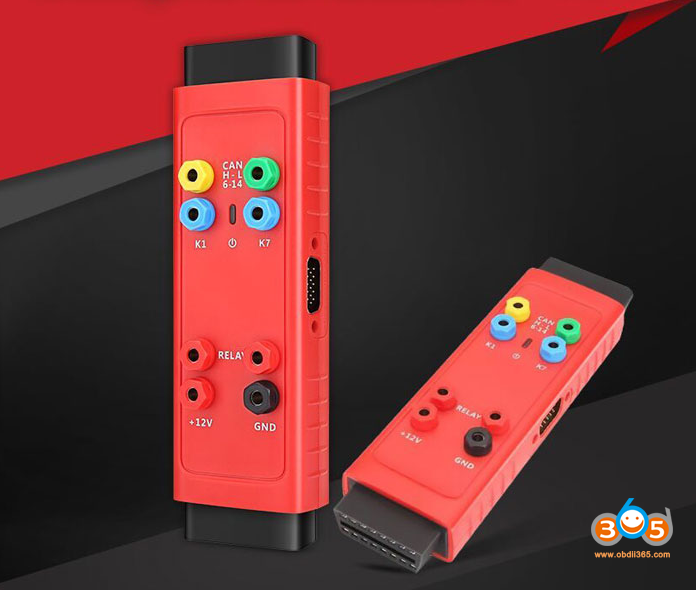
- Used for Mercedes all keys lost and password calculation (much faster)
- Used for Mercedes ECU data and EIS password calculation (much faster)
- Mercedes DAS3 can EIS/EZS all keys lost
- Save time to read W204 ECU data & W207 EIS by over 85%
- No need to remove and reinsert the key for W221 & W164 after 2009
- Help read and write BMW DME/DDE ISN in boot mode
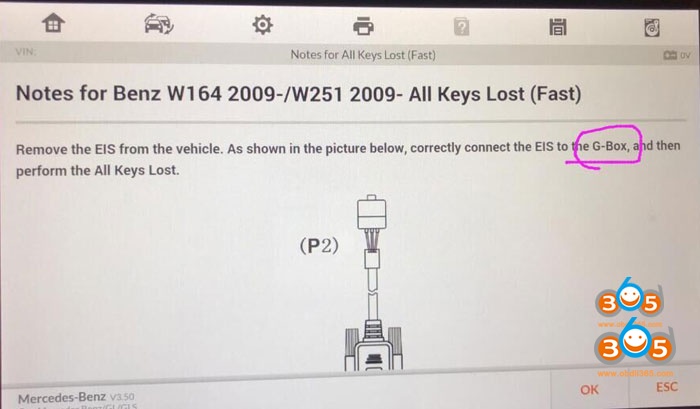
- Mercedes all keys lost – faster password calculation
- Mercedes all keys lost – no more repeated insertions and removables of ir simulator
- Mercedes all keys lost – can be programmed on the vehicle without removing the EIS
- Mercedes all keys lost, BMW DME/DDE ISN reading and writing in boot mode
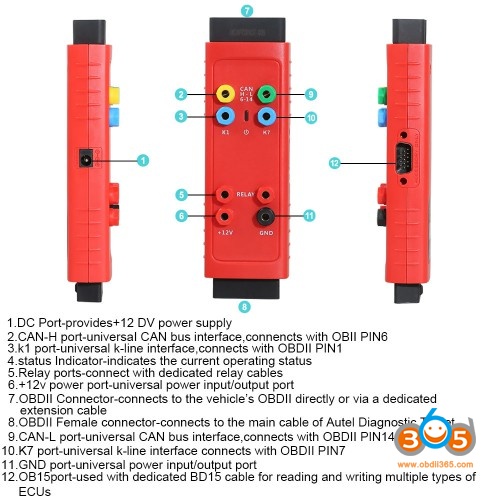
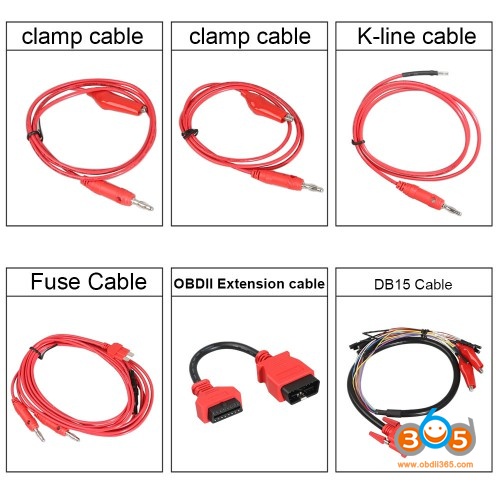
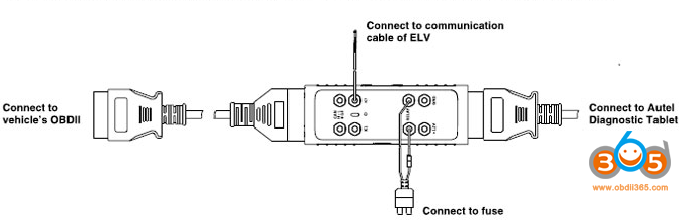
- connect the G-box to the car thru OBD port
- remove the fuse of EIS on the vehicle
- when the vehicle has an ELV, connect the K7 port and ELV plug using the supplied K-line cable
- connect the G-box to the Autel diagnostic tablet like MaxiIM IM608
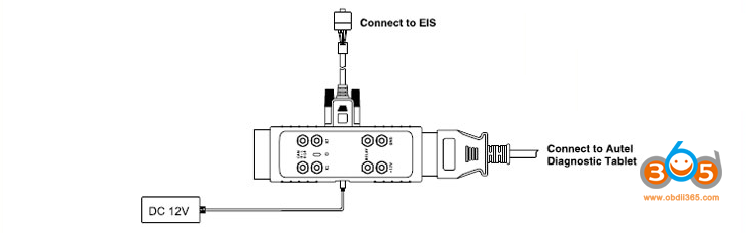
Lonsdor K518 Suzuki Immobilizer Vehicle List
Here comes the Suzuki immobilizer list of Lonsdor K518ISE/K518S key programmer.
Suzuki Global Vehicle List
| SUZUKI\China\Swift\2005- | Lost all key programming,Obtain immoID, |
| SUZUKI\China\Vitara\Immobilizer\Type 1 | Lost all key programming,Obtain immoID, |
| SUZUKI\China\Vitara\Immobilizer\Type 2 | Program key,Obtain immoID, |
| SUZUKI\China\Alto\Immobilizer | Program key,Obtain immoID, |
| SUZUKI\China\SX4\Immobilizer | Program key,Obtain immoID, |
| SUZUKI\China\Vitara\Immobilizer\Type 3 | Program key,Read immoID,Program key (without PIN), |
| SUZUKI\China\Vitara\Smart key | Program smart key (PIN required),Program smart key (without PIN),Obtain immoID, |
| SUZUKI\China\Alivio\Smart key | Program smart key (PIN required),Program smart key (without PIN),Obtain immoID, |
| SUZUKI\China\Alivio\Immobilizer | Program key,Read immoID,Program key (without PIN), |
| SUZUKI\China\Liana\Immobilizer\Type 1 | Lost all key programming,Obtain immoID, |
| SUZUKI\China\S-Cross\Smart key | Program smart key (PIN required),Program smart key (without PIN),Obtain immoID, |
| SUZUKI\China\Jimny\Immobilizer\Type 1 | Program key,Delete key,Register immobiliser, |
| SUZUKI\Japan\Ignis\Immobilizer | Program key,Delete key,Register immobiliser, |
| SUZUKI\China\Liana\Immobilizer\Type 2 | Program key,Delete key,Register immobiliser, |
| SUZUKI\China\Jimny\Immobilizer\Type 2 | Lost all key programming,Obtain immoID, |
| SUZUKI\China\Swift\2012- | Program smart key (PIN required),Program smart key (without PIN),Obtain immoID, |
| SUZUKI\USA\XL7(USA)\2007-2009\Immobilization | All key lost, |
| SUZUKI\China\Swift\2015-\Type 1 | Program key,Read immoID,Program key (without PIN), |
| SUZUKI\Japan\Baleno\Immobilizer\1996-2001 | Immobilizer,Delete ey, |
| SUZUKI\China\Kizashi\Smart key | Program smart key (PIN required),Program smart key (without PIN),Obtain immoID, |
| SUZUKI\Japan\Wagon R\Immobilizer\1998- | Program key,Delete key,Register immobiliser, |
| SUZUKI\China\Swift\2015-\Type 2 | Lost all key programming,Obtain immoID, |
| SUZUKI\Japan\Swift\Immobilizer\1996-2004 | Immobilizer,Delete ey, |
| SUZUKI\Japan\Alto\Immobilizer\1996-2002 | Immobilizer,Delete ey, |
| SUZUKI\Japan\Grand Vitara\Immobilizer\1996-2002 | Immobilizer,Delete ey, |
| SUZUKI\Japan\Grand Vitara\Immobilizer\2002- | Immobilizer,Delete ey, |
| SUZUKI\Japan\Vitara\Immobilizer\1996-2002 | Immobilizer,Delete ey, |
| SUZUKI\Japan\Vitara\Immobilizer\2002- | Immobilizer,Delete ey, |
| SUZUKI\Japan\Jimny\Immobilizer | Immobilizer,Delete ey, |
| SUZUKI\Suzuki(China)\New Alto | Program key,Obtain immoID, |
CHANGHE SUZUKI (China) Vehicle List
| CHANGHE SUZUKI\Wagon R\IMMO\TungThih IMMO | Reset engine ECU,Key detecting,Reset immo ECU,Delete key,Add old key,Clear fault code,Program engine ECU,ECU immobilization,Add new key,Read pin code,Program VIN,Lock immobiliser, |
| CHANGHE SUZUKI\Splash\IMMO\TungThih IMMO | Reset engine ECU,Key detecting,Reset immo ECU,Delete key,Add old key,Clear fault code,Program engine ECU,ECU immobilization,Add new key,Read pin code,Program VIN,Lock immobiliser, |
| CHANGHE SUZUKI\Splash\IMMO\TungThih IMMO | Program engine ECU,ECU immobilization,Program key,Reset EMS, |
| CHANGHE SUZUKI\Liana\IMMO 1 | Program key,Delete key,Register immobiliser, |
| CHANGHE SUZUKI\Liana\Keyless access | Learn new PEPS,Learn old PEPS,Key(keyless enter) programming,Key(immobiliser)programming,Learn SLU (steering solenoid valve),Reset EMS(Engine computer),Learn EMS(Engine computer), |
| CHANGHE SUZUKI\Liana\TungThih IMMO | Reset engine ECU,Key detecting,Reset immo ECU,Delete key,Add old key,Clear fault code,Program engine ECU,ECU immobilization,Add new key,Read pin code,Program VIN,Lock immobiliser, |
VXDIAG VCX NANO SPS GDS2 Another Positive Review
https://www.acdelcotds.com/subscriptions


USB Drivers, and software setup was a little bit of a PITA, its not exactly a straight forward install, and no instructions other than some youtube videos.
Lonsdor K518ISE Nissan Infiniti Immobilizer Car List
Here comes the Nissan & Infiniti immobilizer list of Lonsdor K518ISE/K518S key programmer.
(Note: Models update till June 2019. Keep updating. Functions are all under the free menu).
Nissan Global IMMO Vehicle List
| NISSAN\Select from type\Immobilizer\Electronic key(10) | Add key,Activate steering wheel lock,Add key(fixed code), |
| NISSAN\Select from type\Immobilizer\Electronic key(E0) | Add key, |
| NISSAN\Select from type\Immobilizer\Electronic key(12) | Add key,Add key(fixed code), |
| NISSAN\Select from type\Immobilizer\Auto retrieve type | Add key, |
| NISSAN\Select from type\Remote\Type 1 | Add remote,Delete remote, |
| NISSAN\Select from type\Smart key\4-digit PIN code\Without key slot-knob type 1 | Program smart key,Delete smart key,Program steering lock, |
| NISSAN\Select from type\Smart key\New 20-digit rolling code\Teana-VIP(2013-)\Type 1(rolling code) | Program smart key, |
| NISSAN\Select from type\Smart key\New 20-digit rolling code\Cima(2013-)\Type 1(rolling code) | Program smart key, |
| NISSAN\Select from type\Smart key\New 20-digit rolling code\JX35(2013-)\Type 1(rolling code) | Program smart key, |
| NISSAN\Select from type\Smart key\New 20-digit rolling code\QX60(2013-)\Type 1(rolling code) | Program smart key, |
| NISSAN\Select from type\Smart key\New 20-digit rolling code\Murano\Type 1(rolling code) | Program smart key, |
| NISSAN\Select from type\Smart key\New 20-digit rolling code\Q50\Type 2(rolling code) | Program smart key, |
| NISSAN\Select from type\Smart key\New 20-digit rolling code\X-Trail(2013-)\Type 3(rolling code) | Program smart key, |
| NISSAN\Select from type\Smart key\New 20-digit rolling code\Qashqai(2015-)\Type 3(rolling code) | Program smart key, |
| NISSAN\Select from type\Smart key\4-digit PIN code\without key slot-knob type 2 | Program smart key,Delete smart key, |
| NISSAN\Select from type\Smart key\4-digit PIN code\With key slot-button type 1 | Program smart key, |
| NISSAN\Select from type\Smart key\4-digit PIN code\With slot-button type 2 | Program smart key,Clear fault code, |
| NISSAN\Select from type\Smart key\4-digit PIN code\Without slot-button type 1 | Program smart key, |
| NISSAN\Select from type\Immobilizer\New 20-digit rolling code | Add key, |
| NISSAN\Select from type\Immobilizer\Activate direction lock | Activate steering wheel lock, |
| NISSAN\Select from type\Smart key\4-digit PIN code\Activate direction lock | Activate steering wheel lock, |
| Nissan\Select from type\Smart key\12-digit PIN\All | Smart key,Key count, |
| Nissan\Select from type\Immobilizer\12-digit PIN-type2(CAN) | Smart key,Key count, |
| Nissan\Select from type\Immobilizer\12-digit PIN-type1(KWP) | Program key,Key count, |
| Nissan\Read BCM code and release directional lock(4-digit PIN) | Release steering lock,Read BCM inner code, |
| NISSAN\Select from type\Smart key\4-digit PIN code\Without keyslot-press-type 2 | Read BCM inner code,Release steering lock,Program smart key, |
| NISSAN\Select from vehicle\Asia\Sunny\Smart key | Read BCM inner code,Release steering lock,Program smart key, |
| NISSAN\Select from vehicle\Asia\350Z\2003-\NATS 5 | Add key,Add key(fixed code), |
| NISSAN\Select from vehicle\Asia\X-Trail\2017\With smart | Program smart key, |
| NISSAN\PIN calculator | Type 1,Type 2,Type 3 (20-bit rolling code/PIN), |
| NISSAN\Select from type\Remote\Type 2 | Delete remote,Add remote, |
ZHENGZHOU NISSAN (China) IMMO Vehicle List
| ZHENGZHOU NISSAN\IMMO\Succe 1.5\Industrial traffic IMMO | Immobilization,Program engine,Reset engine,Reset immobiliser,Delete key,Program key,Reset PIN code,Clear fault code,Read pin code, |
| ZHENGZHOU NISSAN\IMMO\Reach\Industrial traffic IMMO | Immobilization,Program engine,Reset engine,Reset immobiliser,Delete key,Program key,Reset PIN code,Clear fault code,Read pin code, |
| ZHENGZHOU NISSAN\IMMO\Odin diesel\Industrial traffic IMMO | Immobilization,Program engine,Reset engine,Reset immobiliser,Delete key,Program key,Reset PIN code,Clear fault code,Read pin code, |
| ZHENGZHOU NISSAN\IMMO\Succe 1.6/2.0\Lianchuang IMMO | Write immo VIN code,Write engine VIN code,Engine ECU detection,Read VIN code,Reset engine ECU,Program engine ECU,Program whole system,Read key count,Add key,Delete key,Detect key,Clear fault code,Read pin code, |
| ZHENGZHOU NISSAN\IMMO\NV200\Type 2 | Add key,Activate steering wheel lock, |
| ZHENGZHOU NISSAN\PEPS\NV200\Smart key(4C) | Program smart key,Delete smart key,Program steering lock, |
| ZHENGZHOU NISSAN\PEPS\Dongfeng MX6\Smart key(4C) | Program smart key,Delete smart key,Program steering lock, |
| ZHENGZHOU NISSAN\IMMO\Dongfeng MX6 | Add key,Activate steering wheel lock, |
| ZHENGZHOU NISSAN\IMMO\NV200\Type 1 | Add key,Activate steering wheel lock, |
| ZHENGZHOU NISSAN\Read PIN code\Succe 1.6/2.0\Read PIN of Lianchuang IMMO | Read PIN code, |
| ZHENGZHOU NISSAN\Release directional lock | Release steering lock, |
| ZHENGZHOU NISSAN\PEPS\Dongfeng MX5\Smart key | Add smart key, |
Lonsdor K518ISE review on Nissan/Infiniti:
OEM Benz C6 DoIP Xentry VCI Configuration
How to configure OEM Benz C6 Xentry VCI Mercedes Benz diagnostic interface?

Procedure:
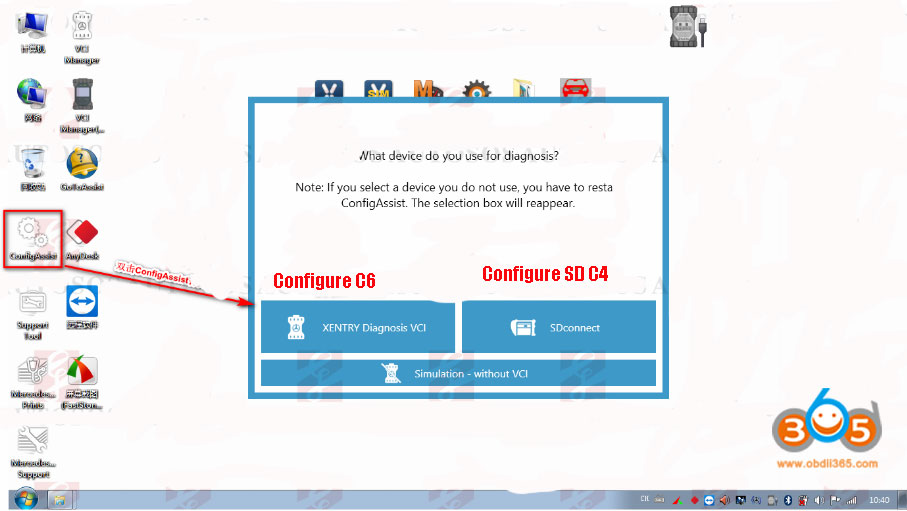
Double click "ConfigAssist" on the desktop, select XENTRY Diagnosis VCI

Click on Configure

Press Continue

Press Continue
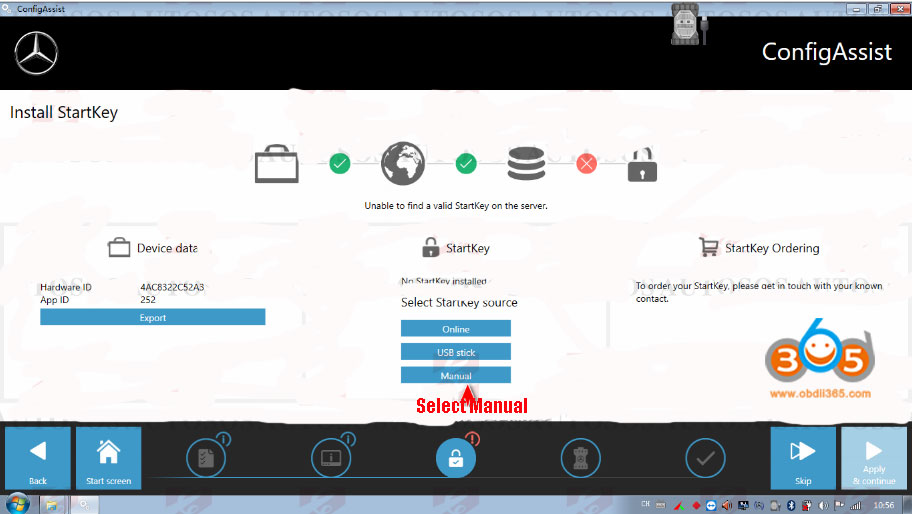
Select Manual and enter StartKey

Save StartKey

StartKey installed successfully. Press OK to continue

Register success. Press Continue.
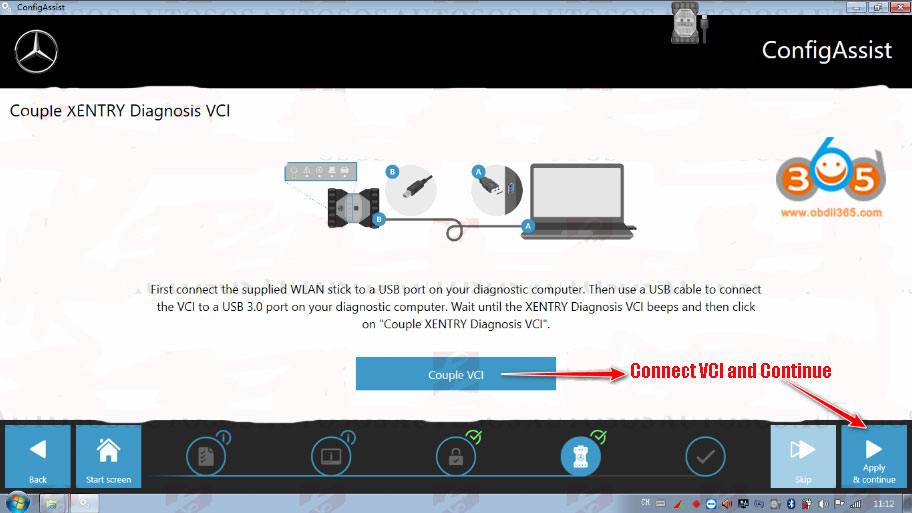
Click on "Couple VCI" to connect VCI

Configuration success. Quit.
http://www.obdii365.com/service/configure-open-benz-c6-xentry-vci.html
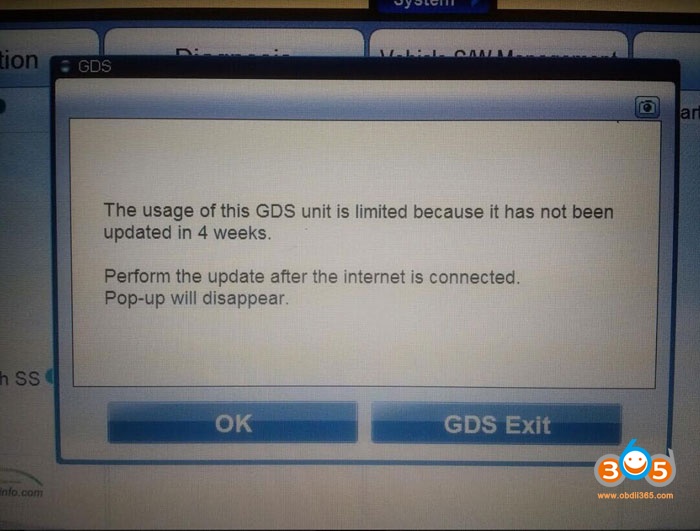
Hyundai GDS unit limited perform update Error Solution
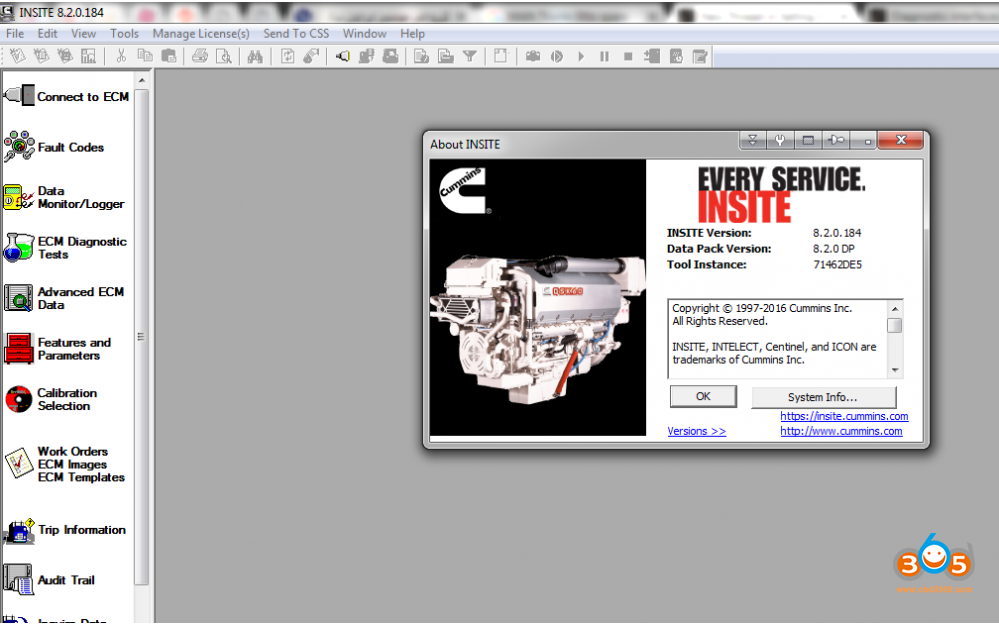
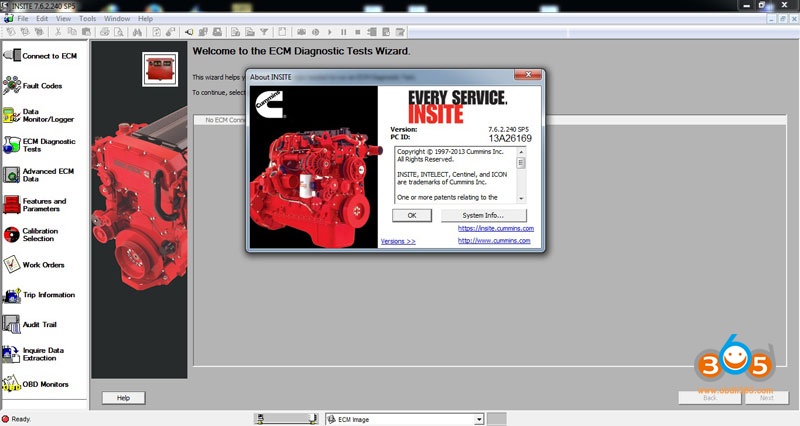
Cummins insite 8.5 tested OK with Inline 6


Year: [03.2019]
Make: Cummins
Region: WorldWide
Language: English
OS: Windows 7 32 bit, Windows 7 64 bit, Windows 8/8.1 32 bit, Windows 8/8.1 64 bit, Windows 10 32 bit, Windows 10 64 bit
• Quick access to trip information
• Adjust parameters and review/clear fault information quickly and easily
• Easy-to-follow troubleshooting assistance
• Wiring and sensor location diagrams
• Store engine and trip information for future use, or as programming templates
Cummins INSITE v8.5 Pro is a PC-based software application that provides quick and easy access to your engines electronic performance information, which enables faster service turnaround times. INSITE helps to ensure accurate procedures and diagnosis and limit downtime while increasing productivity and profits.
The current version is v8.5 with professional level access.
With step-by-step diagnostics, built-in engine drawings and schematic diagrams, working with INSITE is easy.
Using this software application will reduce troubleshooting time, errors and incorrect procedures and quickly get your vehicle back on the road again.


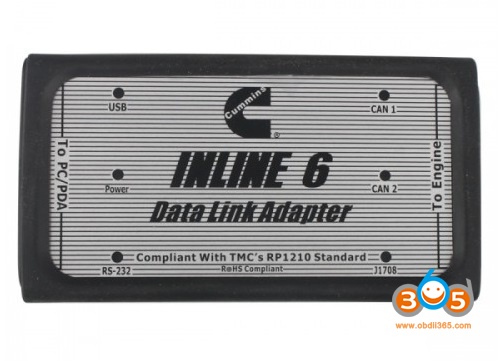
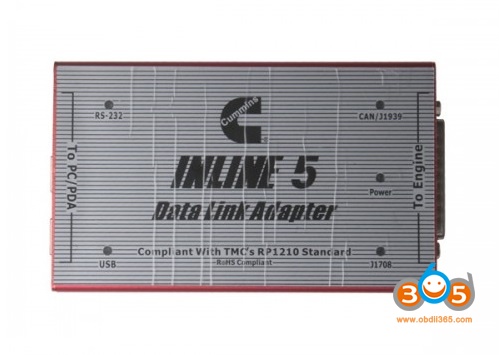
- Inline7 runs the same driver as Inline6
- Software activation is done via server. Need to confirm by server and it may take some time, after success, the software is combined with your computer.
- Do not directly open the Inline 8.3 after installed, you need to go through the server software and use Inline 8.3.
- After Inline 8.3 is authorized successfully, users can use 3 years for free for 70 times, generally the user is supposed to get authorization every month (that is within 3 years, after the times is used up, users can get authorization by themselves). After 3 years, you need to pay extra license.
- The Calibrations in the Inline 7 U disk can be used for 6 months only, after 6 months later you can search “Inline Calibrations”online and download to use.
Program Dodge RAM key with Xtool X100 Pad on Bench
Test: xtool x100 pad bench programming Dodge RAM immobilizer function
Result: Success !
Disclaimer:
The test was carried out by Mexican expert. You are at your risk.
Instructions:
set up bench connection


connect module with VCI module and x100 pad, connect another end to key lock EIS (with key inserted) and power supply


In X100 pad, select Immobilizer->Chrysler->Immobiliser/Fobik (WCM)->Auto detect
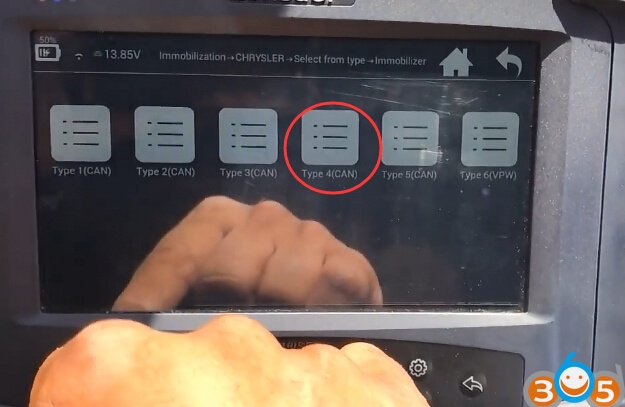
Auto detect Type 4


Select Read security code

Read pin code success

Then choose to program new key/old key and follow xtool x-100 pad prompts until success.
Done.
http://www.key-programmer.org/2019/08/14/program-dodge-ram-key-with-xtool-x100-pad-on-bench/
Lonsdor K518 Chrysler Dodge and Jeep Vehicle List
CHRYSLER\Select from type\Immobilizer\Type 1(CAN) Add new key,Add old key,Add remote,Detect key count,Delete key,
CHRYSLER\Select from type\Immobilizer\Type 2(CAN) Read PIN code,Add new key,Delete key,Key count,Add old key,
CHRYSLER\Select from type\Immobilizer\Type 3(CAN) Read pin code,Add key,Delete key,Key count,
CHRYSLER\Select from type\Immobilizer\Type 4(CAN) Read pin code,Add key,Delete key,Key count,
CHRYSLER\Select from type\Immobilizer\Type 5(CAN) Add key,Delete key,Key count,Add remote,Read PIN code,
CHRYSLER\Select from type\Smart key\Type 1(CAN) Add smart key,Delete smart key,Read PIN code,
CHRYSLER\Select from type\Remote\Type 4(CAN) Add remote,Read pin code,
CHRYSLER\Select from type\Remote\Type 3(VPW) Add remote,
CHRYSLER\Select from type\Remote\Type 2(VPW) Add remote,
CHRYSLER\Select from type\Immobilizer\Type 6(VPW) Add key,Delete key,Key count,
CHRYSLER\Select from vehicle\Asia\300\2011-2014\Smart key Add smart key,Delete smart key,Read PIN code,
CHRYSLER\Select from vehicle\Asia\Freemont\2011-\Smart key Add smart key,Delete smart key,Read PIN code,
CHRYSLER\Select from vehicle\Asia\300M\1999-2000\Remote Add remote,
CHRYSLER\Select from vehicle\Asia\Concorde\1998-2004\Remote Add remote,
CHRYSLER\Select from vehicle\Asia\LHS\1999-2001\Remote Add remote,
CHRYSLER\Select from vehicle\Asia\PT Cruiser\2001-2005\Remote Add remote,
CHRYSLER\Select from vehicle\Asia\Sebring\2001-2006\Remote Add remote,
CHRYSLER\Select from vehicle\Asia\Town and Country\2001-2003\Remote Add remote,Delete remote,
CHRYSLER\Select from type\Remote\Type 1(VPW) Add remote,
CHRYSLER\Select from type\Remote\Type 5(VPW) Add remote,Delete remote,
CHRYSLER\Select from type\Remote\Type 6(VPW) Add remote,
CHRYSLER\Select from type\Remote\Type 7(VPW) Add remote,
CHRYSLER\Select from type\Remote\Type 8(VPW) Add remote,
CHRYSLER\Select from vehicle\Asia\200\2015-\Smart key Read PIN code,Add smart key,Delete smart key,
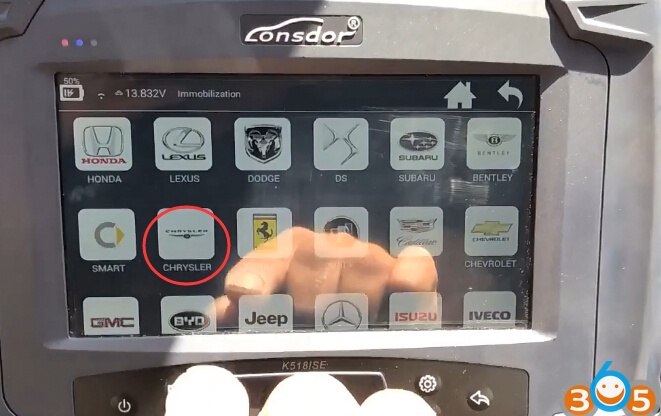
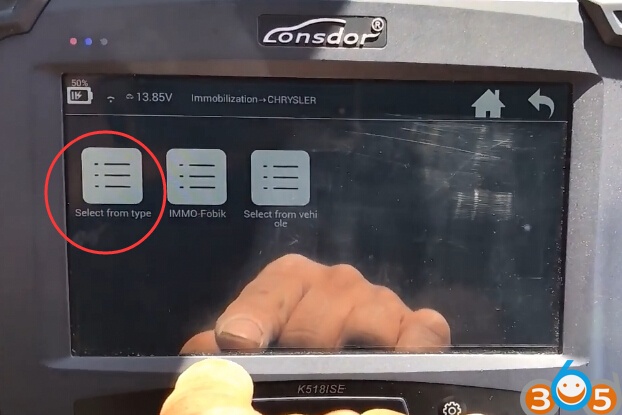

DODGE\Select from type\Remote\Type 2(VPW) Add remote,
DODGE\Select from type\Remote\Type 3(VPW) Add remote,
DODGE\Select from type\Remote\Type 4(CAN) Add remote,Read pin code,
DODGE\Select from type\Remote\Type 5(VPW) Add remote,Delete remote,
DODGE\Select from type\Remote\Type 6(VPW) Add remote,
DODGE\Select from type\Remote\Type 7(VPW) Add remote,
DODGE\Select from type\Remote\Type 8(VPW) Add remote,
DODGE\Select from vehicle\Asia\Caravan\2001-2003\Remote Add remote,Delete remote,
DODGE\Select from vehicle\Asia\Dakota\2001-2004\Remote Add remote,
DODGE\Select from vehicle\Asia\Durango\2001-2003\Remote Add remote,
DODGE\Select from vehicle\Asia\Interpid\1998-2004\Remote Add remote,
DODGE\Select from vehicle\Asia\Neon\2000-2005\Remote Add remote,
DODGE\Select from vehicle\Asia\Ram\2002-2005\Remote Add remote,
DODGE\Select from vehicle\Asia\Stratus\4 door\2001-2006\Remote Add remote,
DODGE\Select from type\ Smart key\Type 1(CAN) Add smart key,Delete smart key,Read PIN code,
DODGE\Select from type\ Smart key\Type 2(CAN) Read PIN code,Add smart key,Delete smart key,Key count,
DODGE\Select from vehicle\Asia\Challenger\2015-\Smart key Add smart key,Delete smart key,Read PIN code,
DODGE\Select from vehicle\Asia\Charger\2011-2014\Smart key Add smart key,Delete smart key,Read PIN code,
DODGE\Select from vehicle\Asia\Magnum\2011-\Smart key Add smart key,Delete smart key,Read PIN code,
DODGE\Select from vehicle\Asia\Viper\2013-\Smart key Add smart key,Delete smart key,Read PIN code,
DODGE\Select from type\Immobilizer\Type 1(CAN) Add new key,Add old key,Add remote,Detect key count,Delete key,
DODGE\Select from type\Immobilizer\Type 2(CAN) Read PIN code,Add new key,Delete key,Key count,Add old key,
DODGE\Select from type\Immobilizer\Type 3(CAN) Read pin code,Add key,Delete key,Key count,
DODGE\Select from type\Immobilizer\Type 4(CAN) Read pin code,Add key,Delete key,Key count,
DODGE\Select from type\Immobilizer\Type 5(CAN) Add key,Delete key,Key count,Add remote,Read PIN code,
DODGE\Select from type\Immobilizer\Type 6(VPW) Add key,Delete key,Key count,
DODGE\Select from vehicle\Asia\Dart\2013-\FOBIK Add key,Delete key,Read PIN code,
DODGE\Select from vehicle\Asia\Ram\2013-\FOBIK Add key,Delete key,Read PIN code,
DODGE\Select from vehicle\Asia\Avenger\2008-2014\Immobilizer Read PIN code,Add new key,Delete key,Key count,Add old key,
DODGE\Select from vehicle\Asia\Caravan\2001-2003\Immobilizer Read PIN code,Add new key,Delete key,Key count,Add old key,
DODGE\Select from vehicle\Asia\Caravan\2004-2007\Immobilizer Add key,Delete key,
DODGE\Select from vehicle\Asia\Caravan\2008-2009\Immobilizer Read pin code,Add key,Delete key,Key count,
DODGE\Select from vehicle\Asia\Caravan\2010-2014\Immobilizer Read pin code,Add key,Delete key,Key count,
DODGE\Select from vehicle\Asia\Caravan\2010-2014\Keyless-go(sync smart function) Sync smart function,
DODGE\Select from vehicle\Asia\Ram\2002-2005\Immobilizer Add key,Delete key,Key count,
DODGE\Select from vehicle\Asia\Ram\2006-2008\Immobilizer Read PIN code,Add new key,Delete key,Key count,Add old key,
DODGE\Select from vehicle\Asia\Ram\2009-2012\Immobilizer Read pin code,Add key,Delete key,Key count,
DODGE\Select from vehicle\Asia\Ram\2013-\Smart key Add smart key,Delete smart key,Read PIN code,



JEEP\Select from vehicle\USA\Cherokee\2014-\Keyless-go Read pin code,Add key,Delete key,
JEEP\Select from vehicle\USA\Cherokee\2014-\Mechanical key Read pin code,Add key,Delete key,
JEEP\Select from vehicle\USA\Grand Cherokee\2014-\Smart key Read PIN code,Add smart key,Delete smart key,Key count,
JEEP\Select from vehicle\USA\Compass\2007-2017\Immobilizer Read PIN code,Add new key,Delete key,Key count,Add old key,
JEEP\Select from vehicle\USA\Renegade\2014-\Smart key Read PIN code,Add key,Delete key,
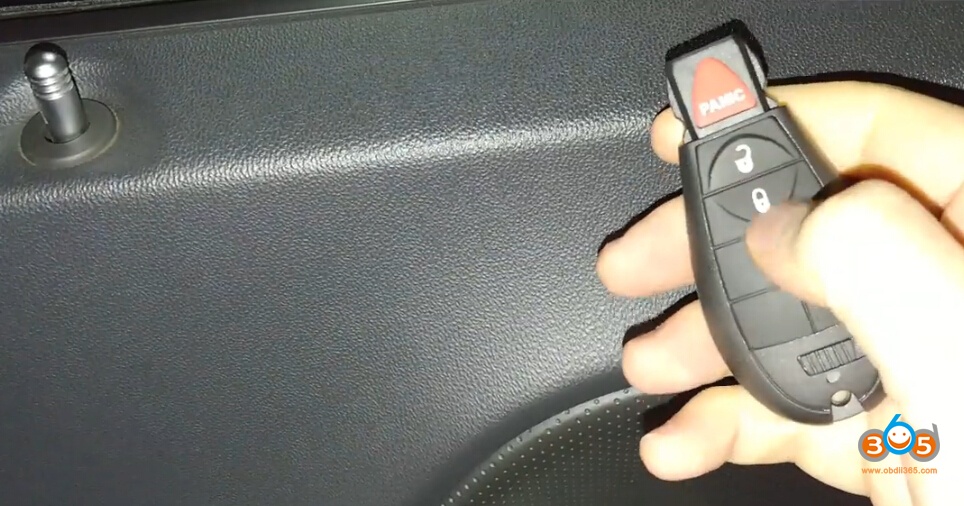
JEEP\Select from vehicle\Asia\Grand Cherokee\2011-2013\FOBIK Read PIN code,Synch smart key,Add key,Delete key,
JEEP\Select from type\IMMO-Fobik Read PIN code,Synch smart key,Add key,Delete key,
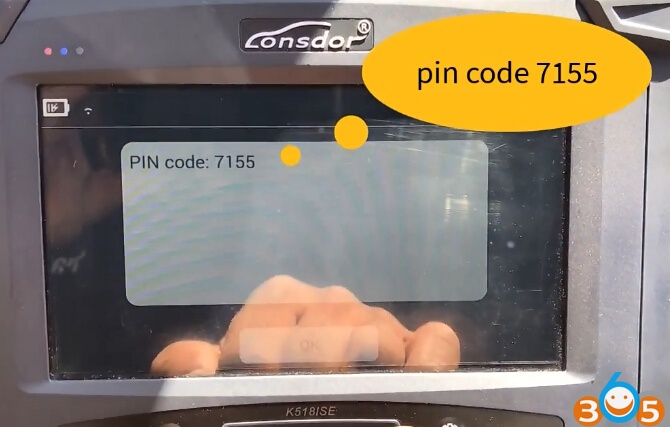
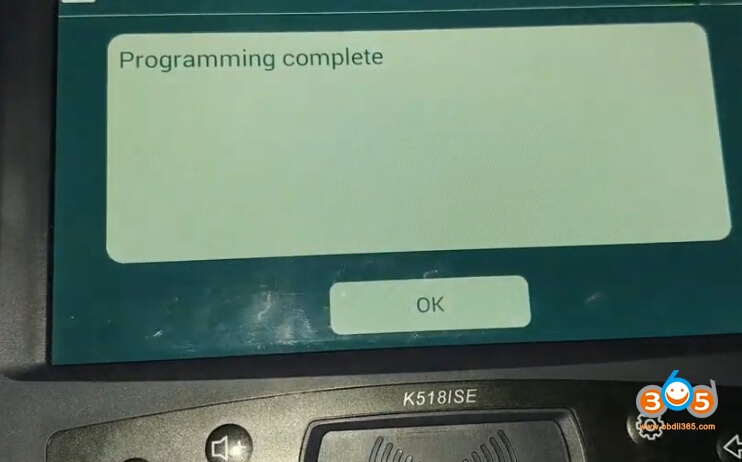
Lonsdor K518ISE Program Jeep Patriot 2017 Key Success
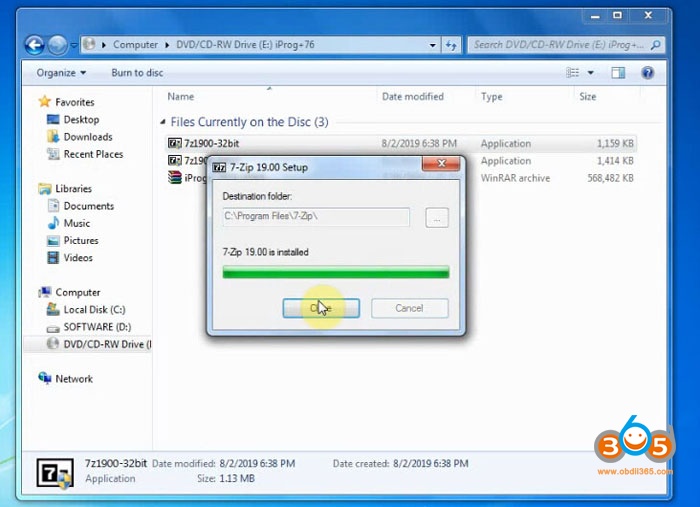
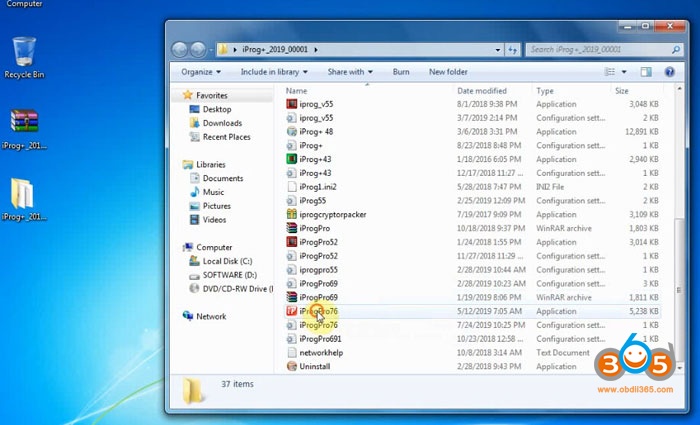
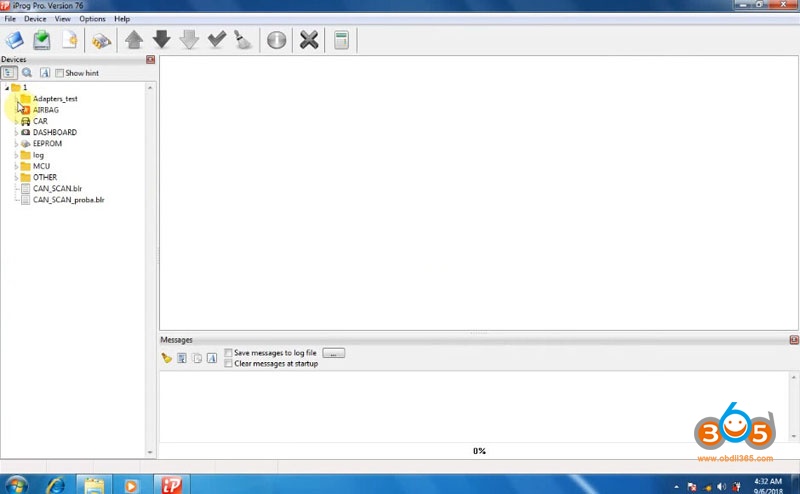
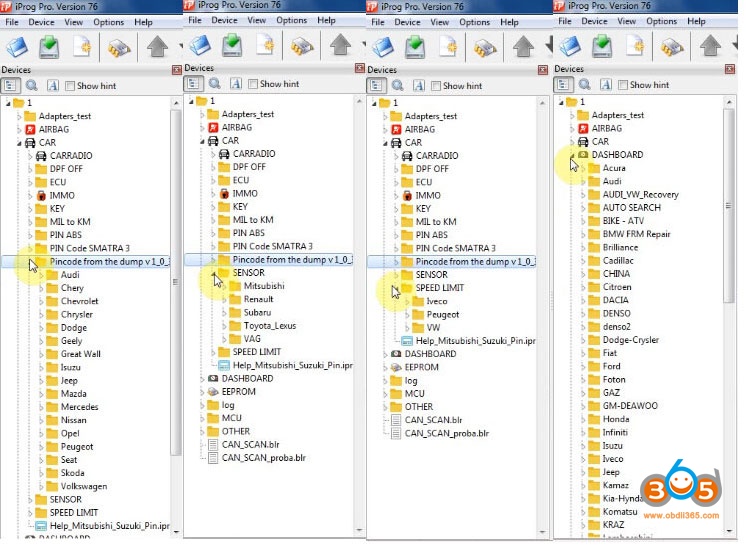
iProg+ Pro V76 Software Download and Installation
password: fm63a3







Toyota Techstream V14.20.019 Installation without Registration Key

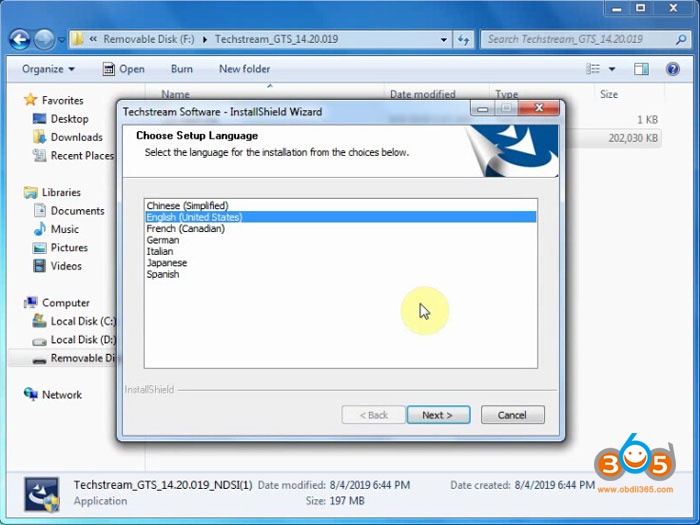
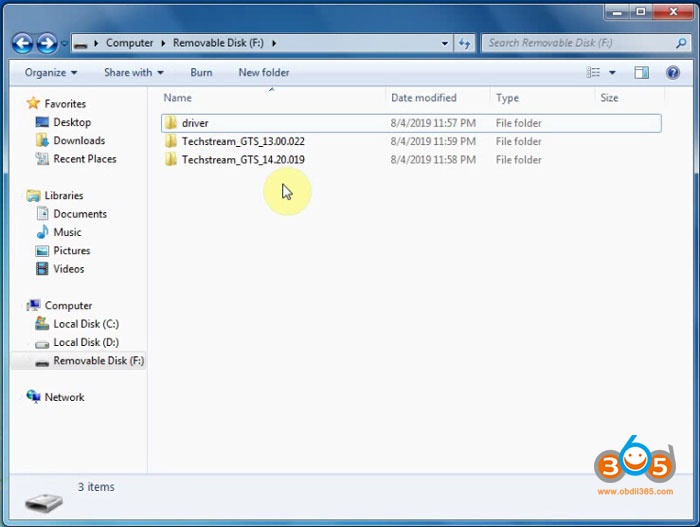

Install Techstream_GTS-14.20.019-NDSI(1)
Select Software language
Agree license agreement

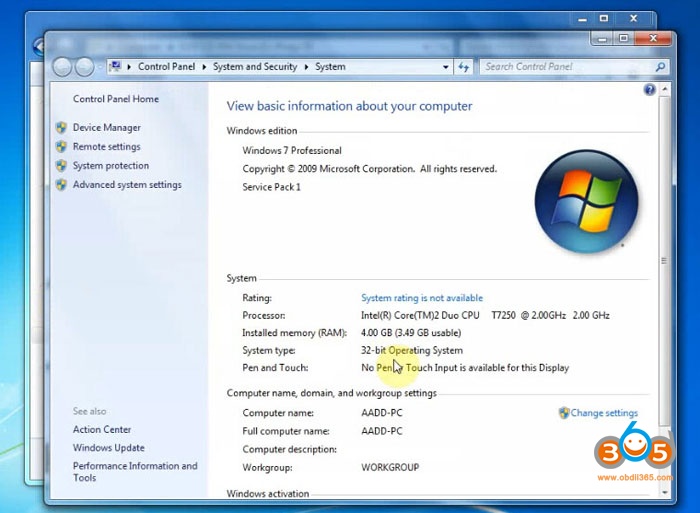
Enter User name (AADD) and company name (1111), press Next
Press Install
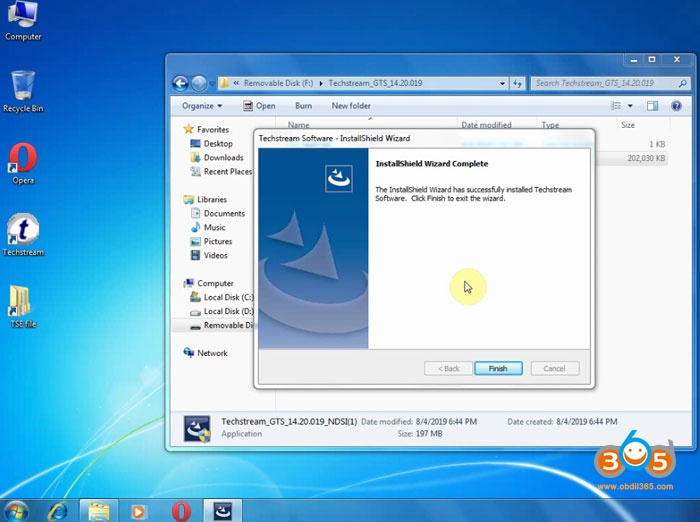
Finish install setup successfully.
Click on Finish to exit.
Open driver folder

Install MVCI Driver for Toyota Cable 2.0.1
Press Install

Finish install MINI-VCI driver
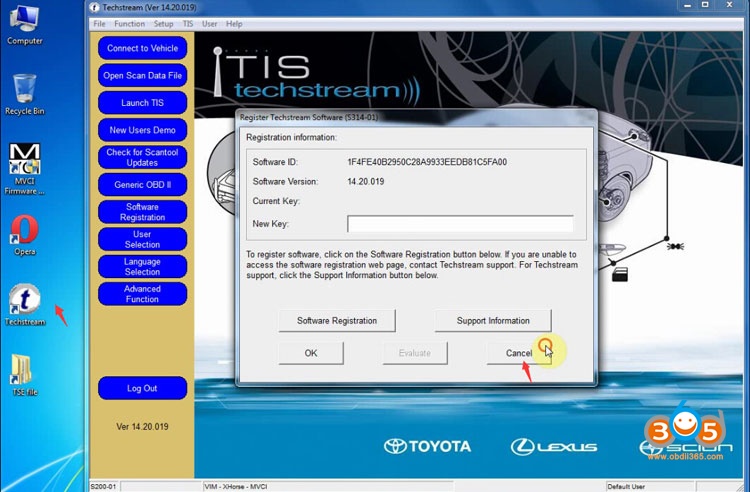
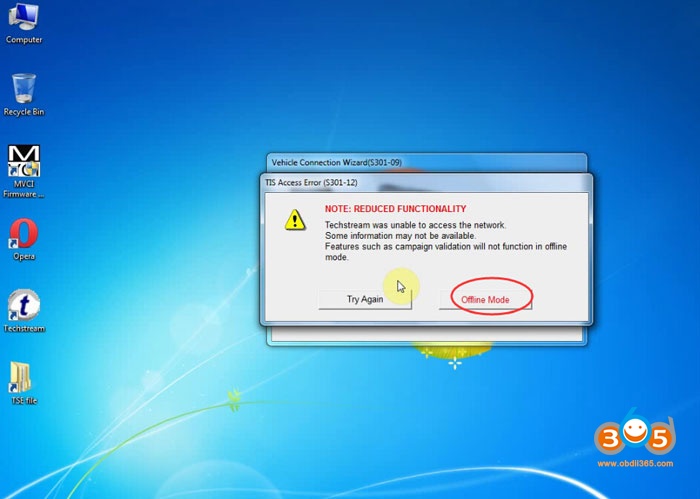
If techstream asks enter activation key, press Cancel


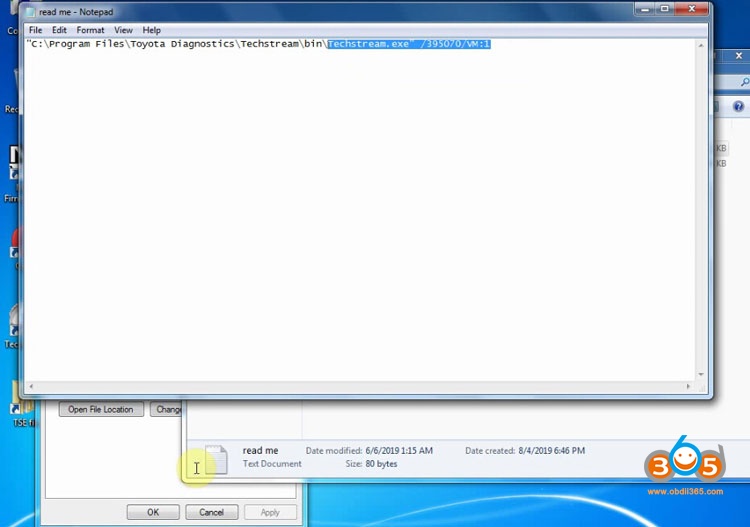
Replace Target “C:/Program Files/Toyota Diagnostics/Techstream/bin/MainMenu.exe” by “C:/Program Files/Toyota Diagnostics/Techstream/bin/Techstream.exe”/395070/VM:1”
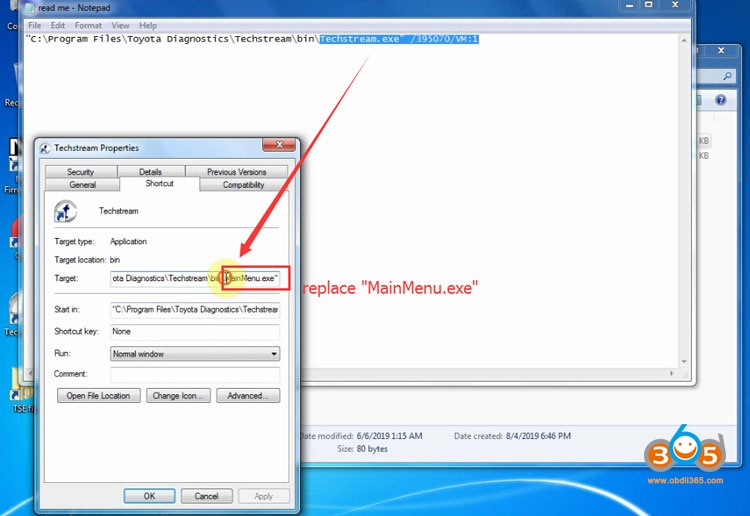
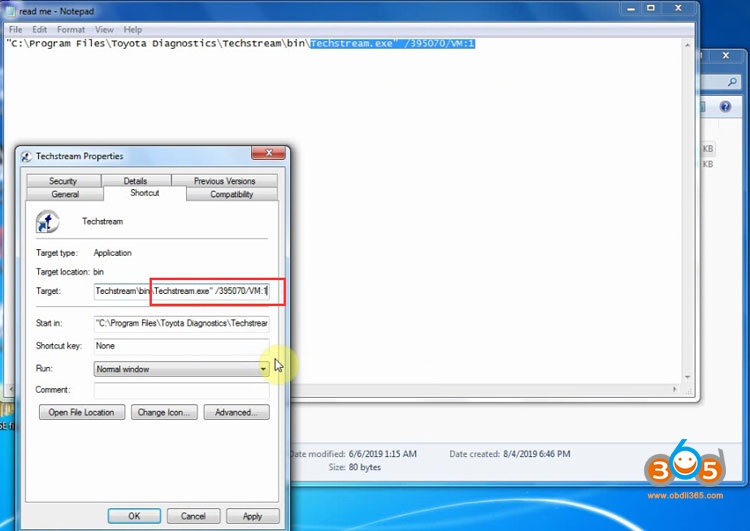
Then press Apply
and OK
Connect MINI VCI J2534 cable with computer
Windows will automatically install device driver
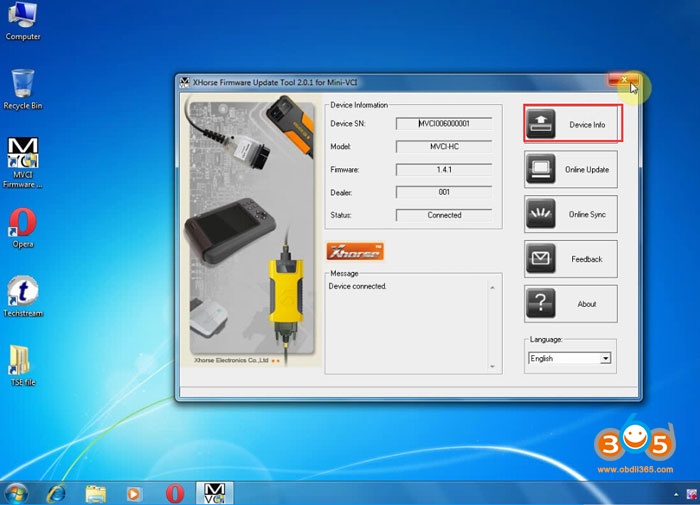
Initializing USB Communication


How to Setup and Download Volvo VIDA 2014D VMware Image?
I’ve built a new ISO for those that want to directly install on their systems with the updates and my redesigned interface already applied. It also contains all the needed files for the install whether on 32bit or 64bit and all 3 patches for the different ways to install… (32bit, 64bit, 32bit installed on 64bit system)
RAM: 6GB RAM
HARD DRIVE: 40GB free space
RAM: 3GB RAM
STORAGE DEVICE: 32GB or better USB 3.0 (Recommend SanDisk Extreme)
Legacy Boot Mode Support (UEFI won’t boot)
VMWare Player – VMware Player
VirtualBox – VirtualBox Image Here
7-ZIP – You’ll need this
- Download the virtual machine 7zip image
- Download VMWare Player or VMWare Fusion. This will depend on which OS you have running.
- If you have Windows but don’t have 7zip. Download it. I believe most Linux distros support 7z files out of the box or can be easily installed via the Software Centre. If you are on Mac OS, you can use ‘The Unarchiver’ available via the App Store.
- Once you have everything downloaded, install your hypervisor of choice. This would be VMWare Player or Fusion. Advanced users can use virtual box with minor modifications I believe.
- Extract the 7z image file you downloaded to a contained folder. The password is V0lv02RuleYou can run it from this location or move it to another location. Doesn’t matter.
- Locate the file ‘Service Machine.vmx’ and double click on this file. It will open your hypervisor. You may be asked if you copied or moved this. Just click moved.
- If you want to adjust the VM image settings now if the time to do so. Things like number of cores dedicated to the VM and how much RAM you want it to be allowed to use.
- Make sure you set the USB setting up to match your machine. If you plug the DICE into a USB 2.0 port it needs to be USB 2.0. If you use a USB 3.0 port, it needs to be set to USB 3.0
- Run it and enjoy.
- Download the image from the builds folder
- Download the USB Imaging Tool.zipfile from tools folder
- If you have Windows but don’t have 7zip. Download it. I believe most Linux distros support 7z files out of the box or can be easily installed via the Software Centre. If you are on Mac OS, you can use ‘The Unarchiver’ available via the App Store.
- Once you have everything downloaded, extract the USB Imaging Tool.
- Run the tool. Select your USB drive from the list on the left. Click Restore. A window will open to locate the IMZ file. In the bottom right is a drop down menu, change it to ‘Compressed (zip) image files’. Locate the folder where you downloaded to and select the IMZ file. Click yes to restore and overwrite the USB drive.
- Run it and enjoy.
VIDA 2014D Wiring Diagram ISO
Volvo Transmission Adaptation
USB Image Install Process
A: Which ever one you want, system specs are based on the one you choose to run. Virtual Machine is the easiest to get up and running and requires the least amount of effort from you.
A: Yes and No. For the virtual machine no. You could have less RAM and a slower processor and it will still run. For the USB images, yes without more modification of the images.
A: Download 7-Zip from the link above AND make sure you have the password
A: Use ‘admin’ and press enter. You can also use 1, 2, 3, 4 or 5.
A: I recommend Quickhash-GUI. If you have a Mac or run Linux, they both have md5sum built in but require CLI knowledge so I won’t recommend it.
A: Most likely, you have not selected all the options for the vehicle profile.
A: NO! But the USB edition does
A: You’ll need to obtain a copy of VMWare Fusion
A: It is very likely just to help out the Mac users…
A: System requirements are for the VMWare image is a 64bit dual-core processor and 4GB RAM. Please know that with 4GB of RAM, you will be moving SLOWLY. I recommend at least 6Gb RAM. If you only meet the minimum requirements, try directly installing.
A: Double check that the download completed correctly. You can do this using the MD5 Hash posted above.
A: The VMware Image may be configured for different USB specifications than the port you are trying to use. If you have a system with USB 3.x, you need to make sure the ‘Machine Settings’ reflect a USB 3.x bus. Same with USB 2.0. Depending on the build of the VM depends on which USB port revision was set to. Drivers have already be install for the Intel buses.
A: Try rebooting, if that didn’t work, make sure you used the right one. If it still doesn’t work, ask for help.
A: While in the USB Flash Tool, click on the options tab. Select the option to truncate the image.
A: Turns out VMWare printer support blocks VIDA from running when you have their driver installed. To get around this, share your printer to the network so that the VM will see it as a network printer and then you can print to it.
